Mineuniverse
Resource Packs
Tiny Takeback

Tiny Takeback

RESOURCE PACK
Take back classic eyes for the new baby mobs in Tiny Takeover game drop!
by THGABS
Download Claim this project
Add a badge to your pageLink to Tiny Takeback from a README, website or forum post.
Preview: Badge

Badges update automatically and link to the resource pack page on MineUniverse.

369 downloads
0 likes
0 followers
Updated Oct 14, 2026
0 hypes
Follow0
16x Traditional
Advertisement Remove ads with Premium →

Bedrock Port


In the Tiny Takeover game drop, Mojang has redesigned almost all baby mobs, and many of their eyes are now in 1 pixel now. With these new models unchanged, this pack brings back the classic 2-pixel eyes for many baby mobs, and even make more changes to ensure them look familiar!

Features

  • Piglet
    • Including temperate, warm, and cold variants
  • Calf
    • Including temperate, warm, and cold variants
  • Mooshroom Calf
    • Their eyes keep unchanged, as 2x2px entirely dark eyes look weird
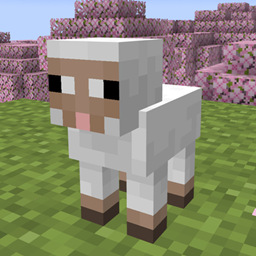
  • Lamb
    • Their face is changed to look more familiar to adult sheeps
  • Baby Donkey & Mule
  • Baby Zombie horse & Skeleton horse
    • Changed their eyes' position by 1px to match foals
  • Wolf pup
    • Wild/angry/tamed, in all variants
    • Angry pups have red iris, instead of entirely red eyes
  • Baby Polar Bear
    • Now they have eyebrows
  • Kitten
    • Siamese cats are made lighter to reflect their baby look in real life
  • Baby Ocelot
  • Baby Fox
  • Baby Llama
    • Their eyes are now in a more reasonable position
  • Baby Strider
    • Their design is made more similar to adult striders
  • Baby Zombified Piglin
    • Their eyes are now in a more reasonable position
  • Baby Hoglin & Zoglin
    • Their eyes are now in a more reasonable position
Tiny Takeback v1
MC 26.1, 26.1.1, 26.1.2, 26.2
Release 2026-03-22 Get

Requirements & install

How to use this resource pack in Minecraft
Resolution
16x
Minecraft
26.1 – 26.2
Install folder
.minecraft/resourcepacks

How to install resource packs

  1. Download the resource pack .zip file (do not extract it).
  2. In Minecraft open Options → Resource Packs → Open Pack Folder.
  3. Drop the .zip into the resourcepacks folder (.minecraft/resourcepacks).
  4. Move the pack to the Selected column and click Done.
Browse more: 16x resource packs 32x resource packs 64x resource packs 128x resource packs 256x resource packs 512x+ resource packs Resource Packs for 26.2 All resource packs

More from THGABS

Advertisement Remove ads with Premium →

You Might Also Like