Mineuniverse
Resource Packs
Hangul & Kana Fix

Hangul & Kana Fix

RESOURCE PACK
Improve the display of CJK characters like Japanese kanas and Korean hanguls
by THGABS
Download Claim this project
1,632 downloads
0 likes
0 followers
Updated Oct 14, 2026
0 hypes
Follow0
Font Packs Miscellaneous
Advertisement Remove ads with Premium →

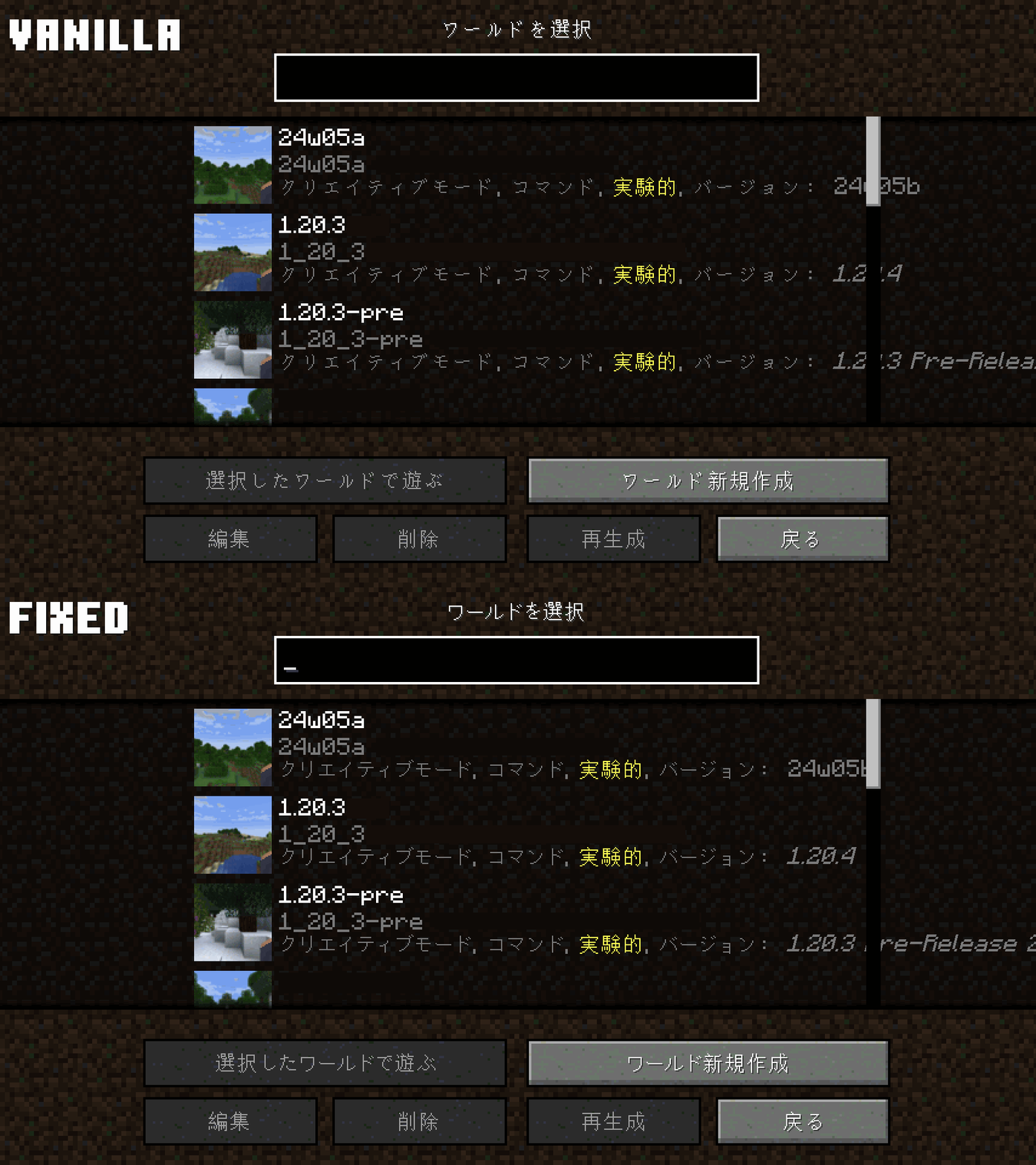
In update 1.20, Minecraft has updated its Unicode font to the latest version, and added full, configurable support for fullwidth characters. However, the display of some CJK (Chinese/Japanese/Korean) characters is still not satisfying.

This resource pack is designed for addressing issues in CJK characters, especially kana (仮名/カナ) for Japanese and hangul (한글) for Korean.
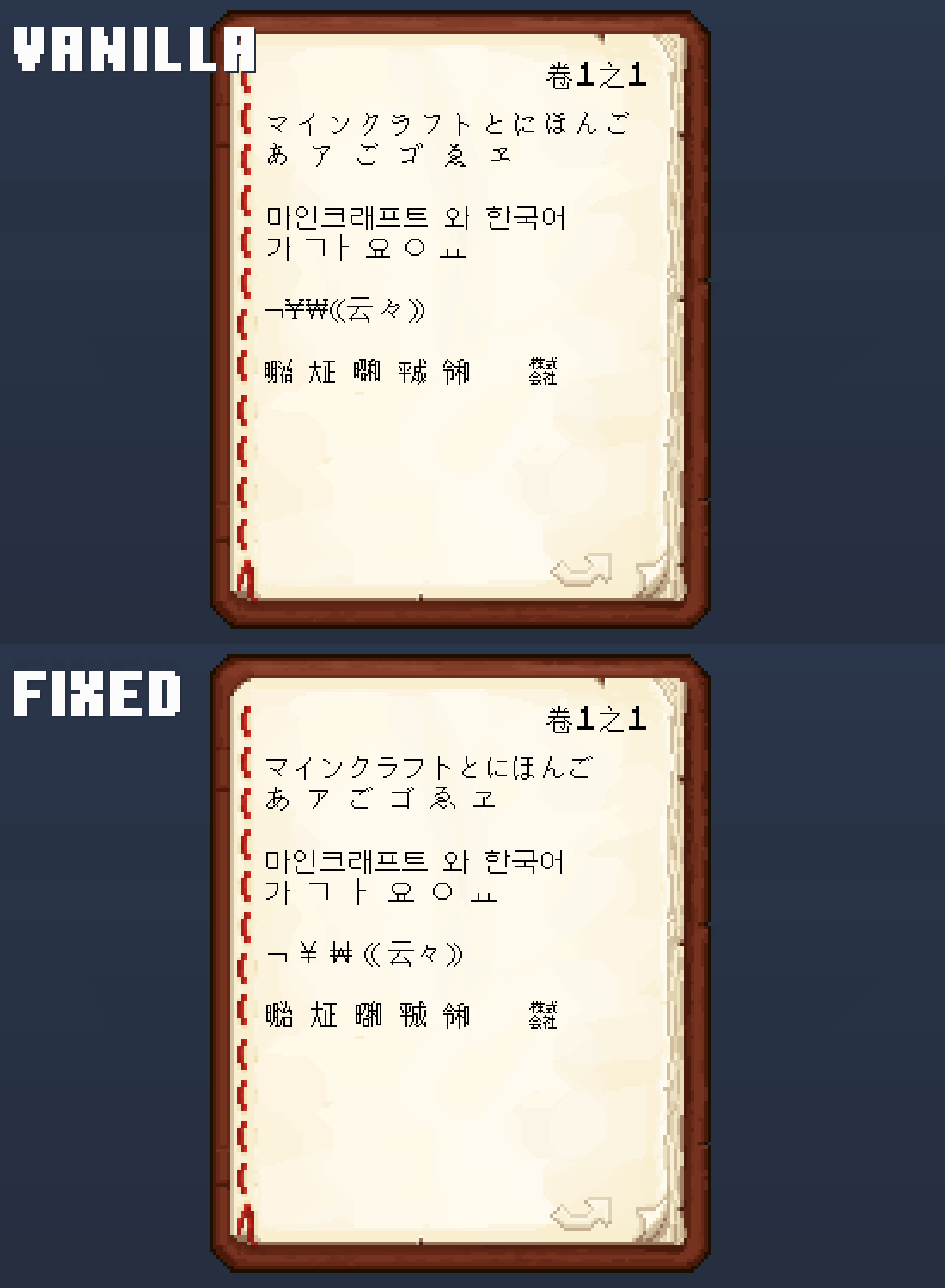

Vanilla vs. Fixed

Features in detail
  • Kanas based on which in Unifont JP, instead of the regular Unifont
    • Fonts in sans serif style instead of script style, consistent with kanjis (or Chinese characters) and other characters
    • Some kanas are edited by myself, making them more recognizable (MC-268370)
    • Width is shortened to prevent them overflowing UI elements
  • Character width of hanguls are fixed
    • Normal hanguls (e.g. 가, 한, 삼) no longer have missing pixels (MC-267230)
    • Hangul jamos (e.g. ㄱ, ㅎ, ㅊ, ㅚ) now display in full width
  • The Chinese iteration mark (々) is redesigned, and no longer display in full width
  • Fullwidth form of JPY/CNY (¥), KRW (₩) and cent (¢) signs are redesigned and set to be fullwidth
  • Other signs in fullwidth form are set to be fullwidth (e.g. ⦅⦆/¬/¦)
Hangul & Kana Fix - rv3
MC 1.21, 1.20.2, 1.21.8, 1.20.5, 1.21.5, 1.21.4, 1.20.6, 1.21.1, 1.21.6, 1.21.3, 1.21.7, 1.20.4, 1.20.3, 1.21.2, 1.21.9, 1.21.10, 1.21.11, 26.1, 26.1.1, 26.1.2, 26.2
Release 2025-09-28 Get
Hangul & Kana Fix - rv2
MC 1.20.2, 1.21, 1.20.5, 1.21.5, 1.21.8, 1.21.4, 1.20.3, 1.20.1, 1.20, 1.20.6, 1.20.4, 1.21.3, 1.21.7, 1.21.1, 1.21.6, 1.21.2
Release 2024-07-19 Get
HangulKanaFix-rv1.zip
MC 1.20.2, 1.20.5, 1.20.2-Snapshot, 1.20.5-Snapshot, 1.20.3-Snapshot, 1.20.3, 1.20.1, 1.20, 1.20.6, 1.20.4
Release 2024-02-05 Get

Requirements & install

How to use this resource pack in Minecraft
Resolution
Not specified
Minecraft
1.21.8 – 26.2
Install folder
.minecraft/resourcepacks

How to install resource packs

  1. Download the resource pack .zip file (do not extract it).
  2. In Minecraft open Options → Resource Packs → Open Pack Folder.
  3. Drop the .zip into the resourcepacks folder (.minecraft/resourcepacks).
  4. Move the pack to the Selected column and click Done.
Browse more: 16x resource packs 32x resource packs 64x resource packs 128x resource packs 256x resource packs 512x+ resource packs Resource Packs for 26.2 All resource packs

More from THGABS

Advertisement Remove ads with Premium →

You Might Also Like