Mineuniverse
Resource Packs
Smol PVP Swords

Smol PVP Swords

RESOURCE PACK
A Pack To Make Swords Smaller.
by sqidgeon
Download Claim this project
Add a badge to your pageLink to Smol PVP Swords from a README, website or forum post.
Preview: Badge

Badges update automatically and link to the resource pack page on MineUniverse.

5,043 downloads
0 likes
0 followers
Updated Oct 14, 2026
0 hypes
Follow0
16x
Advertisement Remove ads with Premium →

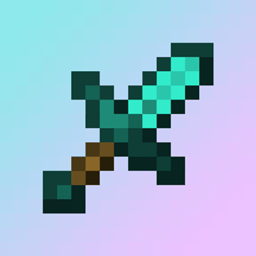
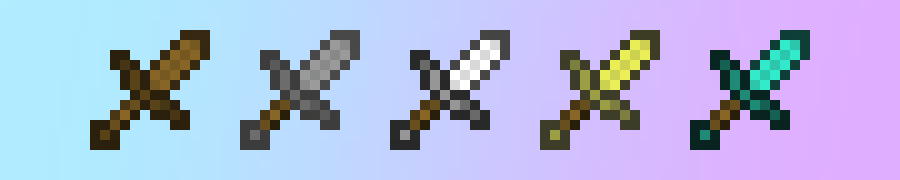
A Texture Pack For Shorter And Cleaner Swords

Where To Download?


Q&A

Q: What Is It?

A: This Pack Is Used In PVP To Make Swords Take Up Less Room On Screen.


Q: What Does This Pack Change?

A: This Pack Changes The Swords Within Game To Make Them Look Shorter And Cleaner.


Q: Should I Download From A New Developer That Makes MC Packs And Why?


A: Yes Absolutely, Downloading From A New Dev Can Help Support Them With Creating New And Better Content, You May Even Find Something That Has Low Downloads And Views But Is What You Really Needed (For Example Going In The Nether In 1.13 But With A Modern Texture Pack).


How To Install :

Drag and Drop The File You Downloaded Into Your Resourcepacks Folder.


How To Get To Resourcepacks Folder :

Way 1 : Go In Game And Click Onto "Options" Then "Resource Packs..." Then "Open Pack Folder".

Way 2 : On Windows Click Win + R and Type %appdata% Then Click Onto ".minecraft" Then "resourcepacks".


Usage

This Pack May Be Used Personaly And In Videos (Credit Would Be Nice To Support Me :D).

If This Pack Goes On To A Public Server, Credit Is Required.

Reuploading This Pack Is Prohibited Without Consent.

 

Smol Swords v1.2
MC 1.16.3, 1.13.1, 1.9.3, 1.8.7, 1.7.4, 1.7.7, 1.7.6, 1.16-Snapshot, 1.17.1, 1.9.1, 1.21.2-Snapshot, 1.21, 1.21.6-snapshot, 1.15-Snapshot, 1.7.5, 1.6.1, 1.16.1, 1.18.1
Release 2025-10-05 Get
Smol Swords v1.0.1
MC 1.7.6, 1.17.1, 1.9.1, 1.16.3, 1.13.1, 1.9.3, 1.8.7, 1.7.4, 1.7.7, 1.19.3, 1.20.2, 1.21, 1.7.5, 1.6.1, 1.16.1, 1.18.1, 1.20.5, 1.21.5, 1.9.4, 1.9.2, 1.8.4, 1.7.9, 1.14.4
Release 2025-08-29 Get
Smol Swords
MC 1.7.6, 1.17.1, 1.9.1, 1.16.3, 1.13.1, 1.9.3, 1.8.7, 1.7.4, 1.7.7, 1.19.3, 1.20.2, 1.21, 1.7.5, 1.6.1, 1.16.1, 1.18.1, 1.20.5, 1.21.5, 1.9.4, 1.9.2, 1.8.4, 1.7.9, 1.14.4
Release 2025-08-28 Get

Requirements & install

How to use this resource pack in Minecraft
Resolution
16x
Minecraft
1.18.1 – 1.21.6-snapshot
Install folder
.minecraft/resourcepacks

How to install resource packs

  1. Download the resource pack .zip file (do not extract it).
  2. In Minecraft open Options → Resource Packs → Open Pack Folder.
  3. Drop the .zip into the resourcepacks folder (.minecraft/resourcepacks).
  4. Move the pack to the Selected column and click Done.
Browse more: 16x resource packs 32x resource packs 64x resource packs 128x resource packs 256x resource packs 512x+ resource packs Resource Packs for 1.21.6-snapshot All resource packs

More from sqidgeon

Advertisement Remove ads with Premium →

You Might Also Like