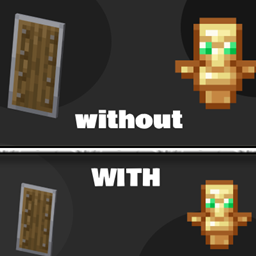
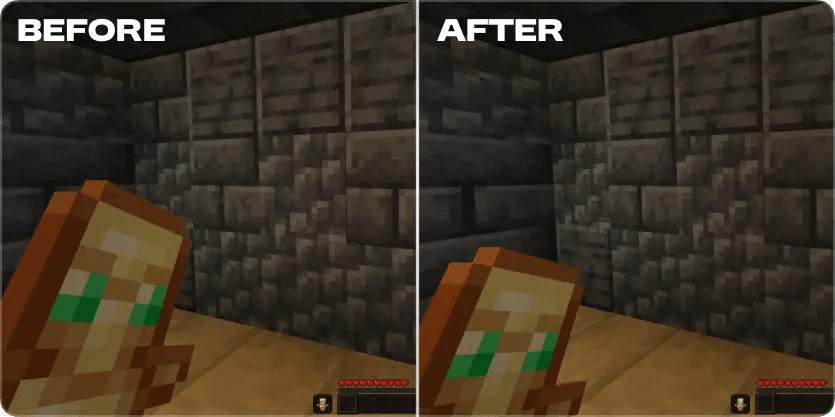
Tired of your Totem of Undying and Shield blocking your view? Smaller Totem & Shield makes both the Totem and Shield smaller while keeping Minecraft's vanilla style, giving you a cleaner screen and better visibility during PvP.
Whether you're playing Crystal PvP, Sword PvP, SMPs, Bedwars, or Survival, this resource pack helps you focus on your opponent instead of large off-hand items.
---
# ✨ Advantages
* 🛡️ Smaller Shield
* 💚 Smaller Totem of Undying
* 👀 More screen visibility
* 🎯 Better focus during combat
* ⚔️ Improved PvP experience
---
✅ Compatibility
Supports a wide range of Minecraft versions.
Works perfectly with:
* ✔️ Vanilla Minecraft
* ✔️ OptiFine
* ✔️ Sodium
* ✔️ Lunar Client
* ✔️ Badlion Client
---
🎮 Advantages
Having more visible screen space makes it easier to:
* 👀 Spot opponents faster
* 🎯 Keep your crosshair on target
* ⚔️ React quicker in PvP
* 🏹 Reduce screen clutter
* 💥 Enjoy a cleaner combat experience
Small changes can make a big difference when every second counts!
---
📥 Installation
### Method 1 (Recommended)
1. Download the resource pack.
2. Open Minecraft.
3. Go to Options → Resource Packs.
4. Click Open Pack Folder.
5. Move the downloaded `.zip` file into the folder.
* Do not extract the ZIP file.
6. Return to Minecraft.
7. Select Smaller Totem & Shield and click Done.
### Method 2
Copy the `.zip` file into:
Windows
```
%AppData%\.minecraft\resourcepacks
```
Then enable it from Options → Resource Packs.
---
⭐ Recommended PvP Packs
Want an even better PvP experience? Pair this pack with these!
## 🌙 Full Bright
Never lose a fight because it's too dark! Full Bright removes darkness, making cave fights and nighttime PvP much easier.
---
## 🎯 PvP Crosshair
Improve your aim with a clean PvP crosshair designed for better accuracy and visibility.
---
❤️ Support
If you enjoy Smaller Totem & Shield, please consider:
⭐ Following the project
❤️ Leaving a like
📝 Sharing it with your friends
📘 Downloading other D & A mods, Texture Packs, Plugins, Modpacks and Datapack
Your support helps keep the project updated with new Minecraft versions!
Happy PvPing! ⚔️