Mineuniverse
Resource Packs
FullBright RP

FullBright RP

RESOURCE PACK
The ultimate full bright resource pack for you!
by darkplayzbgyt
Download Claim this project
5,507 downloads
0 likes
Updated Oct 14, 2026
0 hypes
16x Miscellaneous Modern
Advertisement Remove ads with Premium →

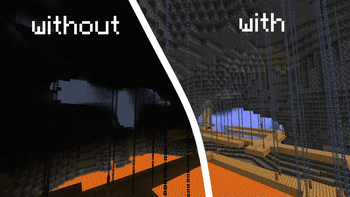
🌕 D & A Fullbright – Ultimate Visibility Pack
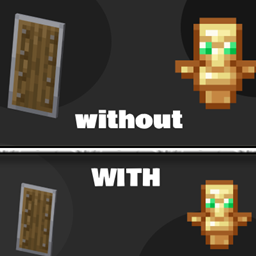
D & A Fullbright is a lightweight resource pack that removes all darkness from Minecraft, giving you perfect visibility in caves, at night, or underwater — without using mods or cheats. Designed for survival, PvP, and exploration, this pack is 100% vanilla-friendly and server-safe.

🔧 Features:

🕳️ Perfect for caving, mining, and building

🌑 Works in total darkness, the Nether, and The End

🔌 Multiplayer/Server-safe (doesn’t modify gameplay)

🧠 Designed for performance and simplicity

🎮 Compatible with all versions from 1.8 to 26x  AND EVEN Future versions

💾 Installation:
Download the .zip file

Move it to your resourcepacks folder

Enable it in .Minecraft > Options > Resource Packs

Enjoy full visibility anytime, anywhere!

📌 Notes:
This is a resource pack, not a mod

Compatible with Optifine, Sodium, Lunar Client, Badlion Client, etc.

Works with any other texture pack — just place D & A Fullbright on top in the pack order

Make your Minecraft experience brighter, cleaner, and easier — without any extra tools.

Designed by the D & A Team!

D & A Fullbright.zip
MC 1.21.2-Snapshot, 1.21, 1.21.6-snapshot, 1.20.2-Snapshot, 1.20.5-Snapshot, 1.21.1-Snapshot, 1.20.2, 1.19.4, 1.21.8, 1.19.4-Snapshot, 1.20.5, 1.21.5, 1.21.4, 1.21.5-Snapshot, 1.20.1
Release 2026-06-29 Get
D & A Fullbright.zip
MC 1.16.3, 1.13.1, 1.16-Snapshot, 1.17.1, 1.21.2-Snapshot, 1.21, 1.21.6-snapshot, 1.15-Snapshot, 1.16.1, 1.18.1, 1.20.2-Snapshot, 1.20.5-Snapshot, 1.14.3, 1.15, 1.13, 1.19-Snapshot
Release 2026-06-29 Get

Requirements & install

How to use this resource pack in Minecraft
Resolution
16x
Minecraft
1.21 – 1.21.8
Install folder
.minecraft/resourcepacks

How to install resource packs

  1. Download the resource pack .zip file (do not extract it).
  2. In Minecraft open Options → Resource Packs → Open Pack Folder.
  3. Drop the .zip into the resourcepacks folder (.minecraft/resourcepacks).
  4. Move the pack to the Selected column and click Done.
Browse more: 16x resource packs 32x resource packs 64x resource packs 128x resource packs 256x resource packs 512x+ resource packs Resource Packs for 1.21.8 All resource packs

More from darkplayzbgyt

Advertisement Remove ads with Premium →

You Might Also Like