Mineuniverse
Resource Packs
Simply Swords: Alternate Greataxes

Simply Swords: Alternate Greataxes

RESOURCE PACK
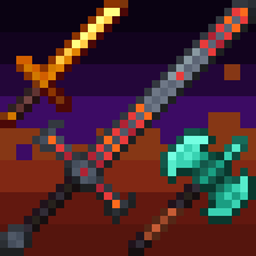
Retextures Greataxes from Simply Swords and its addons to something a bit cleaner.
by Cephelo_
Download Claim this project
Add a badge to your pageLink to Simply Swords: Alternate Greataxes from a README, website or forum post.
Preview: Badge

Badges update automatically and link to the resource pack page on MineUniverse.

731 downloads
0 likes
0 followers
Updated Oct 14, 2026
0 hypes
Follow0
32x Miscellaneous Mod Support
Advertisement Remove ads with Premium →

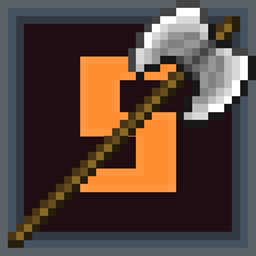
This resource pack replaces the Greataxe textures in Simply Swords with something a bit cleaner.

Supports the following addons:
- Integrated Simply Swords**

- Simply Swords Modded Compatibility

- Simply Swords: Cataclysm 

- Knaves' Needs** 

**Does not change Dark Metal, Fire Dragonbone, Lightning Dragonbone, Cincinnasite, Diamond Cincinnasite, or Nether Ruby Greataxes since I thought they were fine.  Ice Dragonbone, all Dragonsteel and Myrmex Chitin Greataxes are only slightly tweaked.

This pack has only been tested in 1.20.1, though I see no reason why they wouldn't work for previous versions of Simply Swords.  If you see a Greataxe texture that hasn't been changed, please let me know!

Current gallery images are placeholders

Alternate Greataxes 2.0
MC 1.21, 1.18.1, 1.19.3, 1.18, 1.20.1, 1.20, 1.21.1, 1.19.1, 1.18.2, 1.19.2, 1.19
Release 2025-11-13 Get
Alternate Greataxes 1.1
MC 1.18.1, 1.19.3, 1.18, 1.20.1, 1.20, 1.21.1, 1.19.1, 1.18.2, 1.19.2, 1.19
Release 2025-11-12 Get
Alternate Greataxes 1.0
MC 1.19.3, 1.18.1, 1.18.2, 1.19.2, 1.20.1, 1.20, 1.19.1, 1.21.1, 1.18, 1.19
Release 2025-11-10 Get

Requirements & install

How to use this resource pack in Minecraft
Resolution
32x
Minecraft
1.19 – 1.21.1
Install folder
.minecraft/resourcepacks

How to install resource packs

  1. Download the resource pack .zip file (do not extract it).
  2. In Minecraft open Options → Resource Packs → Open Pack Folder.
  3. Drop the .zip into the resourcepacks folder (.minecraft/resourcepacks).
  4. Move the pack to the Selected column and click Done.
Browse more: 16x resource packs 32x resource packs 64x resource packs 128x resource packs 256x resource packs 512x+ resource packs Resource Packs for 1.21.1 All resource packs

More from Cephelo_

Advertisement Remove ads with Premium →

You Might Also Like