Mineuniverse
Resource Packs
SimpleOres Datapacks

SimpleOres Datapacks

RESOURCE PACK
Datapacks for the SimpleOres mod and SimpleOres add-on mods.
by Sinhika
Download Claim this project
851 downloads
0 likes
Updated Oct 14, 2026
0 hypes
Data Packs Mod Support
Advertisement Remove ads with Premium →

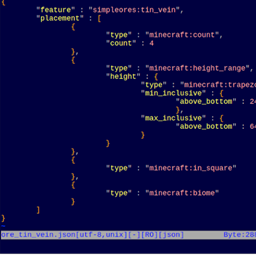
As of 1.19, world generation can only be configured through datapacks. Here, I intend to provide unmodified datapack templates for the Simple Ores mods so that you can customize ore generation as you see fit. I expect that this will primarily be of interest to modpack makers.

Short version: unzip the file, edit the json files you want to change, zip it back up the way you found it, and drop it in your datapacks forlder.

Long version: for how to load and use the datapacks, see the Minecraft Wiki article on Data Packs. For how to create or modify these data packs, see the Minecraft Wiki tutorial on Creating a Datapack, and the article on "Custom World Generation". See also the Forge Community Wiki article on Biome Modifiers.

simpleores_oregen_1_19v2.zip
MC 1.19.2, 1.19.1, 1.19
Release 2022-09-12 Get
arsenic_worldgen_1_19v1.zip
MC 1.19.2, 1.19.1, 1.19
Release 2022-09-12 Get
ashenwheat_worldgen_1_19v1.zip
MC 1.19.2, 1.19.1, 1.19
Release 2022-09-12 Get
cobalt_oregen_1_19v1.zip
MC 1.19.2, 1.19.1, 1.19
Release 2022-09-12 Get
cthon_oregen_1_19v1.zip
MC 1.19.2, 1.19.1, 1.19
Release 2022-09-12 Get
hadite_coal_oregen_1_19v1.zip
MC 1.19.2, 1.19.1, 1.19
Release 2022-09-12 Get
netherrocks_oregen_1_19v1.zip
MC 1.19.2, 1.19.1, 1.19
Release 2022-09-12 Get
only_silver_oregen_1_19v1.zip
MC 1.19.2, 1.19.1, 1.19
Release 2022-09-12 Get

Requirements & install

How to use this resource pack in Minecraft
Resolution
Not specified
Minecraft
1.19 – 1.19.2
Install folder
.minecraft/resourcepacks

How to install resource packs

  1. Download the resource pack .zip file (do not extract it).
  2. In Minecraft open Options → Resource Packs → Open Pack Folder.
  3. Drop the .zip into the resourcepacks folder (.minecraft/resourcepacks).
  4. Move the pack to the Selected column and click Done.
Browse more: 16x resource packs 32x resource packs 64x resource packs 128x resource packs 256x resource packs 512x+ resource packs Resource Packs for 1.19.2 All resource packs

More from Sinhika

Advertisement Remove ads with Premium →

You Might Also Like