Badges update automatically and link to the resource pack page on MineUniverse.
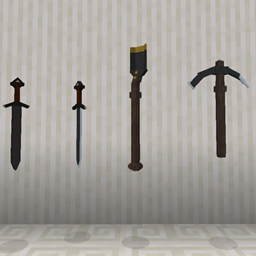
Ray's Models currently includes models for tools and a couple of decorative items, as well as some 'naturally occuring' decoratives.
A few of the included models are; Fancy tools, lanterns, soul-lanterns, chains, logs and end rods (as two variants of candle).
All the textures are provided with exceptions where appropriate.
I'm open for adding more models, provided someone actually wants them.
I will however not be adding blocks like bricks or similarly 'paneled' blocks, as there are plenty of other resource packs out there that adds this.
Updates will come, when they are available, and i will try to keep the pack up to date at least per minecraft version, but no promises for when a release will come.
This was just a personal pack, but it's now being ported to the public for the first time, so i'm working this thing solo for now.
So if anyone has any suggestions please comment it down below and i'll see what i can do about adding it :D
As for licensing;
1. You may;
- modify the pack in any way for personal use only.
- distribute copies of the original pack through other services.
- include this resource pack in a collection
2. you may not;
- distribute any modified version of this resource pack.
- claim it as your own.
- make any kind of profit from this resource pack.
3. I am not to be held liable for any kind of improper use or problems that can occur from using this pack etc. etc.