Mineuniverse
Resource Packs
Powdered Snow Warning

Powdered Snow Warning

RESOURCE PACK
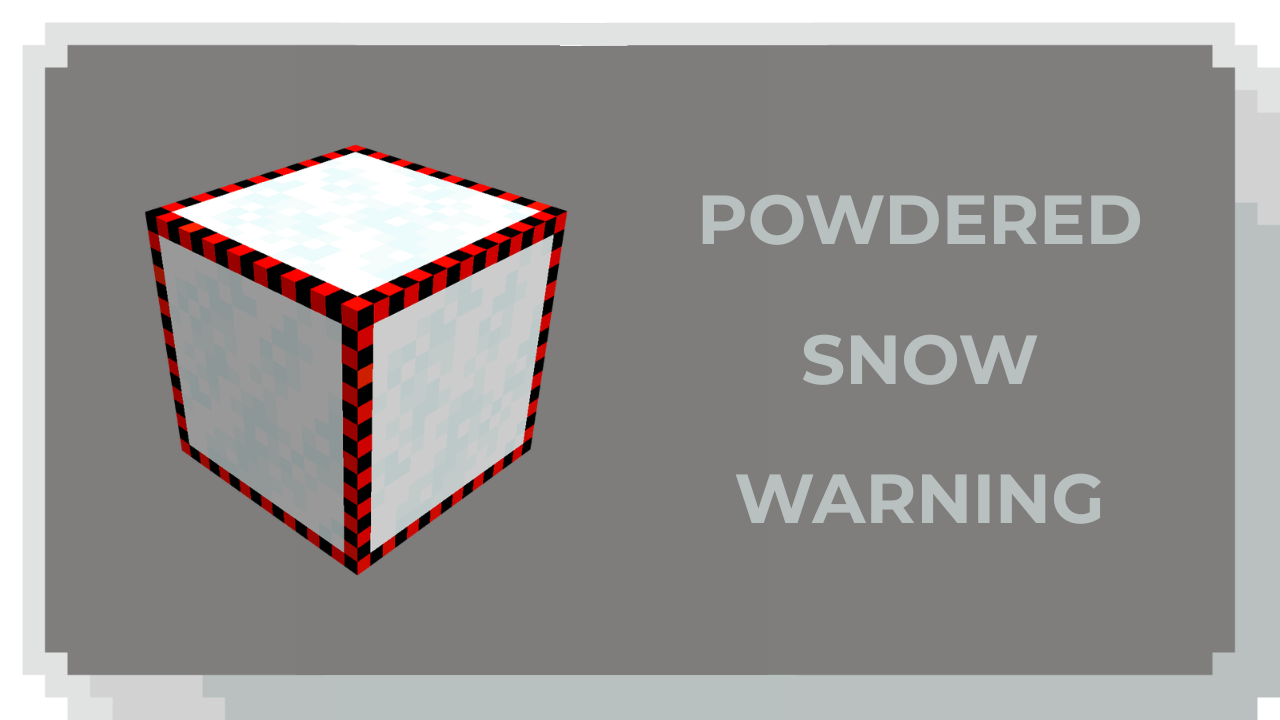
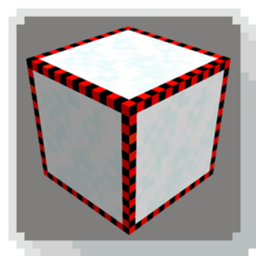
PSW makes the borders of Powdered Snow Blocks visible.
by qlttqb
Download Claim this project
1,944 downloads
0 likes
0 followers
Updated Oct 14, 2026
0 hypes
Follow0
16x Miscellaneous
Advertisement Remove ads with Premium →

❄️ Powdered Snow Warning

Powdered snow now has a red stripe on its sides, making it instantly distinguishable from regular snow before you fall through.


What it does

Powdered snow blocks display a red warning band across their side textures. At a glance, even from a distance, you can tell powdered snow apart from regular snow without hovering over it or guessing.

example image of powdered snow with texturepack on |

Key changes:

  • Red stripe added to the side faces of powdered snow
  • Top and bottom textures remain vanilla-faithful
  • Stripe is visible at standard render distances

Features

   
👁️ Instant recognition The red stripe is readable at a distance, even at lower render distances.
🧩 No mods required Works as a standalone resource pack: no Fabric, Forge, or Quilt needed.
🎮 Zero performance cost Pure texture swap with no impact on frame rate or world loading.
🖼️ Vanilla-faithful Visible from all sides.

Installation

  1. Download the .zip from the releases section — do not unzip it.
  2. Open Minecraft → Options → Resource Packs → Open Pack Folder.
  3. Move the .zip file directly into the resourcepacks folder.

  4. Back in Minecraft, click the pack to activate it and hit Done. No restart required.

Compatibility

  • ✅ Java Edition 1.19.4 and above
  • ✅ Compatible with other resource packs
  • ✅ Works with OptiFine and Iris
  • ❌ Bedrock Edition is not supported
Powdered Snow Warning.zip
MC 1.21.2-Snapshot, 1.21, 1.21.6-snapshot, 1.20.2-Snapshot, 1.20.5-Snapshot, 1.21.1-Snapshot, 1.20.2, 1.19.4, 1.21.8, 1.19.4-Snapshot, 1.20.5, 1.21.5, 1.21.4, 1.21.5-Snapshot, 1.20.1
Release 2026-05-09 Get

Requirements & install

How to use this resource pack in Minecraft
Resolution
16x
Minecraft
1.21 – 1.21.8
Install folder
.minecraft/resourcepacks

How to install resource packs

  1. Download the resource pack .zip file (do not extract it).
  2. In Minecraft open Options → Resource Packs → Open Pack Folder.
  3. Drop the .zip into the resourcepacks folder (.minecraft/resourcepacks).
  4. Move the pack to the Selected column and click Done.
Browse more: 16x resource packs 32x resource packs 64x resource packs 128x resource packs 256x resource packs 512x+ resource packs Resource Packs for 1.21.8 All resource packs

More from qlttqb

Advertisement Remove ads with Premium →

You Might Also Like