Mineuniverse
Resource Packs
Poké-Tarot

Poké-Tarot

RESOURCE PACK
Tarot Cards meets Pokémon!
by Toxicide
Download Claim this project
332 downloads
0 likes
0 followers
Updated Oct 14, 2026
0 hypes
Follow0
16x Miscellaneous
Advertisement Remove ads with Premium →

A resource pack to replace the golden Tarot Cards textures by shiroroku with my custom Pokémon variants.

Due to keeping true to the texture sizes of the original Tarot Cards, it was difficult to create pixil art of certain Pokémon that were visibly identifiable. That being said, the Pokémon I chose for each card is either due to the cards name, its effect / ability in-game, or the meaning of the actual Tarot Card. Even then, some textures were still difficult to create, so I apologize if your favorite Pokémon was not chosen to represent one of the tarot cards.
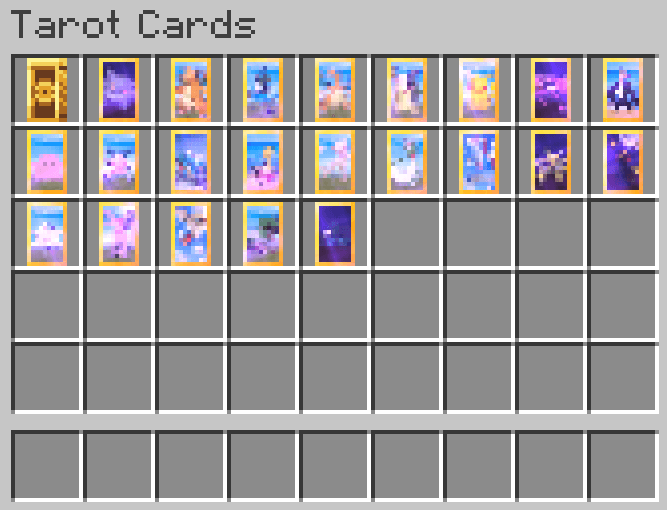


Here is a list of each card and the Pokémon representing it to help with identification...

  • Death: Gengar
  • Judgement: Dragonite
  • Justice: Lucario
  • Strength: Charizard
  • Temperance: Morpeko
  • The Chariot: Pikachu
  • The Devil: Impidimp
  • The Emperor: Empoleon
  • The Empress: Ditto
  • The Fool: Mr. Mime
  • The Hanged Man: Gyarados
  • The Hermit: Shuckle
  • The Hierophant: Mew
  • The High Priestess: Gardevoir
  • The Lovers: Latios & Latias
  • The Magician: Alakazam
  • The Moon: Umbreon
  • The Star: Jirachi
  • The Sun: Espeon
  • The Tower: Pidgeot
  • The World: Torterra
  • The Wheel Of Fortune: Murkrow

Requires Tarot Cards

NO, you cannot re-distribute or upload this resourcepack to any other website.

YES, you can include this with your mod pack.

YES, I am working on a higher resolution version. (ETA: TBA)

Poké-Tarot 1.20.1
MC 1.20.1, 1.20
Release 2025-02-26 Get
Poké-Tarot 1.20.4
MC 1.20.4
Release 2025-02-26 Get
Poké-Tarot 1.18.2
MC 1.18.2
Release 2025-02-25 Get
Poké-Tarot 1.19.2
MC 1.19.2
Release 2025-02-25 Get

Requirements & install

How to use this resource pack in Minecraft
Resolution
16x
Minecraft
1.18.2 – 1.20.4
Install folder
.minecraft/resourcepacks

How to install resource packs

  1. Download the resource pack .zip file (do not extract it).
  2. In Minecraft open Options → Resource Packs → Open Pack Folder.
  3. Drop the .zip into the resourcepacks folder (.minecraft/resourcepacks).
  4. Move the pack to the Selected column and click Done.
Browse more: 16x resource packs 32x resource packs 64x resource packs 128x resource packs 256x resource packs 512x+ resource packs Resource Packs for 1.20.4 All resource packs

More from Toxicide

Advertisement Remove ads with Premium →

You Might Also Like