Mineuniverse
Resource Packs
Pesky Parrots

Pesky Parrots

RESOURCE PACK
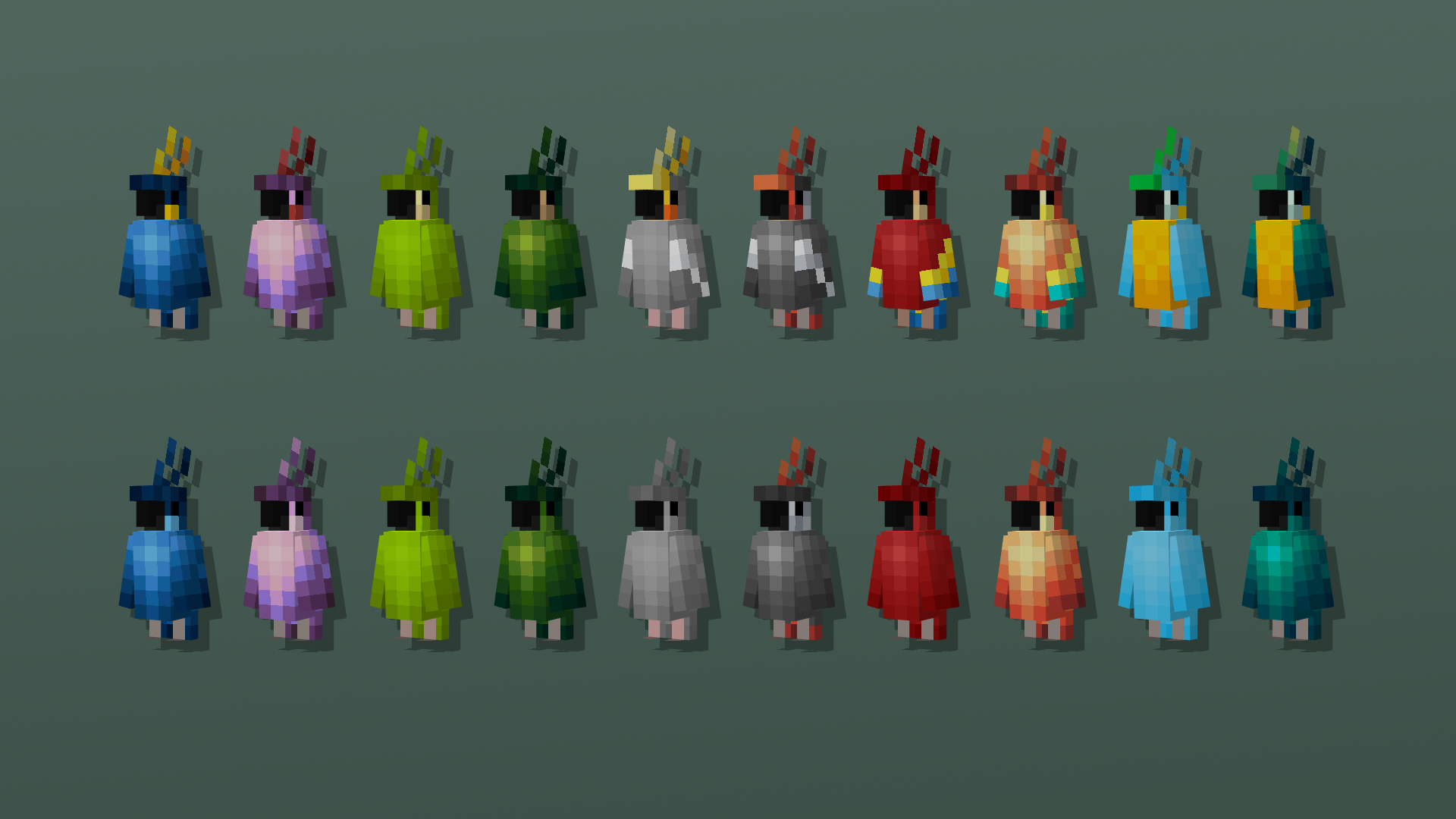
This pack adds 15 New Color styles and a bunch of namable variants to the Parrot
by creepermax123
Download Claim this project
Add a badge to your pageLink to Pesky Parrots from a README, website or forum post.
Preview: Badge

Badges update automatically and link to the resource pack page on MineUniverse.

40,209 downloads
0 likes
0 followers
Updated Oct 14, 2026
0 hypes
Follow0
16x Miscellaneous
Advertisement Remove ads with Premium →

Minecraft Parrots just got a lot Peskier, this pack adds a ton of new parrot colors, these colors are Amethyst, Dark Green, Dark Grey, Peach, and Teal, all of which have a version with additional colors/patterns, There's also some namable variants that keep the color of the named parrot

Variants
● 20 Naturally spawning Variants
● 1 Naturally spawning Rare Variants
● 25 Name Specific Variants


Non-Color Changing Named Variants
● "Mr. Seedyton"
● "Polly"
● "Birdrito"
● "Floatie"


All Named Variants

● "Ender Parrot"
● "Glowy"
● "Skeletal Parrot"
● "Zombified Parrot"

● "Ender Dragon"
● "Takis"
● "Pufferfish"
● "Balloon"
● "Disco"
● "New Year"

● "Crow"
● "Skeletal Crow"
● "Zombified Crow"
● "Canuck"

● "Owl"
● "Skeletal Owl"

● "Zombified Owl"
● "Hedwig"

● "Puffin"
● "Skeletal Puffin"
● "Zombified Puffin"


 Max's Better Mobs and Fresh Animations Version


Made By: creepermax123
Commissioned By: ItsaPhantom
Help From: Gills


To make sure the pack works go to
Options>Video Settings>Quality
and make sure these are on


Custom Entity Models: On
Emissive Textures: On
Random Entities: On


Pesky Parrots.zip
MC 1.18.1, 1.18.2, 1.19.2, 1.19.1, 1.18, 1.19
Release 2023-01-04 Get

Requirements & install

How to use this resource pack in Minecraft
Resolution
16x
Minecraft
1.18 – 1.19.2
Install folder
.minecraft/resourcepacks

How to install resource packs

  1. Download the resource pack .zip file (do not extract it).
  2. In Minecraft open Options → Resource Packs → Open Pack Folder.
  3. Drop the .zip into the resourcepacks folder (.minecraft/resourcepacks).
  4. Move the pack to the Selected column and click Done.
Browse more: 16x resource packs 32x resource packs 64x resource packs 128x resource packs 256x resource packs 512x+ resource packs Resource Packs for 1.19.2 All resource packs

More from creepermax123

Advertisement Remove ads with Premium →

You Might Also Like