Mineuniverse
Resource Packs
Pademia

Pademia

RESOURCE PACK
Pademia resourcepack
by Ceterai
Download Claim this project
Add a badge to your pageLink to Pademia from a README, website or forum post.
Preview: Badge

Badges update automatically and link to the resource pack page on MineUniverse.
1,748 downloads
0 likes
0 followers
Updated Oct 14, 2026
0 hypes
Follow0
64x Mod Support
Advertisement Remove ads with Premium →


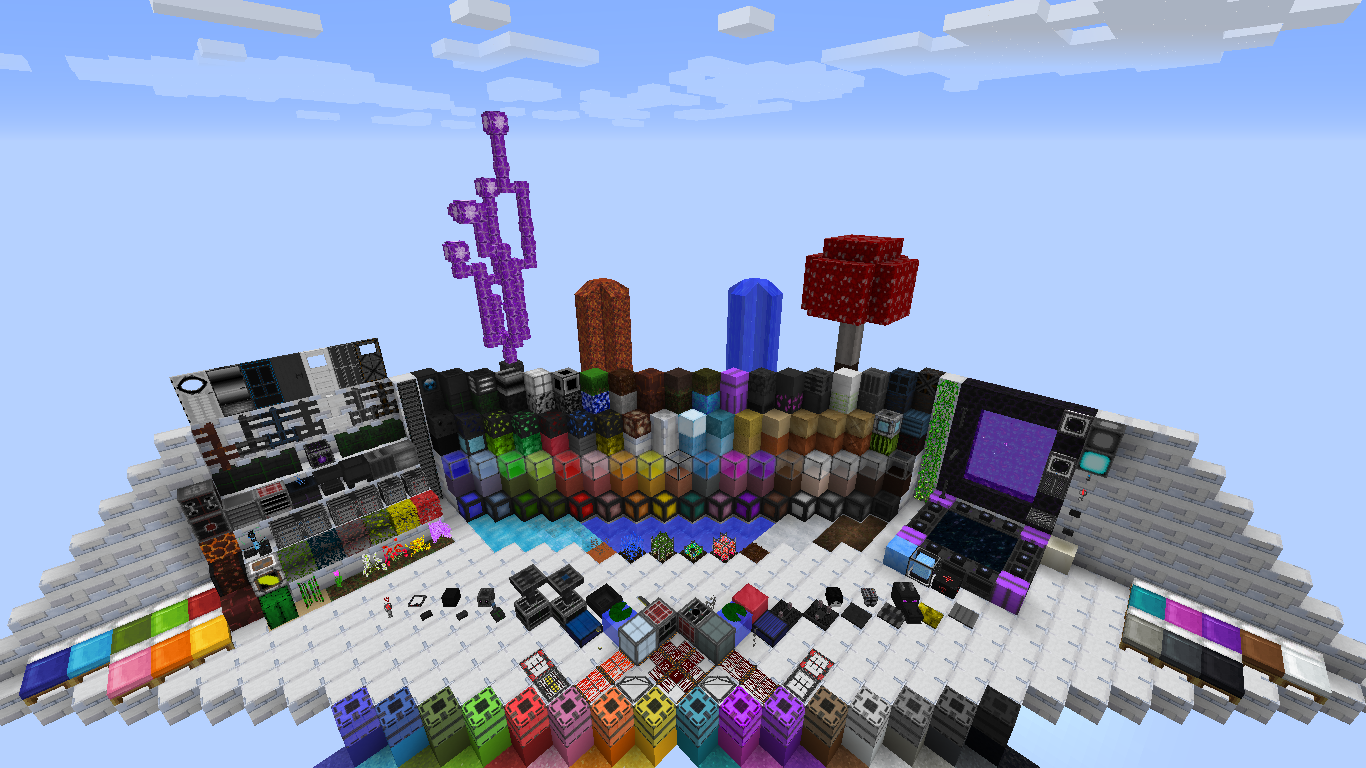
Hello everyone! Let me introduce you the Pademia - a colorful futuristic resourcepack.

First of all, let me tell you some important things:

  • It's not completely 64x. For example, all the items are 32x, and some creatures are even 128x.
  • This is work-in-progress resourcepack, so lots of textures will be added.
  • Yes, it has mod support, but again, there're only a few mods that this resourcepack does support right now and not all of them are supported completely.
  • Optifine and MCpatcher support.


MOD SUPPORT LIST

I hope you like it. Tell me, if anything is wrong with the resourcepack.


This resource pack has been published on CurseForge and PlanetMinecraft specifically, please do not distribute this pack to another site without my permission (or at least credit me - Ceterai - as the author).

PlanetMinecraft link

CurseForge link


SCREENSHOTS

Most of the screenshots were made using the Resource Pack Test Map by SlicNic24!

To view them fullsize, go to the Images section.


MOD TEXTURES SHOWCASE

Birds Nests


Cyclic


Iron Chests


Lumberjack

(on the screenshots below only 5 main lumber axe textures are shown, but the resourcepack has textures for all of 84 lumber axes)


Portable Craft Bench


Uncrafting Table


Weapon Case Loot


Latest updates:

 - added support for the following mods:

     Birds Nests

     Iron Chests

     Lumberjack

     Portable Craft Bench

     jglrxavpok's Uncrafting Table

 - added mod textures showcase

 - updated textures for Cyclic Magic mod

 - added some npc textures to CustomNPC mod

 - added texture for leather strip from Uncrafting Table mod

 - added the rest of block textures and some mob textures


 If the resourcepack does not apply properly, try using Optifine/MCPatcher!

Pademia v1.4
MC 1.12, 1.11, 1.11.1, 1.11.2
Release 2017-06-23 Get
Pademia v1.3.1
MC 1.11, 1.11.1, 1.11.2
Release 2017-04-21 Get
Pademia v1.3
MC 1.11, 1.11.1, 1.11.2
Release 2017-04-19 Get
Pademia v.1.2b
MC 1.11, 1.11.1, 1.11.2
Release 2017-03-14 Get
Pademia v.1.1
MC 1.11, 1.10, 1.11.2
Release 2017-03-10 Get
Pademia v.1.0
MC 1.11, 1.11.1, 1.11.2
Release 2017-02-16 Get

Requirements & install

How to use this resource pack in Minecraft
Resolution
64x
Minecraft
1.10 – 1.12
Install folder
.minecraft/resourcepacks

How to install resource packs

  1. Download the resource pack .zip file (do not extract it).
  2. In Minecraft open Options → Resource Packs → Open Pack Folder.
  3. Drop the .zip into the resourcepacks folder (.minecraft/resourcepacks).
  4. Move the pack to the Selected column and click Done.
Browse more: 16x resource packs 32x resource packs 64x resource packs 128x resource packs 256x resource packs 512x+ resource packs Resource Packs for 1.12 All resource packs
Advertisement Remove ads with Premium →

You Might Also Like




