Mineuniverse
Resource Packs
otaku waifu beds

otaku waifu beds

RESOURCE PACK
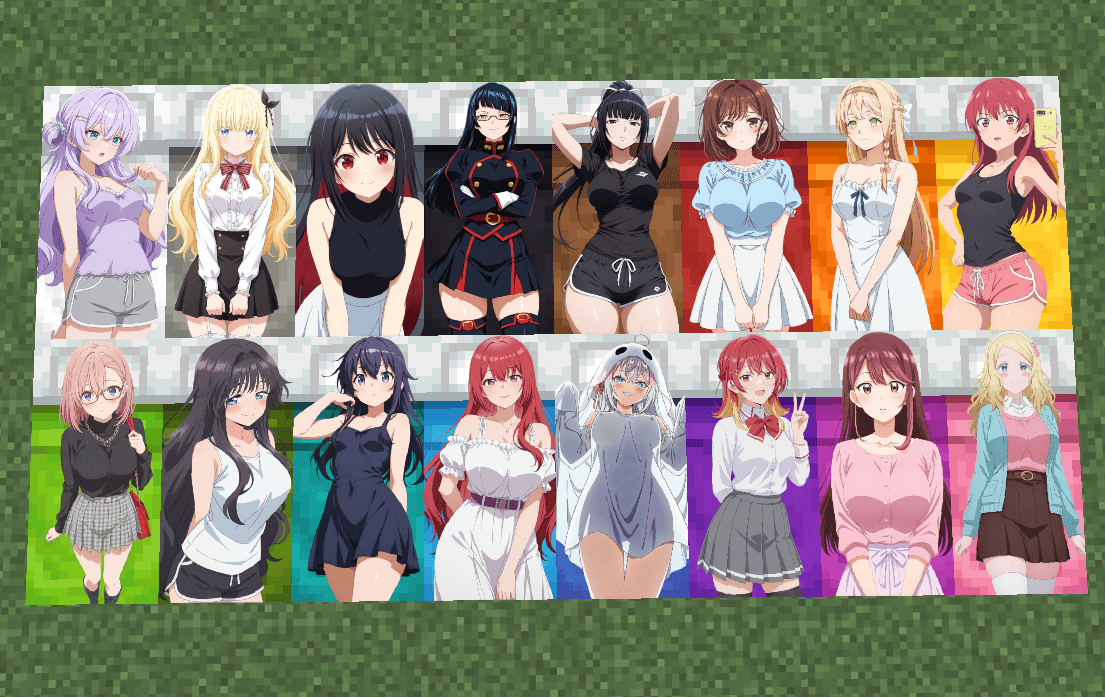
adds 16 girls to the beds
by Waifusik
Download Claim this project
Add a badge to your pageLink to otaku waifu beds from a README, website or forum post.
Preview: Badge

Badges update automatically and link to the resource pack page on MineUniverse.
2,913 downloads
0 likes
0 followers
Updated Oct 14, 2026
0 hypes
Follow0
512x and Higher
Advertisement Remove ads with Premium →

2026-05-30_11.08.51.png
Anime Beds — 16 Girls Edition

Bring a colorful anime vibe to your Minecraft world with this unique bed texture pack! Each bed color features a different anime-style girl, turning ordinary beds into eye-catching decorative pieces.

✨ Features

  • 16 unique anime girl bed designs
  • Custom texture for every bed color
  • Bright, high-quality artwork
  • Works without any mods
  • Perfect for anime-themed worlds and modpacks
  • Lightweight and survival-friendly

📦 Compatibility

  • Minecraft Java Edition
  • Supports Minecraft 1.12+ (adjust if needed)
  • Resource Pack format

🎨 About the Pack

This resource pack replaces the default bed textures with 16 unique anime-inspired character designs. Every bed has its own personality, color palette, and style, making bedrooms and bases feel more lively and personalized.

Whether you're creating an anime-themed build, decorating your survival home, or simply looking for a fresh visual upgrade, this pack adds a fun and stylish touch to your game.

⚠️ Disclaimer

All characters featured in this pack are stylized anime artwork intended for decorative purposes within Minecraft.

❤️ Support

If you enjoy this resource pack, consider leaving a rating and a comment. Your feedback helps support future updates and new texture pack releases!

Enjoy your new anime-inspired beds and happy crafting! 🛏️✨

otaku waifu beds.zip
MC 1.16.3, 1.13.1, 1.17.1, 1.21, 1.16.1, 1.18.1, 1.14.3, 1.15, 1.16, 1.13, 1.16.5, 1.19.3, 1.20.2, 1.19.4, 1.21.8, 1.14.4, 1.14.1, 1.12.1, 1.17, 1.12, 1.20.5, 1.21.5, 1.18
Release 2026-05-30 Get

Requirements & install

How to use this resource pack in Minecraft
Resolution
512x+
Minecraft
1.18.1 – 1.21.8
Install folder
.minecraft/resourcepacks

How to install resource packs

  1. Download the resource pack .zip file (do not extract it).
  2. In Minecraft open Options → Resource Packs → Open Pack Folder.
  3. Drop the .zip into the resourcepacks folder (.minecraft/resourcepacks).
  4. Move the pack to the Selected column and click Done.

512x packs need a strong GPU and at least 4 GB of RAM for Minecraft; a performance mod such as Sodium is strongly recommended.

Browse more: 16x resource packs 32x resource packs 64x resource packs 128x resource packs 256x resource packs 512x+ resource packs Resource Packs for 1.21.8 All resource packs

More from Waifusik

Advertisement Remove ads with Premium →

You Might Also Like