Mineuniverse
Resource Packs
NyaPack 🀺 Minimal Armor

NyaPack 🀺 Minimal Armor

RESOURCE PACK
Subtle armor, more of your skin is visible! πŸ‘€ Animated Turtle Helmet and Netherite Armour! 🎨
by chmonyasik
Download Claim this project
5,406 downloads
0 likes
Updated Oct 14, 2026
0 hypes
16x Animated Miscellaneous Modern
Advertisement Remove ads with Premium →

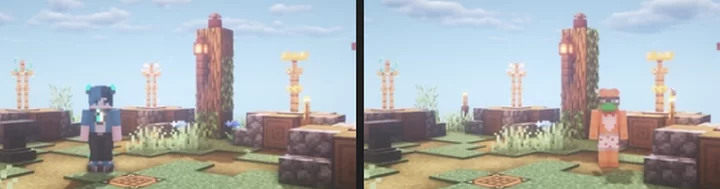
preview

Older versions (such as the Netherite armor version for Minecraft versions before 1.16) can be found on Planet Minecraft! 🌍


NyaPack πŸ¦‹ is a resource pack that lets you show off your skin even more! Armor becomes more like accessories or situational outfits, helping you customize your appearance without covering your character entirely.

✨ Features:

  • Emissives and animations support in newer versions, all without additional mods
  • Support for the new copper armor
  • Versions without emissive and without animations are also available for those who prefer a simpler look

Give your skin more personality and style! πŸ¦‹


NyaPack πŸ¦‹ (no anim-s, no emissive)
MC 1.21.2-Snapshot, 1.21.6-snapshot, 1.21.8, 1.21.5, 1.21.4, 1.21.5-Snapshot, 1.21.6, 1.21.3, 1.21.7, 1.21.4-Snapshot, 1.21.2
Release 2025-11-27 Get
NyaPack πŸ¦‹ (vanilla friendly)
MC 1.21.6-snapshot, 1.21.8, 1.21.6, 1.21.7
Release 2025-11-27 Get
NyaPack πŸ¦‹ (no anim-s, no emissive)
MC 1.21.9-snapshot, 1.21.9, 1.21.10, 1.21.11-snapshot, 1.21.11, 26.1-snapshot, 26.1, 26.1.1, 26.1.2, 26.2
Release 2025-11-27 Get
NyaPack πŸ¦‹ (vanilla friendly)
MC 1.21.9-snapshot, 1.21.9, 1.21.10, 1.21.11-snapshot, 1.21.11, 26.1-snapshot, 26.1, 26.1.1, 26.1.2, 26.2
Release 2025-11-27 Get
NyaPack πŸ¦‹
MC 1.5.3, 1.16.3, 1.13.1, 1.9.3, 1.8.7, 1.7.4, 1.7.7, 1.7.6, 1.16-Snapshot, 1.17.1, 1.9.1, 1.21.2-Snapshot, 1.21, 1.15-Snapshot, 1.7.5, 1.4.6, 1.6.1, 1.0, 1.16.1, 1.18.1
Release 2025-11-25 Get

Requirements & install

How to use this resource pack in Minecraft
Resolution
16x
Minecraft
1.21.10 – 26.2
Install folder
.minecraft/resourcepacks

How to install resource packs

  1. Download the resource pack .zip file (do not extract it).
  2. In Minecraft open Options β†’ Resource Packs β†’ Open Pack Folder.
  3. Drop the .zip into the resourcepacks folder (.minecraft/resourcepacks).
  4. Move the pack to the Selected column and click Done.
Browse more: 16x resource packs 32x resource packs 64x resource packs 128x resource packs 256x resource packs 512x+ resource packs Resource Packs for 26.2 All resource packs

More from chmonyasik

Advertisement Remove ads with Premium →

You Might Also Like