Mineuniverse
Resource Packs
NOTLIVES's The last withered bender

NOTLIVES's The last withered bender

RESOURCE PACK
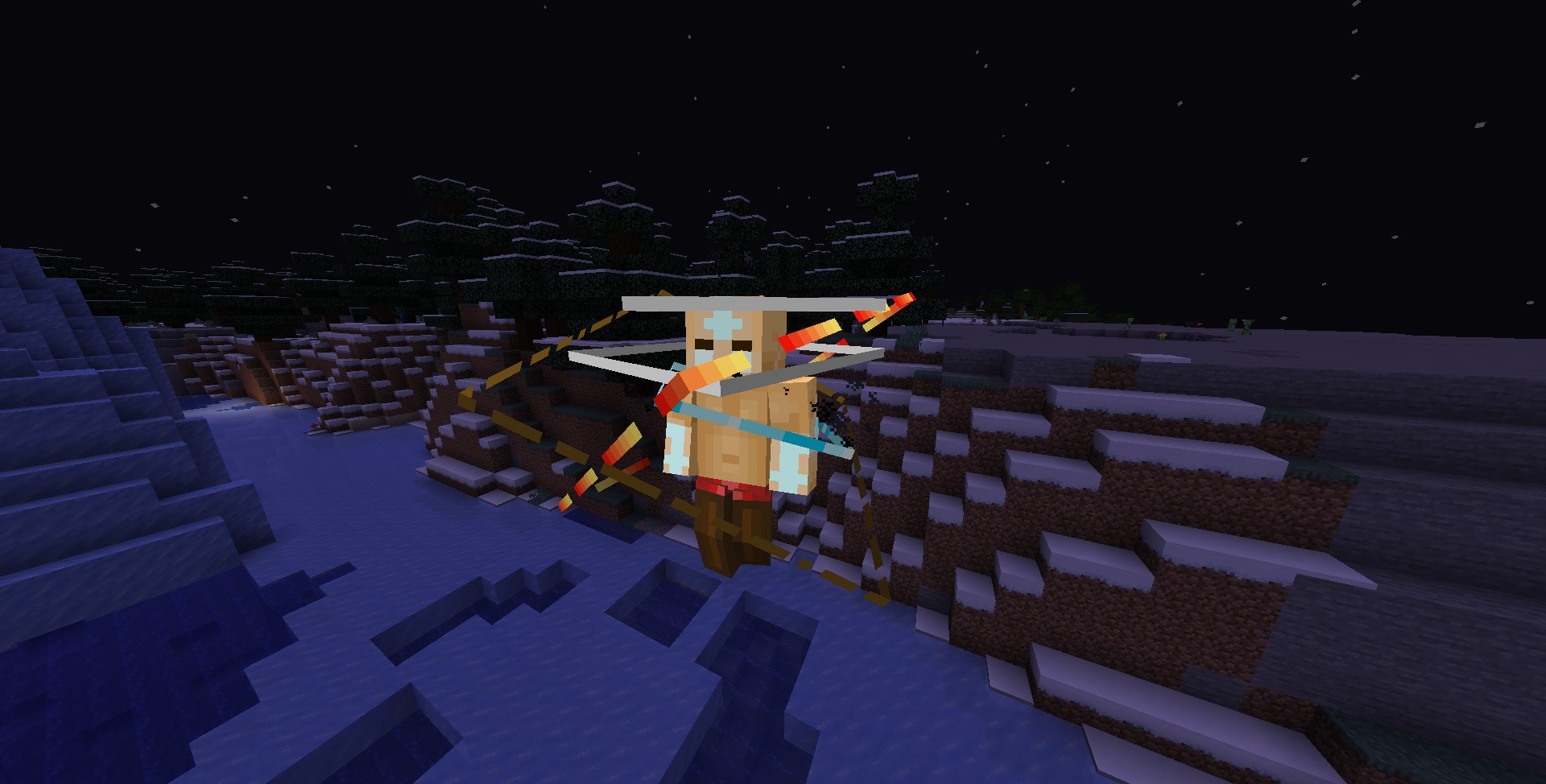
Oh no, Aang has Wither bending now
by notl1ves
Download Claim this project
Add a badge to your pageLink to NOTLIVES's The last withered bender from a README, website or forum post.
Preview: Badge

Badges update automatically and link to the resource pack page on MineUniverse.

880 downloads
0 likes
0 followers
Updated Oct 14, 2026
0 hypes
Follow0
16x Animated Data Packs
Advertisement Remove ads with Premium →

Water. Earth. Fire. Air.

Long ago, the four nations lived together in harmony.

Then, everything changed when the Fire Nation attacked.

Only the Avatar, master of all four elements, could stop them, but when the world needed him most, he vanished.

A hundred years passed and my brother and I discovered the new Avatar, an airbender named Aang.

And although his airbending skills are great, he has a lot to learn before he's ready to save anyone.

But I believe Aang can save the world.


Optifine required


Changes:

  • Te model and the texture of the Wither boss to look like the avatar Aang in "Avatar state"
  • The wither skulls look like rocks
  • Sound effects of the four elements
NOTLIVES's The last withered bender 1.16.2-1.16.5
MC 1.16.3, 1.16.5, 1.16.4, 1.16.2
Release 2024-07-01 Get
NOTLIVES's The last withered bender 1.17-1.17.1
MC 1.17.1, 1.17
Release 2024-07-01 Get
NOTLIVES's The last withered bender 1.18-1.18.2
MC 1.18.1, 1.18.2, 1.18
Release 2024-07-01 Get
NOTLIVES's The last withered bender 1.20.3-1.20.4
MC 1.20.3, 1.20.4
Release 2024-07-01 Get
NOTLIVES's The last withered bender 1.20.2
MC 1.20.2
Release 2024-07-01 Get
NOTLIVES's The last withered bender 1.19.4
MC 1.19.4
Release 2024-07-01 Get
NOTLIVES's The last withered bender 1.19.3
MC 1.19.3
Release 2024-07-01 Get
NOTLIVES's The last withered bender 1.20.5
MC 1.20.5
Release 2024-07-01 Get
NOTLIVES's The last withered bender 1.20-1.20.1
MC 1.20.1, 1.20
Release 2024-07-01 Get
NOTLIVES's The last withered bender 1.19-1.19.2
MC 1.19.2, 1.19.1, 1.19
Release 2022-07-24 Get

Requirements & install

How to use this resource pack in Minecraft
Resolution
16x
Minecraft
1.19.3 – 1.20.5
Install folder
.minecraft/resourcepacks

How to install resource packs

  1. Download the resource pack .zip file (do not extract it).
  2. In Minecraft open Options → Resource Packs → Open Pack Folder.
  3. Drop the .zip into the resourcepacks folder (.minecraft/resourcepacks).
  4. Move the pack to the Selected column and click Done.
Browse more: 16x resource packs 32x resource packs 64x resource packs 128x resource packs 256x resource packs 512x+ resource packs Resource Packs for 1.20.5 All resource packs

More from notl1ves

Advertisement Remove ads with Premium →

You Might Also Like