Mineuniverse
Resource Packs
No More Pumpkin Overlay

No More Pumpkin Overlay

RESOURCE PACK
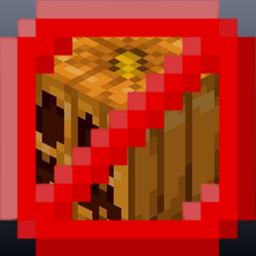
No More Pumpkin Overlay removes the pumpkin blur from your screen, giving you an unobstructed view without changing any gameplay.
by JLM_125
Download Claim this project
Add a badge to your pageLink to No More Pumpkin Overlay from a README, website or forum post.
Preview: Badge

Badges update automatically and link to the resource pack page on MineUniverse.

709 downloads
0 likes
0 followers
Updated Oct 14, 2026
0 hypes
Follow0
16x
Advertisement Remove ads with Premium →

No More Pumpkin Overlay 

See clearly while wearing a carved pumpkin!

No More Pumpkin Overlay removes the pumpkin blur from your screen, giving you an unobstructed view without changing any gameplay. Whether you're exploring, building, or using a carved pumpkin to avoid Endermen, you can enjoy the full visibility of Minecraft while keeping the pumpkin equipped.

Features

  • Removes the carved pumpkin screen overlay
  • Clear, unobstructed view
  • Vanilla-friendly
  • Lightweight and simple
  • Works seamlessly with your favorite resource packs

Perfect for survival players, explorers, and anyone who prefers a cleaner Minecraft experience.

No_More_Pumpkin_Overlay.zip
MC 26.3
Release 2026-09-22 Get
No_More_Pumpkin_Overlay.zip
MC 1.19.4
Release 2026-07-20 Get
No_More_Pumpkin_Overlay.zip
MC 1.20.1, 1.20
Release 2026-07-20 Get
No_More_Pumpkin_Overlay.zip
MC 1.20.5, 1.20.6
Release 2026-07-20 Get
No_More_Pumpkin_Overlay.zip
MC 1.21, 1.21.1
Release 2026-07-20 Get
No_More_Pumpkin_Overlay.zip
MC 1.21.4
Release 2026-07-20 Get
No_More_Pumpkin_Overlay.zip
MC 1.21.5
Release 2026-07-20 Get
No_More_Pumpkin_Overlay.zip
MC 1.21.8, 1.21.7
Release 2026-07-20 Get
No_More_Pumpkin_Overlay.zip
MC 1.21.9, 1.21.10
Release 2026-07-20 Get
No_More_Pumpkin_Overlay.zip
MC 1.21.11
Release 2026-07-20 Get
No_More_Pumpkin_Overlay.zip
MC 26.1
Release 2026-07-20 Get
No_More_Pumpkin_Overlay.zip
MC 26.2
Release 2026-07-20 Get

Requirements & install

How to use this resource pack in Minecraft
Resolution
16x
Minecraft
1.21.7 – 26.3
Install folder
.minecraft/resourcepacks

How to install resource packs

  1. Download the resource pack .zip file (do not extract it).
  2. In Minecraft open Options → Resource Packs → Open Pack Folder.
  3. Drop the .zip into the resourcepacks folder (.minecraft/resourcepacks).
  4. Move the pack to the Selected column and click Done.
Browse more: 16x resource packs 32x resource packs 64x resource packs 128x resource packs 256x resource packs 512x+ resource packs Resource Packs for 26.3 All resource packs

More from JLM_125

Advertisement Remove ads with Premium →

You Might Also Like