Mineuniverse
Resource Packs
End Enchantment Glint

End Enchantment Glint

RESOURCE PACK
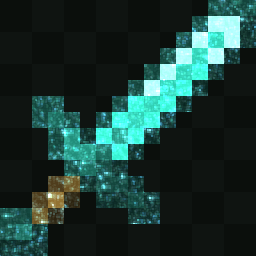
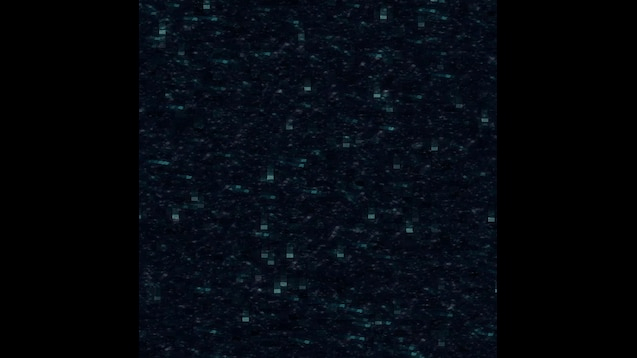
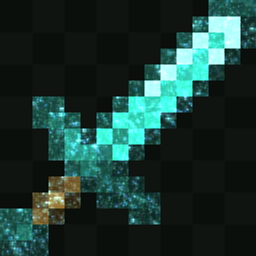
End Enchantment Glint replaces Minecraft's default enchantment glint with a dark, End Void effect
by JLM_125
Download Claim this project
967 downloads
0 likes
0 followers
Updated Oct 14, 2026
0 hypes
Follow0
128x Animated
Advertisement Remove ads with Premium →

End Enchantment Glint

Infuse your enchanted gear with the mysterious power of the End!

End Enchantment Glint replaces Minecraft's default enchantment glint with a dark, End void effect featuring deep purples and mysterious tones. It gives enchanted items a unique appearance while staying true to Minecraft's aesthetic.

Features

  • End-themed enchantment glint
  • Smooth animated effect
  • Works on all enchanted items, armor, and books
  • Vanilla-friendly style
  • Lightweight and easy to use
  • Compatible with most resource packs

Whether you're exploring End Cities, fighting the Ender Dragon, or simply want your gear to match the End dimension, End Enchantment Glint gives every enchanted item a mysterious new look.

End Enchantment Glint
MC 26.3
Release 2026-09-22 Get
End_Enchantment_Glint.zip
MC 1.16.3, 1.16.5, 1.16.2, 1.16.4
Release 2026-07-20 Get
End_Enchantment_Glint.zip
MC 1.19.4
Release 2026-07-20 Get
End_Enchantment_Glint.zip
MC 1.20.1, 1.20
Release 2026-07-20 Get
End_Enchantment_Glint.zip
MC 1.21, 1.21.1
Release 2026-07-20 Get
End_Enchantment_Glint.zip
MC 1.21.4
Release 2026-07-20 Get
End_Enchantment_Glint.zip
MC 1.21.5
Release 2026-07-20 Get
End_Enchantment_Glint.zip
MC 1.21.8, 1.21.7
Release 2026-07-20 Get
End_Enchantment_Glint.zip
MC 1.21.9, 1.21.10
Release 2026-07-20 Get
End_Enchantment_Glint.zip
MC 1.21.11
Release 2026-07-20 Get
End_Enchantment_Glint.zip
MC 26.1
Release 2026-07-20 Get
End_Enchantment_Glint.zip
MC 26.2
Release 2026-07-20 Get

Requirements & install

How to use this resource pack in Minecraft
Resolution
128x
Minecraft
1.21.7 – 26.3
Install folder
.minecraft/resourcepacks

How to install resource packs

  1. Download the resource pack .zip file (do not extract it).
  2. In Minecraft open Options → Resource Packs → Open Pack Folder.
  3. Drop the .zip into the resourcepacks folder (.minecraft/resourcepacks).
  4. Move the pack to the Selected column and click Done.

Packs from 128x upwards need more video memory: install a performance mod such as Sodium for smooth frame rates.

Browse more: 16x resource packs 32x resource packs 64x resource packs 128x resource packs 256x resource packs 512x+ resource packs Resource Packs for 26.3 All resource packs

More from JLM_125

Advertisement Remove ads with Premium →

You Might Also Like