Mineuniverse
Resource Packs
πŸŒ™ Night UI - A Dark Themed Resource Pack

πŸŒ™ Night UI - A Dark Themed Resource Pack

RESOURCE PACK
A Dark Themed Resource Pack
by NotToBlame
Download Claim this project
Add a badge to your pageLink to πŸŒ™ Night UI - A Dark Themed Resource Pack from a README, website or forum post.
Preview: Badge

Badges update automatically and link to the resource pack page on MineUniverse.

26,588 downloads
0 likes
0 followers
Updated Oct 14, 2026
0 hypes
Follow0
16x Miscellaneous
Advertisement Remove ads with Premium →

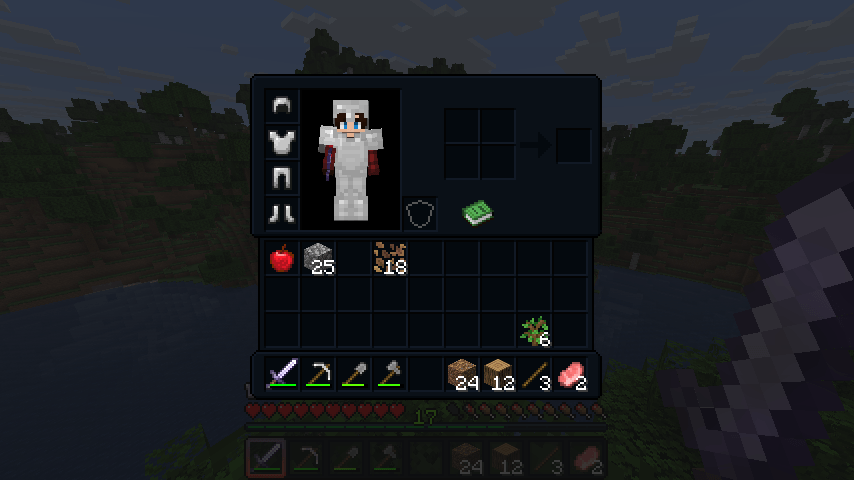
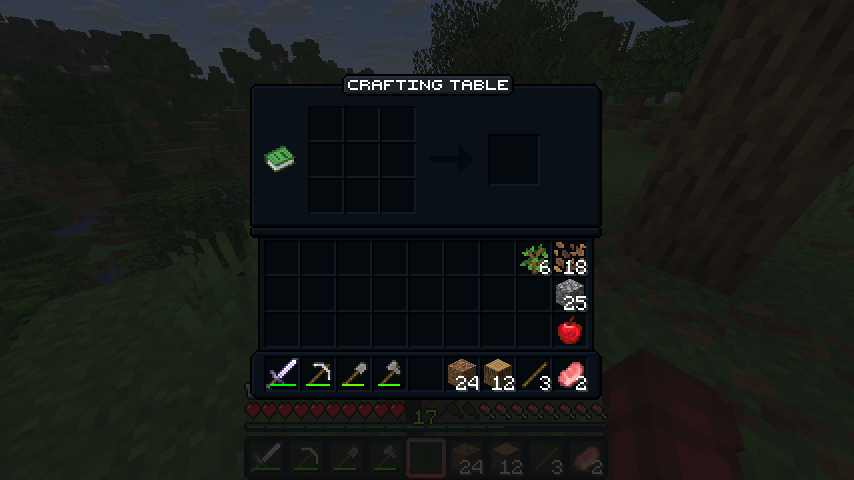
Night UI Banner

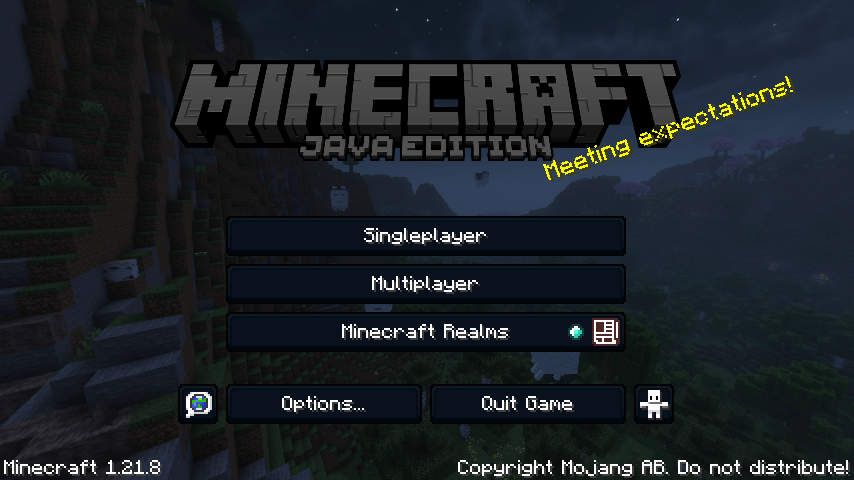
πŸŒ™ NightUI is a dark-themed Minecraft resource pack focused on clarity, comfort, and compatibility. It replaces the vanilla interface with a clean, minimalist design that’s lightweight, easy on the eyes, and compatible with other resource packs — ideal for late-night play or users who prefer a sleek, distraction-free UI.

Legacy4J Compatibility

NightUI integrates seamlessly with Legacy4J — a mod that restores the look and feel of the legacy console editions of Minecraft. With NightUI applied, the retro interface becomes much easier on the eyes.

Coming Soon

A dedicated NightUI configuration website is in development.

This will allow you to:

  • Select which features you want enabled
  • Enable or disable specific mod support to suit your setup
  • Choose presets tailored for popular modpacks

This will also allow for expanded support for many more mods in future updates.

Mod Support

NightUI currently supports UI integration for the following mods:

Want to request support for another mod? Join the Discord server.

License

NightUI is © NotToBlame. You are permitted to:

  • βœ… Use in modpacks if downloaded from official sources (Modrinth, CurseForge)
  • βœ… Create and publish addon packs (as long as no original files are included)
  • βœ… Make personal edits (not for redistribution)

You may not:

  • ❌ Reupload or redistribute this pack or its assets
  • ❌ Include original files in your own uploads or forks
  • ❌ Use the pack commercially without explicit permission

Read the full license here

πŸŒ™ NightUI v1.4.4 for 26.3
MC 26.3
Release 2026-09-21 Get
πŸŒ™ NightUI v1.4.3 for 26.2
MC 26.2
Release 2026-06-24 Get
πŸŒ™ NightUI v1.4 for 1.21.2-1.21.8
MC 1.21.8, 1.21.5, 1.21.4, 1.21.6, 1.21.3, 1.21.7, 1.21.2
Release 2025-08-20 Get
πŸŒ™ NightUI v1.4.1 for 1.21-1.21.8
MC 1.21, 1.21.8, 1.21.5, 1.21.4, 1.21.1, 1.21.6, 1.21.3, 1.21.7, 1.21.2
Release 2025-08-20 Get
πŸŒ™ NightUI v1.4.2 for 1.21.9+
MC 1.21.9-snapshot, 1.21.9, 1.21.10, 1.21.11-snapshot, 1.21.11, 26.1, 26.1.1, 26.1.2
Release 2025-08-20 Get
πŸŒ™ NightUI v1.3.2 for 1.21
MC 1.21.2-Snapshot, 1.21, 1.21.6-snapshot, 1.21.5, 1.21.8, 1.21.1-Snapshot, 1.21.4, 1.21.5-Snapshot, 1.21.3, 1.21.7, 1.21.1, 1.21.6, 1.21.4-Snapshot, 1.21.2
Release 2025-05-25 Get
NightUI v1.3.1 for 1.21
MC 1.21, 1.21.5, 1.21.4, 1.21.3, 1.21.1, 1.21.2
Release 2025-04-29 Get
NightUI v1.2.0 for 1.21
MC 1.21, 1.21.5, 1.21.4, 1.21.3, 1.21.1, 1.21.2
Release 2024-07-05 Get
NightUI v1.1.0 for 1.20
MC 1.20.1, 1.20
Release 2023-08-14 Get
NightUI v1.0.1 for 1.20
MC 1.20.1, 1.20
Release 2023-08-10 Get
NightUI v1.0.2 for 1.20
MC 1.20.1, 1.20
Release 2023-08-10 Get
NightUI.zip
MC 1.20.1, 1.20
Release 2023-08-09 Get

Requirements & install

How to use this resource pack in Minecraft
Resolution
16x
Minecraft
1.21.10 – 26.3
Install folder
.minecraft/resourcepacks

How to install resource packs

  1. Download the resource pack .zip file (do not extract it).
  2. In Minecraft open Options β†’ Resource Packs β†’ Open Pack Folder.
  3. Drop the .zip into the resourcepacks folder (.minecraft/resourcepacks).
  4. Move the pack to the Selected column and click Done.
Browse more: 16x resource packs 32x resource packs 64x resource packs 128x resource packs 256x resource packs 512x+ resource packs Resource Packs for 26.3 All resource packs

More from NotToBlame

Advertisement Remove ads with Premium →

You Might Also Like