Mineuniverse
Resource Packs
Neon Ores [Animated & Emissive]

Neon Ores [Animated & Emissive]

RESOURCE PACK
Makes all Minecraft ores glow in the dark! Perfect for dark caves and efficient mining trips.
by MODMYTH
Download Claim this project
Add a badge to your pageLink to Neon Ores [Animated & Emissive] from a README, website or forum post.
Preview: Badge

Badges update automatically and link to the resource pack page on MineUniverse.

523 downloads
0 likes
0 followers
Updated Oct 14, 2026
0 hypes
Follow0
16x Animated
Advertisement Remove ads with Premium →

# ✨ Glowing & Animated Ores Resource Pack ✨

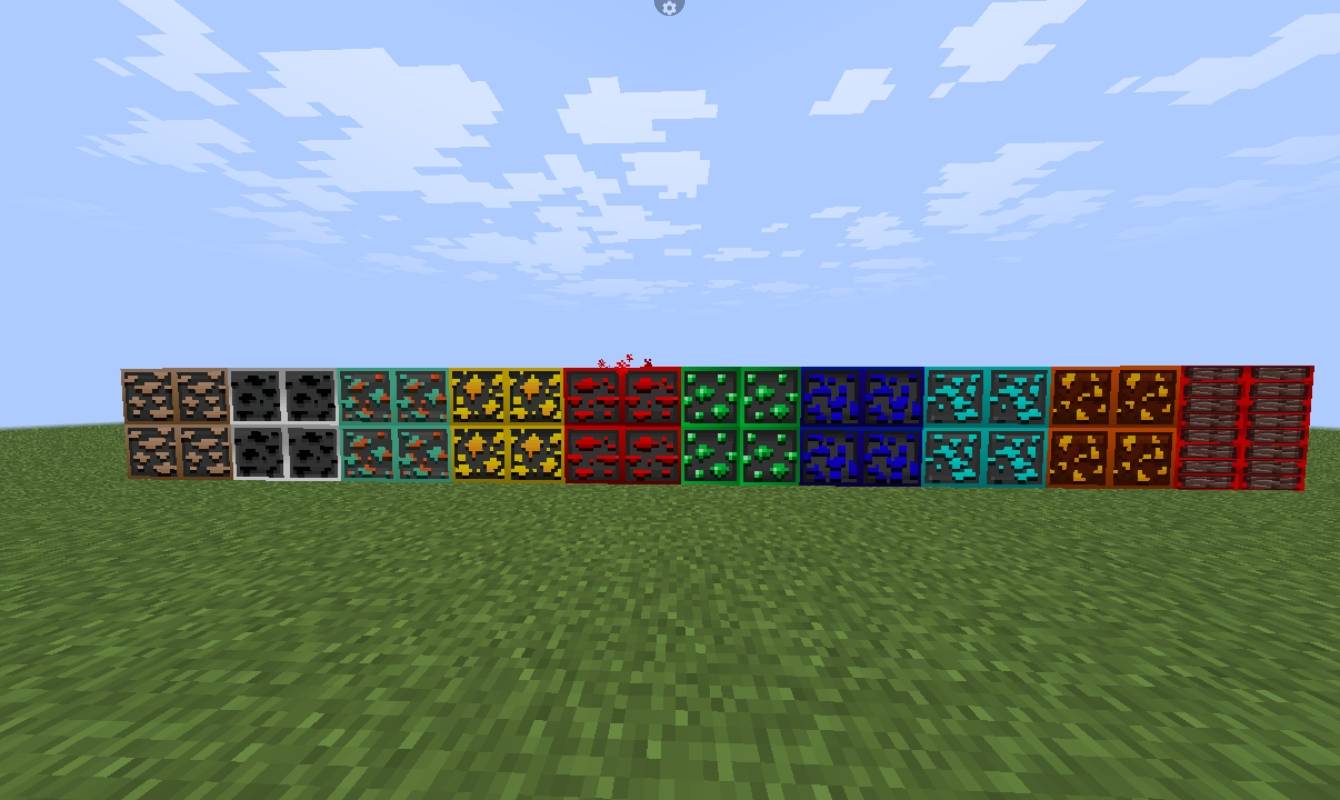
Tired of missing valuable diamonds in deep, dark caves? **Glowing Ores** is a clean, Java-focused resource pack designed to make your mining trips much more efficient, visually stunning, and alive with custom animations! 

This pack adds beautifully crafted, vibrant, and emissive glowing textures with custom animations to all standard blocks, deepslate blocks, and nether ores.

---

## 🚀 Features
* 💎 **Full Ore Coverage:** Includes Diamond, Gold, Iron, Emerald, Lapis, Copper, Coal, and Nether Gold.
* 🎬 **Smooth Animations:** All ores feature custom animated effects to make them pop out in the dark.
* 🌌 **Deepslate Support:** All deepslate variant ores are fully textured with glowing borders.
* 🎨 **Custom Project Logo:** Features a high-quality, sleek custom emblem in your resource pack menu.
* ⚡ **Performance Friendly:** Uses native 16x16 optimized textures to keep your FPS smooth.

---

## 🛠️ Requirements & Installation
To see the ores actually glow in the dark, you **MUST** use one of the following setups:

1. **OptiFine** (Go to Video Settings -> Quality -> Turn ON **Emissive Textures**).
2. **Fabric/Quilt Setup:** Use **Sodium** along with the **Continuity** mod (and an indirection mod like **Indium**).

### How to Install:
1. Download the `.zip` file from the Files tab.
2. Open Minecraft Java Edition and go to **Options > Resource Packs > Open Pack Folder**.
3. Drag and drop the downloaded `.zip` file into the folder.
4. Activate the pack in-game, make sure it's at the top of the list, and enjoy your glowing caves!

---

## 📸 Feedback & Support
If you encounter any bugs, glitched animations, or missing textures for specific versions, please drop a comment below. Happy mining!

Glowing_Ores
MC 26.1.2
Release 2026-10-05 Get
Glowing_Ores
MC 26.2
Release 2026-10-05 Get
Glowing_Ores
MC 26.1.1
Release 2026-10-04 Get
Glowing_Ores
MC 26.1
Release 2026-09-20 Get
Glowing_Ores
MC 1.20.6
Release 2026-09-18 Get
Glowing_Ores
MC 1.20.5
Release 2026-09-17 Get
Glowing_Ores
MC 1.20.4
Release 2026-09-14 Get
Glowing_Ores
MC 1.20.2
Release 2026-09-13 Get
Glowing_Ores
MC 1.21.3
Release 2026-09-13 Get
Glowing_Ores
MC 1.20.1
Release 2026-09-12 Get
Glowing_Ores
MC 1.21.10
Release 2026-09-11 Get
Glowing_ores
MC 1.21.11
Release 2026-09-11 Get
Glowing_Ores
MC 1.21.8
Release 2026-09-09 Get
Glowing_Ores
MC 1.21.9
Release 2026-09-09 Get
Glowing_Ores
MC 1.21.7
Release 2026-09-08 Get
Glowing_Ores
MC 1.21.6
Release 2026-09-06 Get
Glowing_Ores
MC 1.21.3
Release 2026-09-05 Get
Glowing_Ores
MC 1.21.4
Release 2026-09-05 Get
Glowing_Ores
MC 1.21.5
Release 2026-09-05 Get
Glowing_Ores
MC 1.21.2
Release 2026-09-04 Get
Glowing_Ores
MC 1.21.1
Release 2026-07-07 Get

Requirements & install

How to use this resource pack in Minecraft
Resolution
16x
Minecraft
1.21.8 – 26.2
Install folder
.minecraft/resourcepacks

How to install resource packs

  1. Download the resource pack .zip file (do not extract it).
  2. In Minecraft open Options → Resource Packs → Open Pack Folder.
  3. Drop the .zip into the resourcepacks folder (.minecraft/resourcepacks).
  4. Move the pack to the Selected column and click Done.
Browse more: 16x resource packs 32x resource packs 64x resource packs 128x resource packs 256x resource packs 512x+ resource packs Resource Packs for 26.2 All resource packs

More from MODMYTH

Advertisement Remove ads with Premium →

You Might Also Like