Mineuniverse
Resource Packs
NBSP Thousand Separator Fix

NBSP Thousand Separator Fix

RESOURCE PACK
Fixes thousand separator rendering as NBSP glyph on some locales.
by GeorgeHaldane
Download Claim this project
Add a badge to your pageLink to NBSP Thousand Separator Fix from a README, website or forum post.
Preview: Badge

Badges update automatically and link to the resource pack page on MineUniverse.

225 downloads
0 likes
0 followers
Updated Oct 14, 2026
0 hypes
Follow0
Font Packs Miscellaneous
Advertisement Remove ads with Premium →

This resourcepack was made for a modpack "Mechanized Rat".


NBSP Thousand Separator Fix

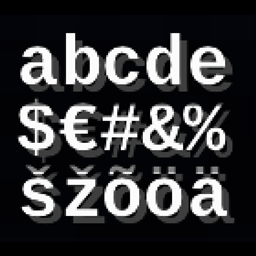
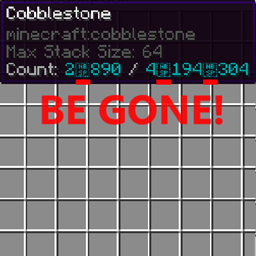
Fixes vanilla Minecraft bug that causes thousand separators to render as [NBSP] glyph instead of a small space on some locales.

This bug is mainly encountered when using mods that allow storage of large stack sizes.

Showcase

Compatibility

Tested for 1.18.2 but should work on most Minecraft versions since Unicode resources haven't been changed ever since resourcepack system has been introduced.

May be incompatible with resourcepacks that change Unicode textures and spacing. For most font resourcepacks that isn't the case since they only change ASCII texture.

How it works

Some language locales use Non-Breaking-SPace (aka NBSP) as a thousand separator. Due to a bug in vanilla Minecraft, the choice of separator locale doesn't always respect in-game language settings. Since the Unicode font that Minecraft uses implements this symbol as a [NBSP] glyph instead of a proper space, we see this ugliness. This resourcepack replaces glyph texture & size with a small space.

NBSP Thousand Separator Fix v.1.2.zip
MC 1.17.1, 1.16.3, 1.13.1, 1.19.3, 1.20.2, 1.16.1, 1.18.1, 1.14.4, 1.14.1, 1.17, 1.14.3, 1.15, 1.16, 1.13, 1.19.4, 1.16.5, 1.18.2, 1.19.2, 1.20.3, 1.15.2, 1.14, 1.20.1, 1.20
Release 2024-02-17 Get

Requirements & install

How to use this resource pack in Minecraft
Resolution
Not specified
Minecraft
1.18.2 – 1.20.3
Install folder
.minecraft/resourcepacks

How to install resource packs

  1. Download the resource pack .zip file (do not extract it).
  2. In Minecraft open Options → Resource Packs → Open Pack Folder.
  3. Drop the .zip into the resourcepacks folder (.minecraft/resourcepacks).
  4. Move the pack to the Selected column and click Done.
Browse more: 16x resource packs 32x resource packs 64x resource packs 128x resource packs 256x resource packs 512x+ resource packs Resource Packs for 1.20.3 All resource packs

More from GeorgeHaldane

Advertisement Remove ads with Premium →

You Might Also Like