Badges update automatically and link to the resource pack page on MineUniverse.
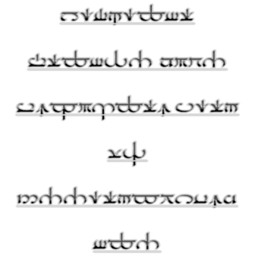
Middle-earth Valmaric Script(of Valinor)(used by Valar and Maiar) Font Resource Pack 32x32(Low Definition)(Normal and Unicode)
Themed
1.8.1
32x32
 Font
100%
The Valmaric Script of Valinor(used by Valar and Maiar) Resource Pack made by AttackOfTheDirt.
Made using HD Font Generator 1.2 by Killjoy1221. This Resource Pack uses the Valmaric Eldamar font by mansbjorkman.
This was made to be added in the LotR Mod for Minecraft if Mevans(the creator of the LotR Mod) wanted to use it.
The files that I think are best have recommended at the end of them.
Unicode is more strong and supports lettering more. Normal supports lettering less. The program I use can only create x32/x64 unicode font textures, but can create x32/x64/x128/x256/x512 normal textures. Even though normal versions are larger and take up more storage, but I think that unicode is better, and also both normal and unicode, contain the same amount of textures and if you want to free up more space on your get unicode because it is more compact.
Changes writing to the Valmaric Script Writing System(used by Valar and Maiar) by J.R.R. Tolkien for the land of Valinor to be written in Valarin in his fictional universe of Arda.
Should work with all Minecraft Versions(this definitely works with 1.8.3).
Versions made so far:
Valmaric Script:
CurseForge: Normal: x32 x64 x128 x256 x512 Unicode: x32 x64
Dropbox: Normal: x32 x64 x128 x256 x512 Unicode: x32 x64
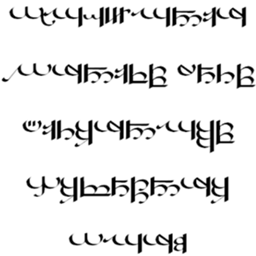
Sarati:
CurseForge: Normal: x32 x64 x128 x256 x512 Unicode: x32 x64
Dropbox: Normal: x32 x64 x128 x256 x512 Unicode: x32 x64
CurseForge: Normal: x32 x64 x128 x256 x512 Unicode: x32 x64
Dropbox: Normal: x32 x64 x128 x256 x512 Unicode: x32 x64
CurseForge: Normal: x32 x64 x128 x256 x512 Unicode: x32 x64
Dropbox: Normal: x32 x64 x128 x256 x512 Unicode: x32 x64
CurseForge: Normal: x32 x64 x128 x256 x512 Unicode: x32 x64
Dropbox: Normal: x32 x64 x128 x256 x512 Unicode: x32 x64
CurseForge: Normal: x32 x64 x128 x256 x512 Unicode: x32 x64
Dropbox: Normal: x32 x64 x128 x256 x512 Unicode: x32 x64
CurseForge: Normal: x32 x64 x128 x256 x512 Unicode: x32 x64
Dropbox: Normal: x32 x64 x128 x256 x512 Unicode: x32 x64
CurseForge: Normal: x32 x64 x128 x256 x512 Unicode: x32 x64
Dropbox: Normal: x32 x64 x128 x256 x512 Unicode: x32 x64
CurseForge: Normal: x32 x64 x128 x256 x512 Unicode: x32 x64
Dropbox: Normal: x32 x64 x128 x256 x512 Unicode: x32 x64
Tengwar:
CurseForge: Normal: x32 x64 x128 x256 x512 Unicode: x32 x64
Dropbox: Normal: x32 x64 x128 x256 x512 Unicode: x32 x64
CurseForge: Normal: x32 x64 x128 x256 x512 Unicode: x32 x64
Dropbox: Normal: x32 x64 x128 x256 x512 Unicode: x32 x64
CurseForge: Normal: x32 x64 x128 x256 x512 Unicode: x32 x64
Dropbox: Normal: x32 x64 x128 x256 x512 Unicode: x32 x64
CurseForge: Normal: x32 x64 x128 x256 x512 Unicode: x32 x64
Dropbox: Normal: x32 x64 x128 x256 x512 Unicode: x32 x64
Allow Comments:Additional Credit:<input maxlength="255" name="credit" size="60" type="text" value="Made by AttackOfTheDirt" />Tags / Keywords: <input maxlength="255" name="tags" size="60" type="text" value="Themed, Font" />
Texture Pack File Mirror:
| URL: | |
| Title: | <input maxlength="255" name="wtitle1" size="60" type="text" value="Link" /> |
Website / Forum Post:
| URL: | |
| Title: | <input maxlength="255" name="wtitle0" size="60" type="text" value="AttackOfTheDirt's Middle-earth Font Resource Packs" /> |