Mineuniverse
Resource Packs
Middle-earth Sarati(of Eldamar)(used by the High Elves) Font Resource Pack 32x32(Low Definition)(Normal and Unicode)

Middle-earth Sarati(of Eldamar)(used by the High Elves) Font Resource Pack 32x32(Low Definition)(Normal and Unicode)

RESOURCE PACK
Middle-earth Sarati(of Eldamar)(used by the High Elves) Font Resource Pack 32x32(Low Definition)(Normal and Unicode)
by _ForgeUser17825084
Download Claim this project
Add a badge to your pageLink to Middle-earth Sarati(of Eldamar)(used by the High Elves) Font Resource Pack 32x32(Low Definition)(Nor from a README, website or forum post.
Preview: Badge

Badges update automatically and link to the resource pack page on MineUniverse.

3,852 downloads
0 likes
0 followers
Updated Oct 14, 2026
0 hypes
Follow0
32x Medieval Miscellaneous Traditional
Advertisement Remove ads with Premium →

Title:


Middle-earth Sarati(of Eldamar)(used by the High Elves) Font Resource Pack 32x32(Low Definition)(Normal and Unicode)


Category:


Themed 


Game Version:


1.8.1 


Resolution:


32x32 


Textures Modified:

  • Font

Progress:


100%


Body / Main Description:


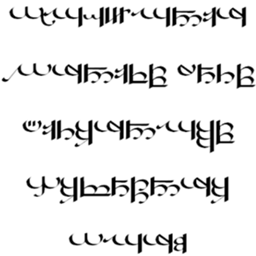
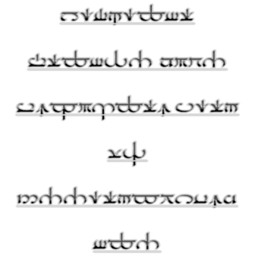
The Sarati Script of Eldamar(used by the High Elves) Resource Pack made by AttackOfTheDirt.

Made using HD Font Generator 1.2 by Killjoy1221. This Resource Pack uses the Tirion Sarati and Sarati Eldamar fonts by mansbjorkman.

This was made to be added in the LotR Mod for Minecraft if Mevans(the creator of the LotR Mod) wanted to use it.

Help:


The files that I think are best have recommended at the end of them.


Unicode is more strong and supports lettering more. Normal supports lettering less. The program I use can only create x32/x64 unicode font textures, but can create x32/x64/x128/x256/x512 normal textures. Even though normal versions are larger and take up more storage, but I think that unicode is better, and also both normal and unicode, contain the same amount of textures and if you want to free up more space on your get unicode because it is more compact.


Tirion Sarati is basically an older version of Sarati Eldamar(I think Tirion SaratiR is RightToLeft lettering Tirion Sarati).


Bar means that font adds a bar at the top of each letter which I think looks quite nice.


LeftToRight is when you the letters are meant to be read starting from the left and ending on the right and are like English and Normal lettering. LeftToRight is what is normally used by Elves.


RightToLeft is read from the right of our screen to the left, but since resource packs can't reverse words this does not work so that means only the letters are the other way around. This is the opposite to English writing and this style is like the style of writing the Ancient Egyptians used: RightToLeft.


Vertical is meant to make letters go down in a margin but Minecraft Resource Packs DEFINATELY don't have the ability to do that but the letters still are done in a different style. 


Info:


Changes writing to the Sarati Writing System(used by the High Elves) by J.R.R. Tolkien for the land of Eldamar to be written in Quenya in his fictional universe of Arda. 

Should work with all Minecraft Versions(this definitely works with 1.8.3).


Versions made so far:


Valmaric Script:

Valmaric Script:


CurseForge: Normal: x32 x64 x128 x256 x512 Unicode: x32 x64


Dropbox: Normal: x32 x64 x128 x256 x512 Unicode: x32 x64

Sarati:

Sarati:


Tirion Sarati:


Normal:


CurseForge: Normal: x32 x64 x128 x256 x512 Unicode: x32 x64


Dropbox: Normal: x32 x64 x128 x256 x512 Unicode: x32 x64


R:


CurseForge: Normal: x32 x64 x128 x256 x512 Unicode: x32 x64


Dropbox: Normal: x32 x64 x128 x256 x512 Unicode: x32 x64


Eldamar Sarati:


LeftToRight:


CurseForge: Normal: x32 x64 x128 x256 x512 Unicode: x32 x64


Dropbox: Normal: x32 x64 x128 x256 x512 Unicode: x32 x64


LeftToRight Bar:


CurseForge: Normal: x32 x64 x128 x256 x512 Unicode: x32 x64


Dropbox: Normal: x32 x64 x128 x256 x512 Unicode: x32 x64


RightToLeft:


CurseForge: Normal: x32 x64 x128 x256 x512 Unicode: x32 x64


Dropbox: Normal: x32 x64 x128 x256 x512 Unicode: x32 x64


RightToLeft Bar:


CurseForge: Normal: x32 x64 x128 x256 x512 Unicode: x32 x64


Dropbox: Normal: x32 x64 x128 x256 x512 Unicode: x32 x64


Vertical:


CurseForge: Normal: x32 x64 x128 x256 x512 Unicode: x32 x64


Dropbox: Normal: x32 x64 x128 x256 x512 Unicode: x32 x64


Vertical Bar:


CurseForge: Normal: x32 x64 x128 x256 x512 Unicode: x32 x64


Dropbox: Normal: x32 x64 x128 x256 x512 Unicode: x32 x64

Tengwar:

Tengwar:


Normal:


Noldor:


Normal:

CurseForge: Normal: x32 x64 x128 x256 x512 Unicode: x32 x64


Dropbox: Normal: x32 x64 x128 x256 x512 Unicode: x32 x64


1(Large):

CurseForge: Normal: x32 x64 x128 x256 x512 Unicode: x32 x64


Dropbox: Normal: x32 x64 x128 x256 x512 Unicode: x32 x64


2(Large Stripe):

CurseForge: Normal: x32 x64 x128 x256 x512 Unicode: x32 x64


Dropbox: Normal: x32 x64 x128 x256 x512 Unicode: x32 x64


A:

CurseForge: Normal: x32 x64 x128 x256 x512 Unicode: x32 x64


Dropbox: Normal: x32 x64 x128 x256 x512 Unicode: x32 x64 


More Info:


Allow Comments:Additional Credit:<input maxlength="255" name="credit" size="60" type="text" value="Made by AttackOfTheDirt" />Tags / Keywords:
help<input maxlength="255" name="tags" size="60" type="text" value="Themed, Font" />


Texture Pack File Mirror:
help

URL:  
Title: <input maxlength="255" name="wtitle1" size="60" type="text" value="Link" />

Website / Forum Post:
help

URL:  
Title: <input maxlength="255" name="wtitle0" size="60" type="text" value="AttackOfTheDirt's Middle-earth Font Resource Packs" />


SaratiEldamarLeftToRightBarUnicodeText32x32ResourcePack1.0(LowDefinition)(Unicode)(recommended)
MC 1.7.6, 1.7.4, 1.7.7, 1.7.5, 1.4.6, 1.6.1, 1.7.9, 1.2.4, 1.7.2, 1.4.4, 1.0.0, 1.8-Snapshot, 1.8.3, Beta 1.7.3, 1.5.2, 1.5.1, 1.1, 1.2.1, Beta 1.6.6, Beta 1.7, 1.7.8, 1.6.4
Release 2015-03-25 Get
SaratiEldamarRightToLeftBarUnicodeText32x32ResourcePack1.0(LowDefinition)(Unicode)
MC 1.7.6, 1.7.4, 1.7.7, 1.7.5, 1.4.6, 1.6.1, 1.7.9, 1.2.4, 1.7.2, 1.4.4, 1.0.0, 1.8-Snapshot, 1.8.3, Beta 1.7.3, 1.5.2, 1.5.1, 1.1, 1.2.1, Beta 1.6.6, Beta 1.7, 1.7.8, 1.6.4
Release 2015-03-25 Get
SaratiEldamarLeftToRightUnicodeText32x32ResourcePack1.0(LowDefinition)(Unicode)
MC 1.7.6, 1.7.4, 1.7.7, 1.7.5, 1.4.6, 1.6.1, 1.7.9, 1.2.4, 1.7.2, 1.4.4, 1.0.0, 1.8-Snapshot, 1.8.3, Beta 1.7.3, 1.5.2, 1.5.1, 1.1, 1.2.1, Beta 1.6.6, Beta 1.7, 1.7.8, 1.6.4
Release 2015-03-25 Get
SaratiEldamarRightToLeftUnicodeText32x32ResourcePack1.0(LowDefinition)(Unicode)
MC 1.7.6, 1.7.4, 1.7.7, 1.7.5, 1.4.6, 1.6.1, 1.7.9, 1.2.4, 1.7.2, 1.4.4, 1.0.0, 1.8-Snapshot, 1.8.3, Beta 1.7.3, 1.5.2, 1.5.1, 1.1, 1.2.1, Beta 1.6.6, Beta 1.7, 1.7.8, 1.6.4
Release 2015-03-25 Get
SaratiEldamarVerticalUnicodeText32x32ResourcePack1.0(LowDefinition)(Unicode)
MC 1.7.6, 1.7.4, 1.7.7, 1.7.5, 1.4.6, 1.6.1, 1.7.9, 1.2.4, 1.7.2, 1.4.4, 1.0.0, 1.8-Snapshot, 1.8.3, Beta 1.7.3, 1.5.2, 1.5.1, 1.1, 1.2.1, Beta 1.6.6, Beta 1.7, 1.7.8, 1.6.4
Release 2015-03-25 Get
SaratiEldamarVerticalBarUnicodeText32x32ResourcePack1.0(LowDefinition)(Unicode)
MC 1.7.6, 1.7.4, 1.7.7, 1.7.5, 1.4.6, 1.6.1, 1.7.9, 1.2.4, 1.7.2, 1.4.4, 1.0.0, 1.8-Snapshot, 1.8.3, Beta 1.7.3, 1.5.2, 1.5.1, 1.1, 1.2.1, Beta 1.6.6, Beta 1.7, 1.7.8, 1.6.4
Release 2015-03-25 Get
TirionSaratiUnicodeText32x32ResourcePack1.0(LowDefinition)(Unicode)(recommended)
MC 1.7.6, 1.7.4, 1.7.7, 1.7.5, 1.4.6, 1.6.1, 1.7.9, 1.2.4, 1.7.2, 1.4.4, 1.0.0, 1.8-Snapshot, 1.8.3, Beta 1.7.3, 1.5.2, 1.5.1, 1.1, 1.2.1, Beta 1.6.6, Beta 1.7, 1.7.8, 1.6.4
Release 2015-03-25 Get
TirionSaratiRUnicodeText32x32ResourcePack1.0(LowDefinition)(Unicode)
MC 1.7.6, 1.7.4, 1.7.7, 1.7.5, 1.4.6, 1.6.1, 1.7.9, 1.2.4, 1.7.2, 1.4.4, 1.0.0, 1.8-Snapshot, 1.8.3, Beta 1.7.3, 1.5.2, 1.5.1, 1.1, 1.2.1, Beta 1.6.6, Beta 1.7, 1.7.8, 1.6.4
Release 2015-03-25 Get
TirionSaratiText32x32ResourcePack1.0(LowDefinition)(Normal)
MC 1.7.6, 1.7.4, 1.7.7, 1.7.5, 1.4.6, 1.6.1, 1.7.9, 1.2.4, 1.7.2, 1.4.4, 1.0.0, 1.8-Snapshot, 1.8.3, Beta 1.7.3, 1.5.2, 1.5.1, 1.1, 1.2.1, Beta 1.6.6, Beta 1.7, 1.7.8, 1.6.4
Release 2015-03-25 Get
TirionSaratiRText32x32ResourcePack1.0(LowDefinition)(Normal)
MC 1.7.6, 1.7.4, 1.7.7, 1.7.5, 1.4.6, 1.6.1, 1.7.9, 1.2.4, 1.7.2, 1.4.4, 1.0.0, 1.8-Snapshot, 1.8.3, Beta 1.7.3, 1.5.2, 1.5.1, 1.1, 1.2.1, Beta 1.6.6, Beta 1.7, 1.7.8, 1.6.4
Release 2015-03-25 Get
SaratiEldamarVerticalBarText32x32ResourcePack1.0(LowDefinition)(Normal)
MC 1.7.6, 1.7.4, 1.7.7, 1.7.5, 1.4.6, 1.6.1, 1.7.9, 1.2.4, 1.7.2, 1.4.4, 1.0.0, 1.8-Snapshot, 1.8.3, Beta 1.7.3, 1.5.2, 1.5.1, 1.1, 1.2.1, Beta 1.6.6, Beta 1.7, 1.7.8, 1.6.4
Release 2015-03-25 Get
SaratiEldamarVerticalText32x32ResourcePack1.0(LowDefinition)(Normal)
MC 1.7.6, 1.7.4, 1.7.7, 1.7.5, 1.4.6, 1.6.1, 1.7.9, 1.2.4, 1.7.2, 1.4.4, 1.0.0, 1.8-Snapshot, 1.8.3, Beta 1.7.3, 1.5.2, 1.5.1, 1.1, 1.2.1, Beta 1.6.6, Beta 1.7, 1.7.8, 1.6.4
Release 2015-03-25 Get
SaratiEldamarLeftToRightBarText32x32ResourcePack1.0(LowDefinition)(Normal)
MC 1.7.6, 1.7.4, 1.7.7, 1.7.5, 1.4.6, 1.6.1, 1.7.9, 1.2.4, 1.7.2, 1.4.4, 1.0.0, 1.8-Snapshot, 1.8.3, Beta 1.7.3, 1.5.2, 1.5.1, 1.1, 1.2.1, Beta 1.6.6, Beta 1.7, 1.7.8, 1.6.4
Release 2015-03-25 Get
SaratiEldamarLeftToRightText32x32ResourcePack1.0(LowDefinition)(Normal)
MC 1.7.6, 1.7.4, 1.7.7, 1.7.5, 1.4.6, 1.6.1, 1.7.9, 1.2.4, 1.7.2, 1.4.4, 1.0.0, 1.8-Snapshot, 1.8.3, Beta 1.7.3, 1.5.2, 1.5.1, 1.1, 1.2.1, Beta 1.6.6, Beta 1.7, 1.7.8, 1.6.4
Release 2015-03-25 Get
SaratiEldamarRightToLeftBarText32x32ResourcePack1.0(LowDefinition)(Normal)
MC 1.7.6, 1.7.4, 1.7.7, 1.7.5, 1.4.6, 1.6.1, 1.7.9, 1.2.4, 1.7.2, 1.4.4, 1.0.0, 1.8-Snapshot, 1.8.3, Beta 1.7.3, 1.5.2, 1.5.1, 1.1, 1.2.1, Beta 1.6.6, Beta 1.7, 1.7.8, 1.6.4
Release 2015-03-25 Get
SaratiEldamarRightToLeftText32x32ResourcePack1.0(LowDefinition)(Normal)
MC 1.7.6, 1.7.4, 1.7.7, 1.7.5, 1.4.6, 1.6.1, 1.7.9, 1.2.4, 1.7.2, 1.4.4, 1.0.0, 1.8-Snapshot, 1.8.3, Beta 1.7.3, 1.5.2, 1.5.1, 1.1, 1.2.1, Beta 1.6.6, Beta 1.7, 1.7.8, 1.6.4
Release 2015-03-25 Get

Requirements & install

How to use this resource pack in Minecraft
Resolution
32x
Minecraft
1.7.4 – 1.8.3
Install folder
.minecraft/resourcepacks

How to install resource packs

  1. Download the resource pack .zip file (do not extract it).
  2. In Minecraft open Options → Resource Packs → Open Pack Folder.
  3. Drop the .zip into the resourcepacks folder (.minecraft/resourcepacks).
  4. Move the pack to the Selected column and click Done.
Browse more: 16x resource packs 32x resource packs 64x resource packs 128x resource packs 256x resource packs 512x+ resource packs Resource Packs for 1.8.3 All resource packs

More from _ForgeUser17825084

Advertisement Remove ads with Premium →

You Might Also Like