Mineuniverse
Resource Packs
Marvelous Custom Items

Marvelous Custom Items

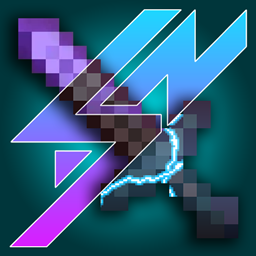
RESOURCE PACK
Replaces the model and texture of tools and weapons if renamed in an anvil.
by szombie_art
Download Claim this project
9,286 downloads
0 likes
Updated Oct 14, 2026
0 hypes
512x and Higher Animated Miscellaneous Traditional
Advertisement Remove ads with Premium →

A CIT resource pack brought to You by Szombie, inspired by Marvel.

(Requires: OptiFine 1.13+)

You can:

  • Showcase the resource pack in any format if you credit me.
  • Share the resource pack with the CurseForge or PlanetMinecraft links.
  • Use the resource pack on any server.
  • Modify the resource pack for private use only!


You can't:

  • Claim the resource pack as your own.
  • Modify the resource pack for public use.
  • Reupload any contents of the resource pack to anywhere.
  • Showcase or share the resource pack without properly crediting the author.

    WARNING: If you disregard ANY of the above statements, measures will be taken to prevent any kind of theft! Thank you for understanding.


About & Credits

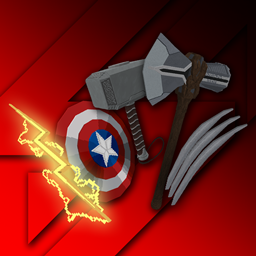
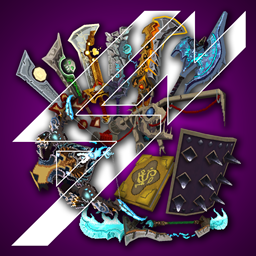
This resource pack aims to add most of the iconic weapons from the Marvel universe to Minecraft. There are two editions of both versions: Effect and No Effect. The No Effect versions remove the all effects on the models (shine, electricity, etc), improving your overall performance by a little. The resource pack only provides cosmetic benefits, it doesn't include anything else! In the Contents section below, you can find out the specifics.

Contents:

  • Captain America's Shield: Rename a shield to a name including "cap"
  • MCU Mjolnir: Rename a diamond / netherite sword / axe to a name including "mjolnir"
  • Stormbreaker: Rename a diamond / netherite sword / axe to a name including "storm"
  • Wolverine's Claws: Rename a diamond / netherite sword / axe to a name including "claw"
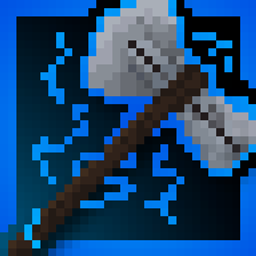
  • Thunderbolt: Rename a diamond / netherite sword / axe / pickaxe to a name including "thunderbolt"


Requirements: OptiFine 1.13+ or OptiFabric with working OptiFine 1.13+ or CIT mod.

Installation: Move the ".zip" file to the "...\.minecraft\resourcepacks\" folder. In the game, activate the resource pack and you're good to go!


In Options -> Video Settings -> Quality, set the Custom Items to "On" in order for the resource pack to work properly!


Update videos, showcases:


THANK YOU!

If you would like to support me, please consider leaving a LIKE on my video and SUBSCRIBE to my channel for more content like this in the future!


You don't have to, but if you would like to support me with more than a Like and a Subscribe, you have the option to donate me on PayPal aswell! The "Donate" button is around the top right of this page!


I really hope you'll enjoy the resource pack! Have fun!

 

V4
MC 1.17.1, 1.16.3, 1.13.1, 1.19.3, 1.16.1, 1.18.1, 1.14.4, 1.14.1, 1.17, 1.14.3, 1.15, 1.16, 1.13, 1.19.4, 1.16.5, 1.18.2, 1.19.2, 1.15.2, 1.14, 1.20.1, 1.20, 1.19.1, 1.18
Release 2023-07-27 Get
V3 (No Effects)
MC 1.17.1, 1.16.3, 1.13.1, 1.19.3, 1.16.1, 1.18.1, 1.14.4, 1.14.1, 1.17, 1.14.3, 1.15, 1.16, 1.13, 1.19.4, 1.16.5, 1.18.2, 1.19.2, 1.15.2, 1.14, 1.20.1, 1.20, 1.19.1, 1.18
Release 2023-05-04 Get
V3
MC 1.17.1, 1.16.3, 1.13.1, 1.19.3, 1.16.1, 1.18.1, 1.14.4, 1.14.1, 1.17, 1.14.3, 1.15, 1.16, 1.13, 1.19.4, 1.16.5, 1.18.2, 1.19.2, 1.15.2, 1.14, 1.20.1, 1.20, 1.19.1, 1.18
Release 2023-05-04 Get
V2 (NO SHINE)
MC 1.17.1, 1.16.3, 1.13.1, 1.19.3, 1.16.1, 1.18.1, 1.14.4, 1.14.1, 1.17, 1.14.3, 1.15, 1.16, 1.13, 1.19.4, 1.16.5, 1.18.2, 1.19.2, 1.15.2, 1.14, 1.20.1, 1.20, 1.19.1, 1.18
Release 2023-03-22 Get
V2
MC 1.17.1, 1.16.3, 1.13.1, 1.19.3, 1.16.1, 1.18.1, 1.14.4, 1.14.1, 1.17, 1.14.3, 1.15, 1.16, 1.13, 1.19.4, 1.16.5, 1.18.2, 1.19.2, 1.15.2, 1.14, 1.20.1, 1.20, 1.19.1, 1.18
Release 2023-03-22 Get
V1 - Wolverine Claws Update
MC 1.17.1, 1.16.3, 1.13.1, 1.19.3, 1.16.1, 1.18.1, 1.14.4, 1.14.1, 1.17, 1.14.3, 1.15, 1.16, 1.13, 1.19.4, 1.16.5, 1.18.2, 1.19.2, 1.15.2, 1.14, 1.20.1, 1.20, 1.19.1, 1.18
Release 2023-03-01 Get
V1 (NO SHINE EFFECT) - Wolverine Claws Update
MC 1.17.1, 1.16.3, 1.13.1, 1.19.3, 1.16.1, 1.18.1, 1.14.4, 1.14.1, 1.17, 1.14.3, 1.15, 1.16, 1.13, 1.19.4, 1.16.5, 1.18.2, 1.19.2, 1.15.2, 1.14, 1.20.1, 1.20, 1.19.1, 1.18
Release 2023-03-01 Get

Requirements & install

How to use this resource pack in Minecraft
Resolution
512x+
Minecraft
1.18.1 – 1.20.1
Install folder
.minecraft/resourcepacks

How to install resource packs

  1. Download the resource pack .zip file (do not extract it).
  2. In Minecraft open Options → Resource Packs → Open Pack Folder.
  3. Drop the .zip into the resourcepacks folder (.minecraft/resourcepacks).
  4. Move the pack to the Selected column and click Done.

512x packs need a strong GPU and at least 4 GB of RAM for Minecraft; a performance mod such as Sodium is strongly recommended.

Browse more: 16x resource packs 32x resource packs 64x resource packs 128x resource packs 256x resource packs 512x+ resource packs Resource Packs for 1.20.1 All resource packs

More from szombie_art

Advertisement Remove ads with Premium →

You Might Also Like