Mineuniverse
Resource Packs
Lume GUI

Lume GUI

RESOURCE PACK
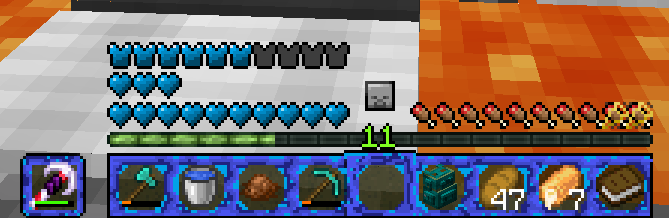
An Resource Pack that is From Leon_bien for His youtube Videos This resource Pack Can have more Themes and Makes your Inventory and so Collored
by Leon_bien
Download Claim this project
103 downloads
0 likes
Updated Oct 14, 2026
0 hypes
64x Modern
Advertisement Remove ads with Premium →

This Resource Pack can have more Themes 

-----------------------------

Diamond Blue: The New Resource Pack Call "Diamond Blue" makes your inventory and so blue

------------------------------

Comming Soon: -------------------------------

------------------------------------

Comming Soon: ---------------

...

Lume GUI V1
MC 1.20.1
Beta 2025-01-01 Get

Requirements & install

How to use this resource pack in Minecraft
Resolution
64x
Minecraft
1.20.1
Install folder
.minecraft/resourcepacks

How to install resource packs

  1. Download the resource pack .zip file (do not extract it).
  2. In Minecraft open Options → Resource Packs → Open Pack Folder.
  3. Drop the .zip into the resourcepacks folder (.minecraft/resourcepacks).
  4. Move the pack to the Selected column and click Done.
Browse more: 16x resource packs 32x resource packs 64x resource packs 128x resource packs 256x resource packs 512x+ resource packs Resource Packs for 1.20.1 All resource packs

More from Leon_bien

Advertisement Remove ads with Premium →

You Might Also Like