Mineuniverse
Resource Packs
Low Fire Camera Overlay

Low Fire Camera Overlay

RESOURCE PACK
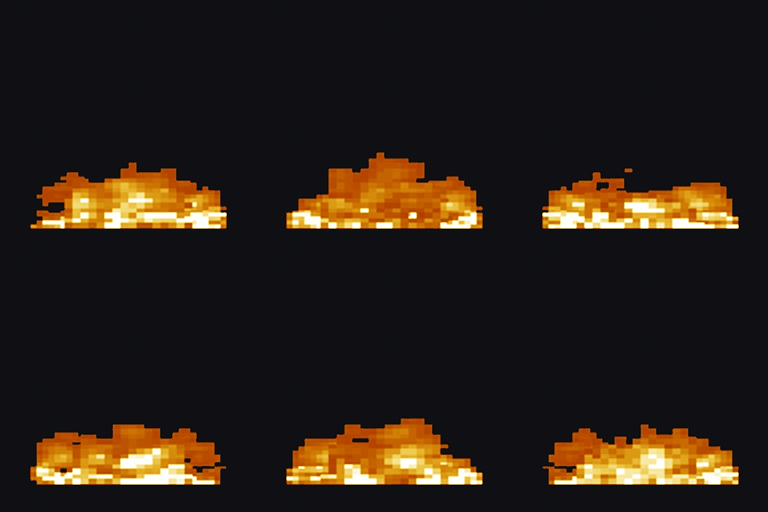
A client-side resource pack that lowers the player's fire overlay, adds subtle edge embers, and keeps world fire vanilla.
by Haider_x
Download Claim this project
974 downloads
0 likes
Updated Oct 14, 2026
0 hypes
16x
Advertisement Remove ads with Premium →

1

Low Fire Camera Overlay

Low Fire Camera Overlay is a lightweight client-side resource pack for Minecraft: Java Edition. It reduces the fire overlay that covers the player's camera while burning, adds a subtle animated ember effect near the screen edges, and keeps the center of the screen clear.

Features

  • Lowers the on-screen fire overlay while the player is burning.
  • Adds light animated embers near the screen borders.
  • Keeps the center of the camera clear for better visibility.
  • Preserves the normal vanilla fire appearance in the game world.
  • Works in vanilla Minecraft; Fabric, Forge, NeoForge, and OptiFine are not required.
  • Uses the original 16× Minecraft visual style.

Supported Minecraft versions

Download Supported releases
1.16.x 1.16–1.16.5
1.17.x 1.17–1.17.1
1.18.x 1.18–1.18.2
1.19.x 1.19–1.19.4
1.20.x 1.20–1.20.6
1.21.x 1.21–1.21.11
26.x 26.1–26.2

Each Minecraft series has its own release file. Download and enable only the file matching your Minecraft series. Versions 1.8.x through 1.15.x are not supported.

Installation

  1. Download the release matching your Minecraft version.
  2. Move the ZIP file into .minecraft/resourcepacks.
  3. Open Minecraft and go to Options → Resource Packs.
  4. Enable Low Fire Camera Overlay.

Do not enable more than one Low Fire Camera Overlay series pack at the same time.

Low_Fire_Camera_26.3.zip
MC 26.3
Release 2026-10-03 Get

Requirements & install

How to use this resource pack in Minecraft
Resolution
16x
Minecraft
26.3
Install folder
.minecraft/resourcepacks

How to install resource packs

  1. Download the resource pack .zip file (do not extract it).
  2. In Minecraft open Options → Resource Packs → Open Pack Folder.
  3. Drop the .zip into the resourcepacks folder (.minecraft/resourcepacks).
  4. Move the pack to the Selected column and click Done.
Browse more: 16x resource packs 32x resource packs 64x resource packs 128x resource packs 256x resource packs 512x+ resource packs Resource Packs for 26.3 All resource packs

More from Haider_x

Advertisement Remove ads with Premium →

You Might Also Like