Mineuniverse
Resource Packs
I_am's Crosshair removal

I_am's Crosshair removal

RESOURCE PACK
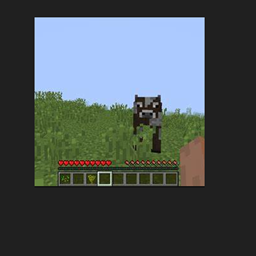
This remouves the crosshair to have a better vison.
by Quantum2001
Download Claim this project
Add a badge to your pageLink to I_am's Crosshair removal from a README, website or forum post.
Preview: Badge

Badges update automatically and link to the resource pack page on MineUniverse.

2,829 downloads
0 likes
0 followers
Updated Oct 14, 2026
0 hypes
Follow0
Data Packs Miscellaneous Photo Realistic Traditional
Advertisement Remove ads with Premium →

https://url-shortener.curseforge.com/6ZpEg <this will giv you 25% off !!! your first server on bisectHosting !!!

 crosshair remouval to upgrade your experience.


IT WILL HELP YOU SEE BETTER.

It will give you a better vision allong with more style!


ATTENTION MODPACK CREATORS If you are looking forward to creating a modpack, this resource pack will make the rest of your creation feel big and epic. Combined with a good shader it will make the perfect combo to give the feeling that your world is huge and epic.

⚠️Warning!⚠️ 

Do NOT download this from any other site than curseforge.com. If you find this pack on any other site than curseforge it is stolen property. Thankyou.

Just on the side, I own a server on discord for general gaming and artist that I’m looking forward to grow so feel free to join and chat with some other gamers or artist like you :)


https://discord.gg/UvVffJ633w

I am's crosshair remouver.zip
MC 1.20.2, 1.20.5, 1.20.3, 1.20.1, 1.20, 1.20.6, 1.20.4
Release 2025-01-20 Get
medieval GUI.zip
MC 1.20.2, 1.20.5, 1.20.3, 1.20.1, 1.20, 1.20.6, 1.20.4
Release 2024-12-19 Get
medieval crosshair.zip
MC 1.20.1, 1.20
Release 2024-12-17 Get

Requirements & install

How to use this resource pack in Minecraft
Resolution
Not specified
Minecraft
1.20 – 1.20.6
Install folder
.minecraft/resourcepacks

How to install resource packs

  1. Download the resource pack .zip file (do not extract it).
  2. In Minecraft open Options → Resource Packs → Open Pack Folder.
  3. Drop the .zip into the resourcepacks folder (.minecraft/resourcepacks).
  4. Move the pack to the Selected column and click Done.
Browse more: 16x resource packs 32x resource packs 64x resource packs 128x resource packs 256x resource packs 512x+ resource packs Resource Packs for 1.20.6 All resource packs

More from Quantum2001

Advertisement Remove ads with Premium →

You Might Also Like