Mineuniverse
Resource Packs
I_am's crafting table

I_am's crafting table

RESOURCE PACK
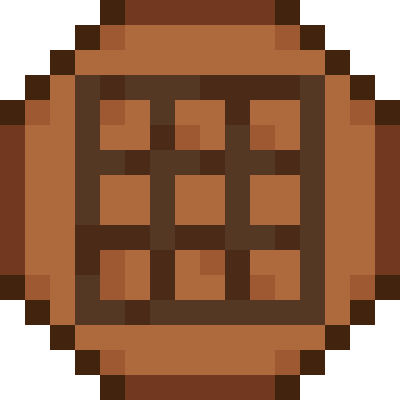
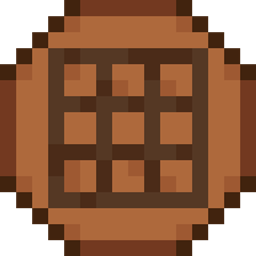
changes the plain old look of the crafting tables to a newer and nice medieval crafting table
by Quantum2001
Download Claim this project
2,848 downloads
0 likes
0 followers
Updated Oct 14, 2026
0 hypes
Follow0
Data Packs Medieval Miscellaneous Photo Realistic
Advertisement Remove ads with Premium →

New epic crafting table reworck to upgrade your experience.


This pack changes the plain old crafting table into an epic good loking new one to upgrade your experience and give you a better felling in your world.


ATTENTION MODPACK CREATORS If you are looking forward to creating a modpack, this resource pack will make the rest of your creation feel big and epic. Combined with a good shader it will make the perfect combo to give the feeling that your world is huge and epic.

⚠️Warning!⚠️ 

Do NOT download this from any other site than curseforge.com. If you find this pack on any other site than curseforge it is stolen property. Thankyou.

Just on the side, I own a server on discord for general gaming and artist that I’m looking forward to grow so feel free to join and chat with some other gamers or artist like you :)

https://discord.gg/UvVffJ633w

I_am's crafting table.zip
MC 1.20.2, 1.20.5, 1.20.3, 1.20.1, 1.20, 1.20.6, 1.20.4
Release 2025-01-06 Get
I_am's crafting table.zip
MC 1.20.2, 1.20.5, 1.20.3, 1.20.1, 1.20, 1.20.6, 1.20.4
Release 2024-12-19 Get
I am's crafting table.zip
MC 1.20.2, 1.20.5, 1.20.3, 1.20.1, 1.20, 1.20.6, 1.20.4
Release 2024-12-18 Get
I_am's crafting table.zip
MC 1.20.2, 1.20.5, 1.20.3, 1.20.1, 1.20, 1.20.6, 1.20.4
Release 2024-12-18 Get
better crafting tables.zip
MC 1.20.1
Release 2024-12-17 Get

Requirements & install

How to use this resource pack in Minecraft
Resolution
Not specified
Minecraft
1.20 – 1.20.6
Install folder
.minecraft/resourcepacks

How to install resource packs

  1. Download the resource pack .zip file (do not extract it).
  2. In Minecraft open Options → Resource Packs → Open Pack Folder.
  3. Drop the .zip into the resourcepacks folder (.minecraft/resourcepacks).
  4. Move the pack to the Selected column and click Done.
Browse more: 16x resource packs 32x resource packs 64x resource packs 128x resource packs 256x resource packs 512x+ resource packs Resource Packs for 1.20.6 All resource packs

More from Quantum2001

Advertisement Remove ads with Premium →

You Might Also Like