Spanish translations for the Eldritch End mod.
Supports all spanish variations / slangs.
How to install
1. Download the .zip file and put it inside the /resourcepacks folder inside .minecraft
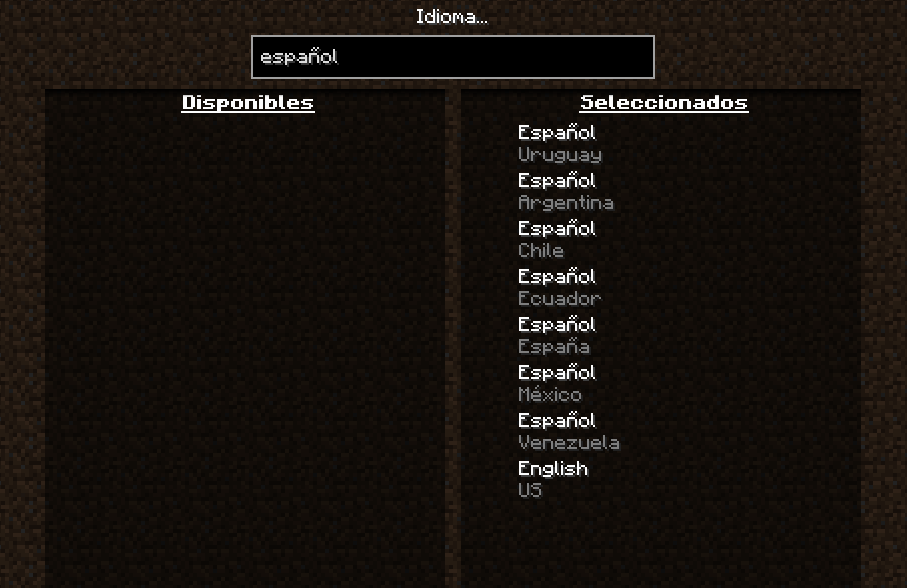
2. Choose the following language order, and put your preferred variation on the top
Who are we?
We're a small team with one simple goal: bring spanish translations to all mods as possible.
Modded MC has a great chunk of spanish translated mods, but sadly, there's a lot more that aren't. There are also some cases where translations are inconsistent or incomplete.
That's why we decided to make HTP, to try to fix this task.
Open Source
Our project is open source, contribution friendly, and most importantly, under the Public Domain.
If you're a mod developer and want to add our translations officially to your mod, feel free to! We encourage it.
These pages will still be updated frequently and serve as an unofficial translation, but the content of them is free to use for everyone.
Contributing
If you're a native spanish speaker and want to contribute by either adding more translations or proofreading, you can open a Pull Request in our Github Repository.
Donating
Your best donation is a contribution on our Github Repository!
If you don't want to open a pull request, you can always make an issue pointing out stuff to be improved on.
Due to CurseForge moderation policies the description must be in english, the projects are not getting approved with spanish descriptions.