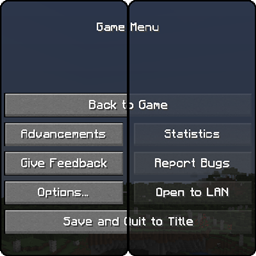
Grey's Transparent Menu & Widgets HUD is a transparent edit of Kraineff's Faithful addon made for users who love the artstyle of Faithful and dark mode for UI interfaces. It only affects the menu and widget interfaces and is compatible with other interface mods that change the look of containers and other graphical interfaces, giving more options for customization while minimizing potential conflicts.
Installation
This mod, like other resource pack mods, should be extracted into the resource pack folder within Minecraft's main directory. Using Windows Explorer, you will need to locate and select This PC, followed by opening a drive your main OS is installed in. Look for a drive that has a Windows sprite within its own icon. By default, it is the C: drive. Open the drive and make sure Hidden Items is checked at the top of the window (Windows Explorer > View > Hidden items). Then, navigate to the following directory below:
C:\Users\(Username)\AppData\Roaming\.minecraft\resourcepacks
By default, Minecraft should be installed within the provided directory. If you had manually installed Minecraft to an unspecified directory, navigate to it instead. Using your favorite file archiver software, whether it is 7-Zip, WinRAR, or Window's built-in Windows Compressed Folders, extract the mod to Minecraft's resourcepacks directory; If this is your first time installing mods, the resourcepacks folder could be empty. Open your Minecraft launcher and load the game. When presented with the title screen, navigate to Options > Resource Packs and you will be presented with an two boxes, Available and Selected. The menu and widgets mod should be located within the Available section. Hover your mouse pointer over its icon, click on its arrow, and the mod should have moved over to the Selected box. Click on Done at the bottom of your screen, and the game will load your mods. Go play singleplayer or multiplayer!
Compatibility
Grey's Transparent Menu & Widgets HUD only affects the menu and widget interfaces, that being your HUD for items, armor, health, and hunger, and the menu screen. Other interface mods like containers and advancements will not interfere with Grey's Transparent Menu & Widgets HUD, as they are in their separate folders. Resource packs like Kraineff's Faithful and Sphax's PureBDCraft will conflict and load ordering will be necessary. To solve this, simply return to Options > Resource Packs. Hover your mouse pointer over the menu and widgets mod and there should be two or three arrows. Click on the smallest arrows that puts Grey's Menu & Widgets mod above one that may conflict and click on Done.
Reporting Issues
If there are minor oversights with this mod; if some colors do not appear correctly against the background in various scenes, inconveniences with specific interfaces, or even some feedback, navigate to the top of this webpage and look for Issue to start a discussion.