Mineuniverse
Resource Packs
Glowline Ores

Glowline Ores

RESOURCE PACK
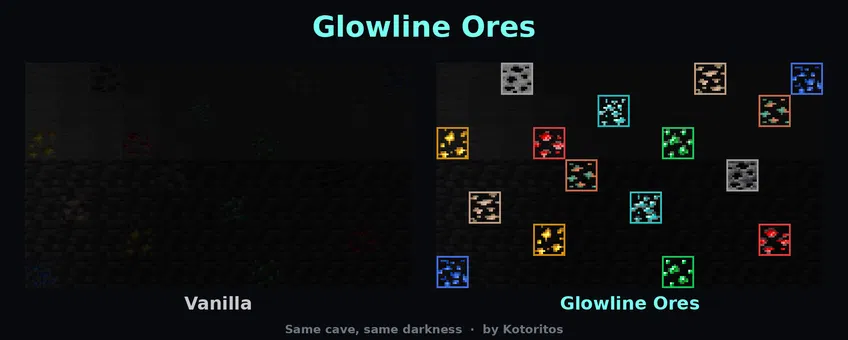
Makes every ore glow in the dark so you can spot it from across a cave. Ores keep their exact vanilla look, with a thin border in each ore’s colour so you can tell them apart instantly. No mods needed.
by kotoritos
Download Claim this project
1,021 downloads
0 likes
Updated Oct 14, 2026
0 hypes
16x Miscellaneous Traditional
Advertisement Remove ads with Premium →

✨ Glowline Ores ✨

Never walk past a diamond in the dark again.

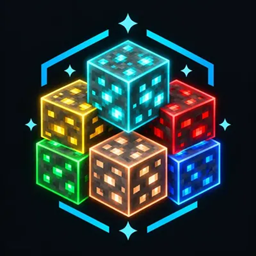
Glowline Ores makes every ore in the game glow in the dark, with a clean coloured outline in each ore's own colour. It keeps the exact vanilla look you already know, so you can spot ores from across the cave, in pitch black, before your torch even reaches them.
image

🔦 No mods. No OptiFine. No shaders required. Drop it in, turn the lights off, and start mining.

💎 Why Glowline Ores?

⛏️ Spot every ore instantly. Diamonds, emeralds, gold, redstone, lapis… they all light up in the dark.

🎨 100% vanilla look. The ore chunks keep Minecraft's original pixels and shading. In daylight it looks just like vanilla, with a thin border in the ore's colour.

🌈 Easy to tell apart. Every ore has its own glow colour: cyan diamonds, green emeralds, golden gold, red redstone, blue lapis.

⚡ Glows for real. It uses Minecraft's own emissive models, so it isn't just a brighter texture: the ores are fully lit even in total darkness.

🚀 Lightweight and optimised. Hidden faces are never drawn, glow layers are merged into as few pieces as possible, and blocks with the same shape share a single model.

❓ FAQ

Is this X-ray? Can I use it on servers? No, it's not X-ray. You only see ores that are already visible. Still, some servers forbid any ore-highlighting pack, so check the rules first.

Does it work with other resource packs? Yes. Keep Glowline Ores above them. If another pack redraws the ores, the glow follows the vanilla chunk shapes and may not line up.

Does it hurt performance? Barely. Only visible faces are drawn and everything is merged and shared to stay as light as possible.

💡 Made with care by Kotoritos

If you enjoy it, leave a ❤️ and follow the project for updates!

Glowline-Ores-26.3
MC 26.3
Release 2026-10-10 Get
Glowline-Ores-1.21.9-26.2
MC 1.21.9, 1.21.10, 1.21.11-snapshot, 1.21.11, 26.1, 26.1.1, 26.1.2, 26.2
Release 2026-10-10 Get
Glowline-Ores-1.21.2-1.21.8
MC 1.21.2-Snapshot, 1.21.6-snapshot, 1.21.8, 1.21.5, 1.21.4, 1.21.5-Snapshot, 1.21.6, 1.21.3, 1.21.7, 1.21.4-Snapshot, 1.21.2
Release 2026-10-10 Get
Glowline-Ores-1.20.1-1.21.1
MC 1.21, 1.20.2-Snapshot, 1.20.5-Snapshot, 1.21.1-Snapshot, 1.20.2, 1.20.5, 1.20.1, 1.20.6, 1.21.1, 1.20.4, 1.21-Snapshot, 1.20.3-Snapshot, 1.20.3
Release 2026-10-10 Get

Requirements & install

How to use this resource pack in Minecraft
Resolution
16x
Minecraft
1.21.10 – 26.3
Install folder
.minecraft/resourcepacks

How to install resource packs

  1. Download the resource pack .zip file (do not extract it).
  2. In Minecraft open Options → Resource Packs → Open Pack Folder.
  3. Drop the .zip into the resourcepacks folder (.minecraft/resourcepacks).
  4. Move the pack to the Selected column and click Done.
Browse more: 16x resource packs 32x resource packs 64x resource packs 128x resource packs 256x resource packs 512x+ resource packs Resource Packs for 26.3 All resource packs

More from kotoritos

Advertisement Remove ads with Premium →

You Might Also Like