Mineuniverse
Resource Packs
Pure Bright (FULLBRIGHT)

Pure Bright (FULLBRIGHT)

RESOURCE PACK
The best Vanilla FULLBRIGHT
by kotoritos
Download Claim this project
490,731 downloads
0 likes
Updated Oct 14, 2026
0 hypes
16x Miscellaneous
Advertisement Remove ads with Premium →

Pure Bright

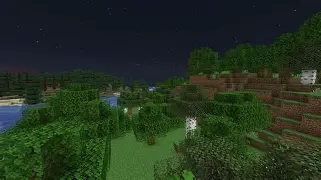
Pure Bright is a lightweight Minecraft resource pack that removes all in-game darkness, giving you maximum brightness at all times — no gamma tweaking, no night vision potions, no mods required.

Whether you're caving, building underground, or just tired of squinting at dark corners, Pure Bright keeps every corner of your world fully visible.

How It Works

Pure Bright overrides Minecraft's built-in lightmap shader with a single GLSL file that outputs full brightness unconditionally. No textures are modified, no gameplay mechanics are altered — just clean, consistent lighting everywhere.

Compatibility

Pure Bright works across a wide range of setups without any additional configuration.

Mod loaders and clients:

  • Vanilla (no mods) — fully supported
  • Fabric — fully supported
  • Forge / NeoForge — fully supported
  • Sodium — fully supported
  • Lithium — fully supported
  • Iris Shaders — supported when no shaderpack is active
  • OptiFine — supported when no shaderpack is active
PureBright_26.3
MC 26.3
Release 2026-09-15 Get

Requirements & install

How to use this resource pack in Minecraft
Resolution
16x
Minecraft
26.3
Install folder
.minecraft/resourcepacks

How to install resource packs

  1. Download the resource pack .zip file (do not extract it).
  2. In Minecraft open Options → Resource Packs → Open Pack Folder.
  3. Drop the .zip into the resourcepacks folder (.minecraft/resourcepacks).
  4. Move the pack to the Selected column and click Done.
Browse more: 16x resource packs 32x resource packs 64x resource packs 128x resource packs 256x resource packs 512x+ resource packs Resource Packs for 26.3 All resource packs

More from kotoritos

Advertisement Remove ads with Premium →

You Might Also Like