Mineuniverse
Resource Packs
GearPlus: continued

GearPlus: continued

RESOURCE PACK
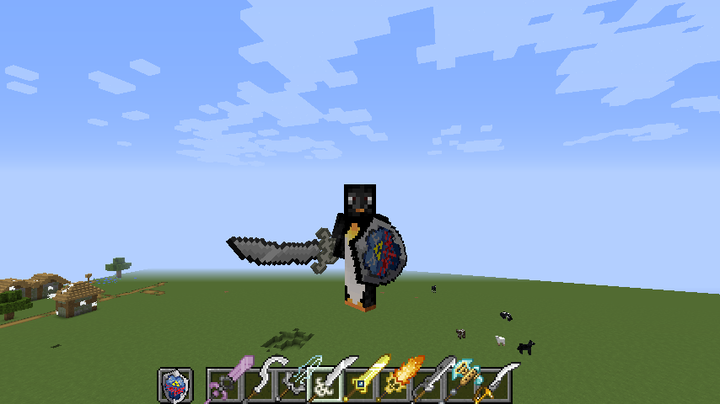
GearPlus allows you to re-skin your weapons, armor, elytra, shields and more without replacing the default textures, you can spawn in as many of them at a time as you like and there is a wide variety to choose from.

by Ontvlambaar
Download Claim this project
1,204 downloads
0 likes
Updated Oct 14, 2026
0 hypes
64x Miscellaneous
Advertisement Remove ads with Premium →

GearPlus allows you to re-skin your weapons, armor, elytra, shields and more without replacing the default textures, you can spawn in as many of them at a time as you like and there is a wide variety to choose from.


gearplus optifine 1.16.zip
MC 1.16.3, 1.16.1, 1.16, 1.16.2
Release 2020-09-18 Get

Requirements & install

How to use this resource pack in Minecraft
Resolution
64x
Minecraft
1.16 – 1.16.3
Install folder
.minecraft/resourcepacks

How to install resource packs

  1. Download the resource pack .zip file (do not extract it).
  2. In Minecraft open Options → Resource Packs → Open Pack Folder.
  3. Drop the .zip into the resourcepacks folder (.minecraft/resourcepacks).
  4. Move the pack to the Selected column and click Done.
Browse more: 16x resource packs 32x resource packs 64x resource packs 128x resource packs 256x resource packs 512x+ resource packs Resource Packs for 1.16.3 All resource packs

More from Ontvlambaar

Advertisement Remove ads with Premium →

You Might Also Like