Mineuniverse
Resource Packs
Distinct Pack v1

Distinct Pack v1

RESOURCE PACK
Textures and models from MCPE/W10 ported for PC (Java).
by CrisXolt
Download Claim this project
Add a badge to your pageLink to Distinct Pack v1 from a README, website or forum post.
Preview: Badge

Badges update automatically and link to the resource pack page on MineUniverse.

1,393 downloads
0 likes
0 followers
Updated Oct 14, 2026
0 hypes
Follow0
16x Miscellaneous
Advertisement Remove ads with Premium →

Is about the textures and models from MCPE ported for PC.


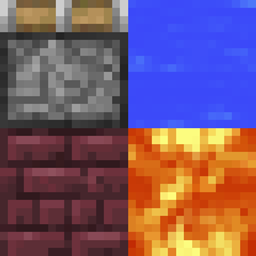
Comparison textures and models between MCPE to PC.


  • Nether bricks looks bit bright.
  • Tallgrass looks different and have height variants, also won't look rescaled, inlcude inside of flower pot.
  • The pistons looks better, the arm is different.
  • Ice block (non packed/normal) doesn't look translucent.
  • Lava and Water looks different, is similar to alpha/beta from 2010-2011, and the lava animation frames smooth same.
  • In HUD, the inventory looks bit translucent.
  • Leaves looks different to more fancy, except the jungle, doesn't look transparent.

Proof:

MCPE/MCPC


Example about pack (in PC):


Usage

  • Don't make redistribution, just for personal use only.
  • You can make review about this pack, including monetized content, as long as you credit me "CrizArtEX" and link back to this page.
  • Strictly don't use for make fake concepts about MCPE future versions, everyone knows it's not a game and could cause consequences to the MCPE community.


It is all I will say about misc TP Port.


Just enjoy yourself, and sorry for my english.


Good luck!!!


Distinct Pack v1.1
MC 1.10.2
Release 2016-07-07 Get
Distinct Pack v1.zip
MC 1.10
Release 2016-06-12 Get

Requirements & install

How to use this resource pack in Minecraft
Resolution
16x
Minecraft
1.10 – 1.10.2
Install folder
.minecraft/resourcepacks

How to install resource packs

  1. Download the resource pack .zip file (do not extract it).
  2. In Minecraft open Options → Resource Packs → Open Pack Folder.
  3. Drop the .zip into the resourcepacks folder (.minecraft/resourcepacks).
  4. Move the pack to the Selected column and click Done.
Browse more: 16x resource packs 32x resource packs 64x resource packs 128x resource packs 256x resource packs 512x+ resource packs Resource Packs for 1.10.2 All resource packs

More from CrisXolt

Advertisement Remove ads with Premium →

You Might Also Like