Mineuniverse
Resource Packs
Dee's Wearable Witch Hats | CIT Pack

Dee's Wearable Witch Hats | CIT Pack

RESOURCE PACK
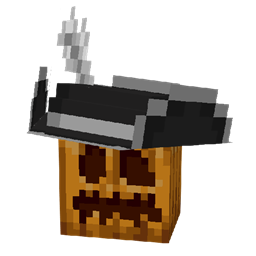
Adds wearable witch hats through CIT
by Deesaster
Download Claim this project
Add a badge to your pageLink to Dee's Wearable Witch Hats | CIT Pack from a README, website or forum post.
Preview: Badge

Badges update automatically and link to the resource pack page on MineUniverse.

3,492 downloads
0 likes
0 followers
Updated Oct 14, 2026
0 hypes
Follow0
16x Miscellaneous
Advertisement Remove ads with Premium →

This resource pack requires Optifine, CIT Resewn, or any other mod which adds support for Custom Item Textures.


This resource pack adds, as the name would suggest, wearable witch hats through custom item models for carved pumpkins. This pack doesn't outright replace the carved pumpkin model and it does not allow the placing of witch hats! This pack should be compatible with all other packs, so long as they don't change the pumpkin blur effect to something that isn't completely transparent.


How to Get Witch Hats

Renaming carved pumpkins to any of the following names (not case sensitive) will turn them into witch hats.

  • Witch hat (plain)
  • Gray/grey witch hat
  • Red witch hat
  • Candy red witch hat
  • Orange witch hat
  • Yellow witch hat
  • Green witch hat
  • Lime witch hat
  • Teal witch hat
  • Mint witch hat
  • Cyan witch hat
  • Blue witch hat
  • Dark blue witch hat
  • Purple witch hat
  • Violet/magenta witch hat
  • Pink witch hat


Feel free to use this pack anywhere, I just ask that you credit me and link back to this page (or the PMC page) if you do!


Wearable Witch Hats.zip
MC 1.16-Snapshot, 1.17.1, 1.16.3, 1.15-Snapshot, 1.16.1, 1.18.1, 1.14.4, 1.14.1, 1.17, 1.14.3, 1.15, 1.16, 1.19-Snapshot, 1.16.5, 1.18.2, 1.15.2, 1.14, 1.19.1, 1.17-Snapshot, 1.18
Release 2022-07-15 Get

Requirements & install

How to use this resource pack in Minecraft
Resolution
16x
Minecraft
1.17-Snapshot – 1.19.1
Install folder
.minecraft/resourcepacks

How to install resource packs

  1. Download the resource pack .zip file (do not extract it).
  2. In Minecraft open Options → Resource Packs → Open Pack Folder.
  3. Drop the .zip into the resourcepacks folder (.minecraft/resourcepacks).
  4. Move the pack to the Selected column and click Done.
Browse more: 16x resource packs 32x resource packs 64x resource packs 128x resource packs 256x resource packs 512x+ resource packs Resource Packs for 1.19.1 All resource packs

More from Deesaster

Advertisement Remove ads with Premium →

You Might Also Like