Mineuniverse
Resource Packs
Dee's Pirate Accessories | CIT Pack

Dee's Pirate Accessories | CIT Pack

RESOURCE PACK
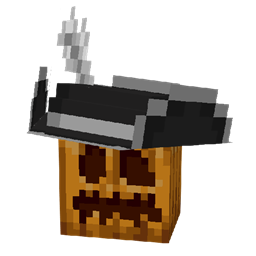
Adds pirates hats and some accessories through CIT
by Deesaster
Download Claim this project
Add a badge to your pageLink to Dee's Pirate Accessories | CIT Pack from a README, website or forum post.
Preview: Badge

Badges update automatically and link to the resource pack page on MineUniverse.

14,976 downloads
0 likes
0 followers
Updated Oct 14, 2026
0 hypes
Follow0
16x Miscellaneous
Advertisement Remove ads with Premium →

This resource pack requires Optifine, CIT Resewn, or any other mod which adds support for Custom Item Textures.


This resource pack adds four new types of pirate hats (which come in a plethora of colors), cutlasses, and a pirate hook through custom item models for carved pumpkins, swords, and the hoe respectively. This pack doesn't outright replace the carved pumpkin model and it does not allow the placing of pirate hats! This pack should be compatible with all other packs, so long as they don't change the pumpkin blur effect to something that isn't completely transparent.


How to Get Pirate Hats

Renaming carved pumpkins to any of the following names (not case sensitive) will turn them into the type of pirate hat specified.

  • Tricorn (three-sided)
  • Bicorn (two-sided)
  • Turned bicorn (turned to have the brims facing the left and right)
  • Cavalier (bicorn with one brim tilted down)


Additionally, all pirate hats must have a color before the type in their name. Any of the following are valid colors:

  • White
  • Light gray/grey
  • Gray
  • Black
  • Brown
  • Leather
  • Red
  • Orange
  • Yellow
  • Green
  • Lime
  • Mint
  • Cyan
  • Light blue
  • Blue
  • Magenta
  • Pink


For example, naming a carved pumpkin mint tricorn will work, but naming it tricorn, mint, or tricorn mint will not work.


How to Get Cutlasses and Hooks

Renaming an iron hoe to include the word hook will turn it into a hook and renaming any sword to include the word cutlass will turn it into a cutlass. Pretty straightforward if you ask me.


Feel free to use this pack anywhere, I just ask that you credit me and link back to this page (or the PMC page) if you do!

 

Dee's Pirate Accessories.zip
MC 1.16-Snapshot, 1.17.1, 1.16.3, 1.16.1, 1.18.1, 1.17, 1.16, 1.19-Snapshot, 1.16.5, 1.18.2, 1.19.1, 1.17-Snapshot, 1.18, 1.16.4, 1.18-Snapshot, 1.16.2, 1.19
Release 2022-07-15 Get

Requirements & install

How to use this resource pack in Minecraft
Resolution
16x
Minecraft
1.17.1 – 1.19.1
Install folder
.minecraft/resourcepacks

How to install resource packs

  1. Download the resource pack .zip file (do not extract it).
  2. In Minecraft open Options → Resource Packs → Open Pack Folder.
  3. Drop the .zip into the resourcepacks folder (.minecraft/resourcepacks).
  4. Move the pack to the Selected column and click Done.
Browse more: 16x resource packs 32x resource packs 64x resource packs 128x resource packs 256x resource packs 512x+ resource packs Resource Packs for 1.19.1 All resource packs

More from Deesaster

Advertisement Remove ads with Premium →

You Might Also Like