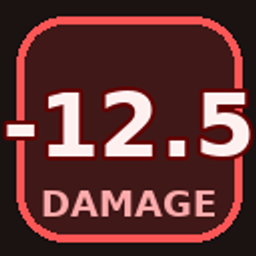
The DAI Damage Indicators Resource Pack provides the themed visual skins used by DAI Damage Indicators v2.0.0.
Designed as the companion to the Damage Indicators Data Pack, it adds custom bitmap number styles for players who want their floating damage values to match different Minecraft themes or a completely custom Resource Pack design.
The gameplay logic, damage detection, floating displays, and customization screen are provided by the Damage Indicators Data Pack.
This pack controls how those indicators can look.
Version 2.0.0 includes three dedicated bitmap styles selectable from the in-game Damage Indicator Customization screen.
A surface-world inspired number set using earthy brown tones with green highlights.
It is designed to feel familiar to the Minecraft Overworld while remaining clearly readable during combat.
A dark red and crimson number style inspired by Nether brick and Nether environments.
This skin gives damage indicators a heavier, more hostile visual identity.
A pale End-themed number set using light End-stone colors with purple accents.
It provides a cleaner, otherworldly appearance suited to End-inspired experiences and environments.
The Resource Pack also includes a fourth bitmap font:
Custom
This slot is intentionally exposed for Resource Pack creators.
The included Custom artwork acts as a fallback and preview so selecting the Custom option never produces a missing-font state.
Creators can replace the Custom skin without modifying the Damage Indicators Data Pack.
To create your own Damage Indicator style, override these two Resource Pack paths:
assets/dai_damage_indicators/font/custom.json
assets/dai_damage_indicators/textures/font/custom_digits.png
Keep the font identifier:
dai_damage_indicators:customand preserve the glyph order:
0123456789.-+Place your custom Resource Pack above the official Damage Indicators Resource Pack in Minecraft's Resource Pack list.
Then select:
Custom Resource-Pack Skin
from the in-game Damage Indicator Customization screen.
This allows other DAI projects, modpacks, and creators to give Damage Indicators their own visual identity without changing the underlying Data Pack.
Each included themed skin uses its own bitmap font definition and dedicated digit texture.
The current Resource Pack includes:
Each font supports:
0–9This covers the full character set required by the Damage Indicators display system.
The Resource Pack does not replace unrelated Minecraft textures or redesign the entire game.
Its purpose is intentionally narrow:
provide visual skins for floating damage numbers.
That makes it easy to combine with larger Resource Packs and DAI experiences without unnecessarily overriding other assets.
When used with the companion Data Pack, different players can choose different Damage Indicator skins independently.
One player can use Vanilla while another uses Nether, End, Default, or a custom Resource Pack style.
The Resource Pack supplies the visual assets.
The Data Pack manages each player's selected skin.
The standard Default Damage Indicator style does not depend on this Resource Pack.
It uses normal Minecraft text rendering and remains available even without the companion Resource Pack installed.
This pack is required specifically for the themed:
bitmap styles.
Damage Indicators Resource Pack v2.0.0 contains:
This Resource Pack is designed for use with:
For the complete Damage Indicators experience, use the Resource Pack alongside the matching Data Pack.
The Data Pack decides when damage appears.
The Resource Pack decides how it looks.