Mineuniverse
Resource Packs
[DAI] Comic Effects (Resource)

[DAI] Comic Effects (Resource)

RESOURCE PACK
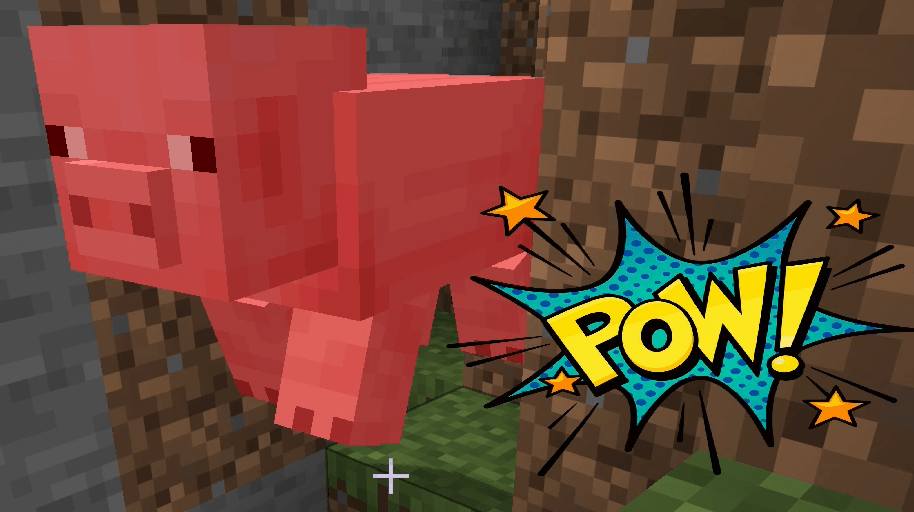
DAI ComicEffects is a companion resource pack for DAI that provides transparent comic-style GUI sprites and animation textures used by the Comic Effects datapack for POW!, BAM!, WHACK!, KAPOW!, layered, and animated screen effects.
by J12H36H
Download Claim this project
69 downloads
0 likes
0 followers
Updated Oct 14, 2026
0 hypes
Follow0
Animated Data Packs Miscellaneous Mod Support
Advertisement Remove ads with Premium →

DAI ComicEffects is the companion resource pack for the DAI Comic Effects datapack.

It supplies the transparent comic-style artwork used by DAI's screen overlay and sprite-sheet systems, including POW!, BAM!, WHACK!, KAPOW!, burst effects, and animated comic graphics.

The resource pack provides textures for:
- static comic effect sprites
- layered screen effects
- transparent burst graphics
- animated sprite-sheet effects
- custom GUI overlay assets

The textures are stored under the dai_comic_fx resource namespace and are referenced directly by the Comic Effects datapack through DAI's overlay_sprite and overlay_sprite_sheet actions.

DAI ComicEffects contains presentation assets only. The datapack controls when effects appear, their size, position, transparency, tint, Z-order, lifetime, animation timing, and interaction behavior.

The resource pack must be enabled through Minecraft's normal Resource Packs menu for the Comic Effects datapack's custom graphics to render.

DAI ComicEffects is designed as a demonstration of how external Minecraft resource packs can supply custom visual assets for DAI datapacks without embedding those assets into the DAI mod itself.


DAI_ComicEffects_Resource_v1.5.0.zip
MC 26.2
Release 2026-08-27 Get
DAI_ComicEffects_Resource_v1.3.0.zip
MC 26.2
Release 2026-08-19 Get
DAI_ComicEffects_Resource_v1.1.0.zip
MC 26.2
Release 2026-08-18 Get
ComicEffects_R1-0.zip
MC 26.2
Release 2026-08-13 Get

Requirements & install

How to use this resource pack in Minecraft
Resolution
Not specified
Minecraft
26.2
Install folder
.minecraft/resourcepacks

How to install resource packs

  1. Download the resource pack .zip file (do not extract it).
  2. In Minecraft open Options → Resource Packs → Open Pack Folder.
  3. Drop the .zip into the resourcepacks folder (.minecraft/resourcepacks).
  4. Move the pack to the Selected column and click Done.
Browse more: 16x resource packs 32x resource packs 64x resource packs 128x resource packs 256x resource packs 512x+ resource packs Resource Packs for 26.2 All resource packs

More from J12H36H

Advertisement Remove ads with Premium →

You Might Also Like