Mineuniverse
Resource Packs
Cute UI

Cute UI

RESOURCE PACK
A Cute UI for Minecraft Java
by AnSit
Download Claim this project
Add a badge to your pageLink to Cute UI from a README, website or forum post.
Preview: Badge

Badges update automatically and link to the resource pack page on MineUniverse.

167 downloads
0 likes
0 followers
Updated Oct 14, 2026
0 hypes
Follow0
64x Mod Support Modern
Advertisement Remove ads with Premium →

Cute UI


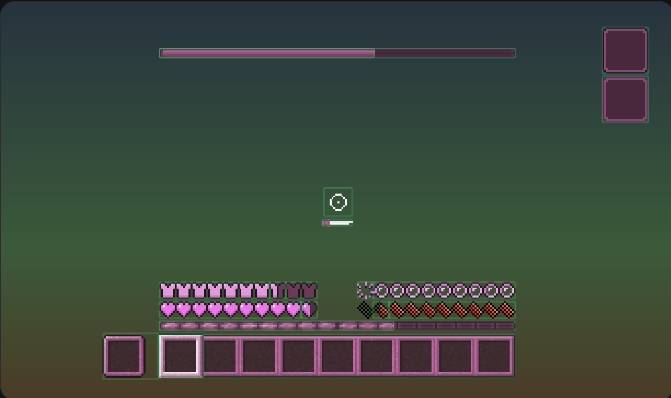
Cute UI is a clean and charming Minecraft resource pack that redesigns the vanilla user interface with a cute, polished aesthetic.


The pack focuses on improving the overall look and feel of Minecraft's menus and interface elements while maintaining the familiar vanilla experience. It is designed to be lightweight, consistent, and suitable for everyday gameplay.


Features


- Redesigned Minecraft UI elements

- Clean and polished visual style

- Cute aesthetic while preserving usability

- Consistent interface design

- Lightweight and easy to use

- Designed for a smooth vanilla-friendly experience


Compatibility


Cute UI is designed to support the Minecraft versions listed on the project's CurseForge files page. Please make sure to download the correct version for your Minecraft installation.


Installation


1. Download the appropriate version of Cute UI.

2. Place the resource pack ".zip" file into your Minecraft "resourcepacks" folder.

3. Launch Minecraft and enable the pack from Options → Resource Packs.


Enjoy a cleaner, cuter Minecraft interface with Cute UI.

CuteUI_1.21-1.21.1.zip
MC 1.21, 1.21.1
Release 2026-08-31 Get
CuteUI_1.19-1.19.2.zip
MC 1.19.1, 1.19.2, 1.19
Release 2026-08-31 Get
CuteUI_26.1.zip
MC 26.1
Release 2026-08-30 Get

Requirements & install

How to use this resource pack in Minecraft
Resolution
64x
Minecraft
1.19 – 26.1
Install folder
.minecraft/resourcepacks

How to install resource packs

  1. Download the resource pack .zip file (do not extract it).
  2. In Minecraft open Options → Resource Packs → Open Pack Folder.
  3. Drop the .zip into the resourcepacks folder (.minecraft/resourcepacks).
  4. Move the pack to the Selected column and click Done.
Browse more: 16x resource packs 32x resource packs 64x resource packs 128x resource packs 256x resource packs 512x+ resource packs Resource Packs for 26.1 All resource packs

More from AnSit

Advertisement Remove ads with Premium →

You Might Also Like