Mineuniverse
Resource Packs
Cute Anime Girl Main Menu GUI

Cute Anime Girl Main Menu GUI

RESOURCE PACK
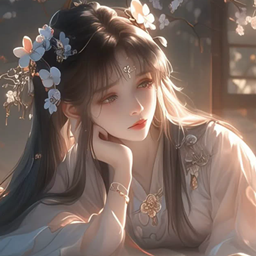
Replaces the Minecraft's main menu panorama with an Anime Girl
by Freestyle_modding
Download Claim this project
Add a badge to your pageLink to Cute Anime Girl Main Menu GUI from a README, website or forum post.
Preview: Badge

Badges update automatically and link to the resource pack page on MineUniverse.

1,531 downloads
0 likes
0 followers
Updated Oct 14, 2026
0 hypes
Follow0
16x Mod Support Modern Photo Realistic
Advertisement Remove ads with Premium →

Keep it simple, keep it cute! Anime Panorama replaces Minecraft’s default spinning 3D main menu background with a clean, high-quality static image of a cute anime girl to welcome you every time you launch the game.


✨ Features

  • Custom Main Menu: Swaps the default blur/spinning background for a aesthetic static anime wallpaper.

  • 100% Lightweight: Extremely minimal impact on loading times.

  • Pure Visual Mod: Only changes the main menu panorama background. Inventory GUIs, game HUDs, blocks, mobs, and items remain entirely untouched.


🛠️ Installation & Compatibility

  1. Download the .zip file for your Minecraft version.

  2. Place it into your .minecraft/resourcepacks folder.

  3. Activate it in Options > Resource Packs.

  4. Drag it to the top of your pack list!

💡 Tip: Works alongside almost any other resource pack—just make sure to place this at the very top so it takes priority over default menu backgrounds!

Cute Anime Girl Main Menu GUI.zip
MC 1.21.2-Snapshot, 1.21, 1.21.6-snapshot, 1.20.2-Snapshot, 1.20.5-Snapshot, 1.21.1-Snapshot, 1.20.2, 1.21.8, 1.20.5, 1.21.5, 1.21.4, 1.21.5-Snapshot, 1.20.1, 1.20, 1.20.6
Release 2026-07-25 Get

Requirements & install

How to use this resource pack in Minecraft
Resolution
16x
Minecraft
1.21 – 1.21.8
Install folder
.minecraft/resourcepacks

How to install resource packs

  1. Download the resource pack .zip file (do not extract it).
  2. In Minecraft open Options → Resource Packs → Open Pack Folder.
  3. Drop the .zip into the resourcepacks folder (.minecraft/resourcepacks).
  4. Move the pack to the Selected column and click Done.
Browse more: 16x resource packs 32x resource packs 64x resource packs 128x resource packs 256x resource packs 512x+ resource packs Resource Packs for 1.21.8 All resource packs

More from Freestyle_modding

Advertisement Remove ads with Premium →

You Might Also Like