Mineuniverse
Resource Packs
Cubiz: Combat & Tools Edition

Cubiz: Combat & Tools Edition

RESOURCE PACK
Adds striking outlines to the tools.
by Creliont
Download Claim this project
Add a badge to your pageLink to Cubiz: Combat & Tools Edition from a README, website or forum post.
Preview: Badge

Badges update automatically and link to the resource pack page on MineUniverse.

66 downloads
0 likes
0 followers
Updated Oct 14, 2026
0 hypes
Follow0
128x
Advertisement Remove ads with Premium →

Combat Edition

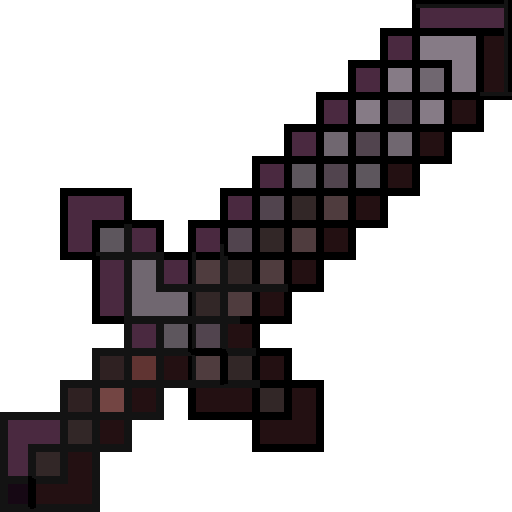
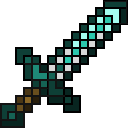
Cubiz: Combat Edition adds clean, outlined textures to Minecraft's weapons and tools while preserving the original vanilla style. Every texture is carefully redesigned to improve visibility and make your gear stand out without changing its recognizable appearance.

The pack includes/Will include:

  • ⚔️ Swords
  • 🪓 Axes
  • ⛏️ Pickaxes
  • 🪏 Shovels
  • 🌾 Hoes

Each texture is created in the Cubiz style with crisp outlines and improved highlights for a cleaner, more polished look.

Note: Some textures use 512× details to achieve smoother shading and higher visual quality.

🚧 This pack is still in active development. More weapons, tools, and combat-related items will be added in future updates.


Cubiz Outine CE - BIG Hotfix + Shears v1.5
MC 1.21.2-Snapshot, 1.21, 1.21.6-snapshot, 1.21.1-Snapshot, 1.21.8, 1.21.5, 1.21.4, 1.21.5-Snapshot, 1.21.1, 1.21.6, 1.21.3, 1.21.7, 1.21.4-Snapshot, 1.21.2, 1.21.9-snapshot, 1.21.9
Release 2026-07-30 Get
Cubiz - Combat & Tools Edition v1.3
MC 1.21.2-Snapshot, 1.21, 1.21.6-snapshot, 1.21.1-Snapshot, 1.21.8, 1.21.5, 1.21.4, 1.21.5-Snapshot, 1.21.1, 1.21.6, 1.21.3, 1.21.7, 1.21.4-Snapshot, 1.21.2, 1.21.9-snapshot, 1.21.9
Release 2026-07-28 Get
Cubiz - Combat And Tools Edition v1.4
MC 1.21.2-Snapshot, 1.21, 1.21.6-snapshot, 1.21.1-Snapshot, 1.21.8, 1.21.5, 1.21.4, 1.21.5-Snapshot, 1.21.1, 1.21.6, 1.21.3, 1.21.7, 1.21.4-Snapshot, 1.21.2, 1.21.9-snapshot, 1.21.9
Release 2026-07-28 Get
Cubiz: Combat & Tools Edition v1.2
MC 1.21.2-Snapshot, 1.21, 1.21.6-snapshot, 1.21.1-Snapshot, 1.21.8, 1.21.5, 1.21.4, 1.21.5-Snapshot, 1.21.1, 1.21.6, 1.21.3, 1.21.7, 1.21.4-Snapshot, 1.21.2, 1.21.9-snapshot, 1.21.9
Release 2026-07-26 Get
Cubiz: Combat & Tools Edition
MC 1.21.2-Snapshot, 1.21, 1.21.6-snapshot, 1.21.1-Snapshot, 1.21.8, 1.21.5, 1.21.4, 1.21.5-Snapshot, 1.20.6, 1.21.1, 1.21.6, 1.21.3, 1.21.7, 1.21-Snapshot, 1.21.4-Snapshot, 1.21.2
Release 2026-07-25 Get
Cubiz: Combat & Tools Edition v1.1
MC 1.21.2-Snapshot, 1.21, 1.21.6-snapshot, 1.21.1-Snapshot, 1.21.8, 1.21.5, 1.21.4, 1.21.5-Snapshot, 1.21.1, 1.21.6, 1.21.3, 1.21.7, 1.21.4-Snapshot, 1.21.2, 1.21.9-snapshot, 1.21.9
Release 2026-07-25 Get

Requirements & install

How to use this resource pack in Minecraft
Resolution
128x
Minecraft
1.21.5-Snapshot – 1.21.9
Install folder
.minecraft/resourcepacks

How to install resource packs

  1. Download the resource pack .zip file (do not extract it).
  2. In Minecraft open Options → Resource Packs → Open Pack Folder.
  3. Drop the .zip into the resourcepacks folder (.minecraft/resourcepacks).
  4. Move the pack to the Selected column and click Done.

Packs from 128x upwards need more video memory: install a performance mod such as Sodium for smooth frame rates.

Browse more: 16x resource packs 32x resource packs 64x resource packs 128x resource packs 256x resource packs 512x+ resource packs Resource Packs for 1.21.9 All resource packs

More from Creliont

Advertisement Remove ads with Premium →

You Might Also Like