Mineuniverse
Resource Packs
Crops 3D - Pam's HarvestCraft 2

Crops 3D - Pam's HarvestCraft 2

RESOURCE PACK
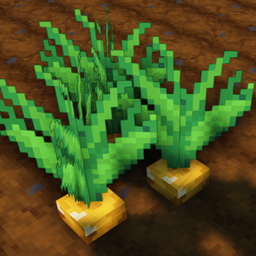
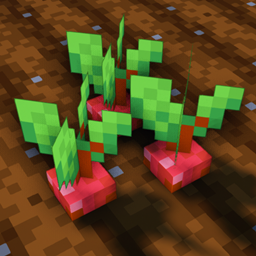
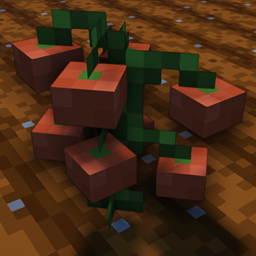
Makes all the crops in Pam's HarvestCraft 2 mod 3D
by NinthWorld
Download Claim this project
Add a badge to your pageLink to Crops 3D - Pam's HarvestCraft 2 from a README, website or forum post.
Preview: Badge

Badges update automatically and link to the resource pack page on MineUniverse.

4,339 downloads
0 likes
0 followers
Updated Oct 14, 2026
0 hypes
Follow0
16x Miscellaneous Mod Support Traditional
Advertisement Remove ads with Premium →

Crops 3D - Pam's HarvestCraft 2


Requirements

Mods -

Resource Packs -

  • Crops 3D (Optional; For 3D vanilla Minecraft crops)


Description

Crops 3D - Pam's HarvestCraft 2 is a resource pack which replaces all of the crop blocks in Pam's HarvestCraft 2 mod with custom 3D models. All 78 crop blocks and 6 garden blocks are included in this resource pack. For 3D vanilla crops, get the Crops 3D resource pack and include it below this pack in Minecraft's resource pack menu.


Credits

This pack would not be possible without the incredible work done by pamharvestcraft.

Check out her patreon here: https://www.patreon.com/pamsmods


All textures created from Pam's HarvestCraft 2 - Crops mod textures by pamharvestcraft
All models created with Blockbench


Terms of Use

The textures in this resource pack were created directly from the textures in Pam's HarvestCraft 2 - Crops mod with special written permission from the author. Under no circumstances are the textures in this pack to be used by anyone without the express written permission of the original author pamharvestcraft. Please refer to the terms of use on the Pam's HarvestCraft 2 - Crops CurseForge page for more information, as the same terms apply to this resource pack.

Crops-3D_Pam's-HarvestCraft-2_MC1.14.4_v1.0.0.zip
MC 1.14.4
Release 2020-03-08 Get

Requirements & install

How to use this resource pack in Minecraft
Resolution
16x
Minecraft
1.14.4
Install folder
.minecraft/resourcepacks

How to install resource packs

  1. Download the resource pack .zip file (do not extract it).
  2. In Minecraft open Options → Resource Packs → Open Pack Folder.
  3. Drop the .zip into the resourcepacks folder (.minecraft/resourcepacks).
  4. Move the pack to the Selected column and click Done.
Browse more: 16x resource packs 32x resource packs 64x resource packs 128x resource packs 256x resource packs 512x+ resource packs Resource Packs for 1.14.4 All resource packs

More from NinthWorld

Advertisement Remove ads with Premium →

You Might Also Like