Mineuniverse
Resource Packs
CraftGlow Netherite Totem

CraftGlow Netherite Totem

RESOURCE PACK
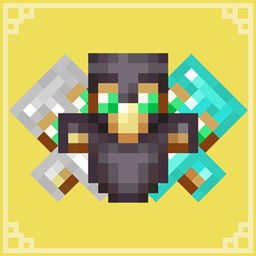
A simple texture pack that gives the Totem of Undying a netherite-armored look, making it match perfectly with your netherite gear.
by CraftGlow
Download Claim this project
Add a badge to your pageLink to CraftGlow Netherite Totem from a README, website or forum post.
Preview: Badge

Badges update automatically and link to the resource pack page on MineUniverse.

2,483 downloads
0 likes
0 followers
Updated Oct 14, 2026
0 hypes
Follow0
16x
Advertisement Remove ads with Premium →

🇬🇧 English: This resource pack transforms the Totem of Undying into an epic netherite-armored version!

🔹 New design: The totem wears a netherite helmet and armor 🔹 Perfect match for your netherite gear 🔹 Stays true to Minecraft’s original style

Show everyone that your totem is as unbreakable as Netherite!

📥 Download and try it now!

🇵🇱 Polski: Ten resource pack zmienia Totem Nieśmiertelności w epicką wersję w netheritowej zbroi!

🔹 Nowy wygląd: Totem nosi netheritowy hełm i pancerz 🔹 Idealnie pasuje do netheritowego ekwipunku 🔹 Zachowuje styl oryginalnego Minecrafta

Pokaż wszystkim, że Twój totem jest niezniszczalny jak Netherite!

📥 Pobierz i sprawdź sam!

🇪🇸 Español: ¡Este paquete de texturas transforma el Tótem de la Inmortalidad en una versión épica con armadura de netherite!

🔹 Nuevo diseño: El tótem lleva un casco y armadura de netherite 🔹 Combina perfectamente con tu equipo de netherite 🔹 Mantiene el estilo original de Minecraft

¡Demuestra que tu tótem es tan irrompible como el Netherite!

📥 ¡Descárgalo y pruébalo ahora!

CraftGlow Netherite Totem.zip
MC 1.21, 1.20.2, 1.21.8, 1.20.5, 1.21.5, 1.21.4, 1.20.6, 1.21.1, 1.21.6, 1.21.3, 1.21.7, 1.20.4, 1.20.3, 1.21.2, 1.21.9, 1.21.10, 1.21.11, 26.1, 26.1.1, 26.1.2, 26.2, 26.3
Release 2026-04-28 Get

Requirements & install

How to use this resource pack in Minecraft
Resolution
16x
Minecraft
1.21.9 – 26.3
Install folder
.minecraft/resourcepacks

How to install resource packs

  1. Download the resource pack .zip file (do not extract it).
  2. In Minecraft open Options → Resource Packs → Open Pack Folder.
  3. Drop the .zip into the resourcepacks folder (.minecraft/resourcepacks).
  4. Move the pack to the Selected column and click Done.
Browse more: 16x resource packs 32x resource packs 64x resource packs 128x resource packs 256x resource packs 512x+ resource packs Resource Packs for 26.3 All resource packs

More from CraftGlow

Advertisement Remove ads with Premium →

You Might Also Like