Couches V2
WARNING :This pack requires Optifine To work.
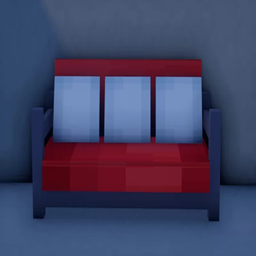
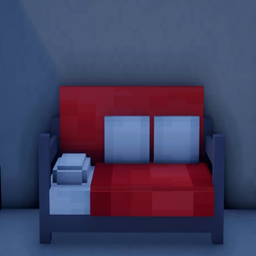
This pack Changes All beds to Couches and you can put them on top of each other.
This Pack Was made By Me ( Khaled Shooter )
- Do not distribute the pack or textures and/or claim them as your own.
- Feel free to use in-game (loading the pack through the Minecraft client), edit the textures for your own personal use. However, you may not distribute the modified textures without my consent.
- Do not re-upload the pack elsewhere. I urge everyone to link to here, this is to protect the packs integrity and to centralize comments/critique that may help me improve the pack.
- Feel free to take screenshots/video recordings in/from Minecraft while using this pack and/or the contents/assets therein (loading the pack or parts of it through the Minecraft client) and to distribute such content with or without commercial purposes (crediting is necessary).
- You are allowed to distribute the resourcepack within your Minecraft servers community* if you are the owner or acting on behalf of the owner of said server. This only applies to the server resourcepack prompt (serverside resourcepack) and does not include hosting this resourcepack on a server forum/website.
* Anyone who has ever connected to your server
--------------------------------------------------------------------------------------------------------------------------------------------
Images: