Mineuniverse
Resource Packs
Comically Long Swords

Comically Long Swords

RESOURCE PACK
Makes swords 64x
by FinsCon
Download Claim this project
2,597 downloads
0 likes
Updated Oct 14, 2026
0 hypes
64x Miscellaneous
Advertisement Remove ads with Premium →

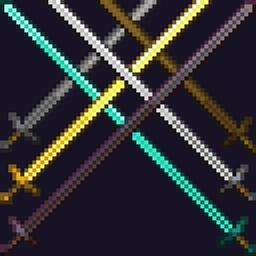
Ever gotten tired of generic pvp short swords? Well this it the thing for you!


--------------------------------


 REQUIRES OPTIFINE!


This pack adds optional longer swords, using 64x textures. Obtainable by renaming any sword to "Longsword".


Is compatible with 1.18.x, and should work fine down to 1.16, older versions can be tested by the user.

If this gets enough attention I might do a backport or a part 2


Credits


I am using Iluve's optifine files as templates, and adjusted them to the bigger swords.

https://www.planetminecraft.com/texture-pack/swords-to-longswords-optifine/

https://www.planetminecraft.com/member/iluve/

----

Textures are the vanilla textures edited by me


Known issue(s)


 - Swords on the first person left hand look off


If you find any more report them here please.


Images


Comically-Long-Swords.zip
MC 1.17.1, 1.16.3, 1.16.1, 1.18.1, 1.17, 1.16, 1.16.5, 1.18.2, 1.18, 1.16.4, 1.16.2
Release 2021-12-17 Get

Requirements & install

How to use this resource pack in Minecraft
Resolution
64x
Minecraft
1.16.3 – 1.18.2
Install folder
.minecraft/resourcepacks

How to install resource packs

  1. Download the resource pack .zip file (do not extract it).
  2. In Minecraft open Options → Resource Packs → Open Pack Folder.
  3. Drop the .zip into the resourcepacks folder (.minecraft/resourcepacks).
  4. Move the pack to the Selected column and click Done.
Browse more: 16x resource packs 32x resource packs 64x resource packs 128x resource packs 256x resource packs 512x+ resource packs Resource Packs for 1.18.2 All resource packs
Advertisement Remove ads with Premium →

You Might Also Like