Mineuniverse
Resource Packs
ClearGlass_

ClearGlass_

RESOURCE PACK
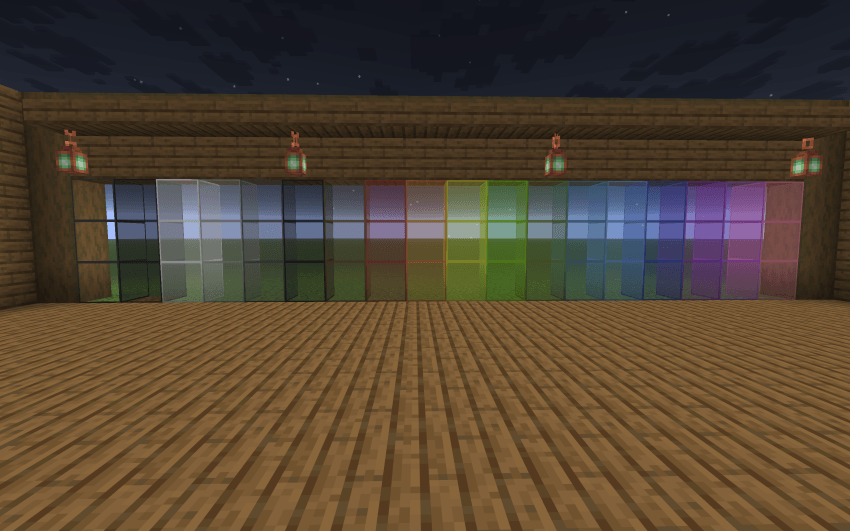
ClearGlass removes the inner grid lines and heavy borders from Minecraft’s glass blocks and panes, creating a smooth, connected, and fully transparent look.
by GraceBlok
Download Claim this project
Add a badge to your pageLink to ClearGlass_ from a README, website or forum post.
Preview: Badge

Badges update automatically and link to the resource pack page on MineUniverse.

179 downloads
0 likes
0 followers
Updated Oct 14, 2026
0 hypes
Follow0
128x
Advertisement Remove ads with Premium →

Clear Glass clean-ups Minecraft’s default glass textures by removing distracting border lines, giving you fully transparent windows and seamless connected visuals.

Features:

Borderless Transparency: Eliminates harsh inner grid lines on glass blocks and glass panes.

Vanilla Friendly: Preserves the core feel of Minecraft while dramatically improving builder aesthetics.

FPS Friendly: Extremely lightweight textures with zero performance overhead.

Universal Compatibility: Stackable with any custom resource pack or shader setup.

ClearGlass 26.3
MC 26.3
Release 2026-09-19 Get

Requirements & install

How to use this resource pack in Minecraft
Resolution
128x
Minecraft
26.3
Install folder
.minecraft/resourcepacks

How to install resource packs

  1. Download the resource pack .zip file (do not extract it).
  2. In Minecraft open Options → Resource Packs → Open Pack Folder.
  3. Drop the .zip into the resourcepacks folder (.minecraft/resourcepacks).
  4. Move the pack to the Selected column and click Done.

Packs from 128x upwards need more video memory: install a performance mod such as Sodium for smooth frame rates.

Browse more: 16x resource packs 32x resource packs 64x resource packs 128x resource packs 256x resource packs 512x+ resource packs Resource Packs for 26.3 All resource packs

More from GraceBlok

Advertisement Remove ads with Premium →

You Might Also Like