Mineuniverse
Resource Packs
BMW Blossom GUI

BMW Blossom GUI

RESOURCE PACK
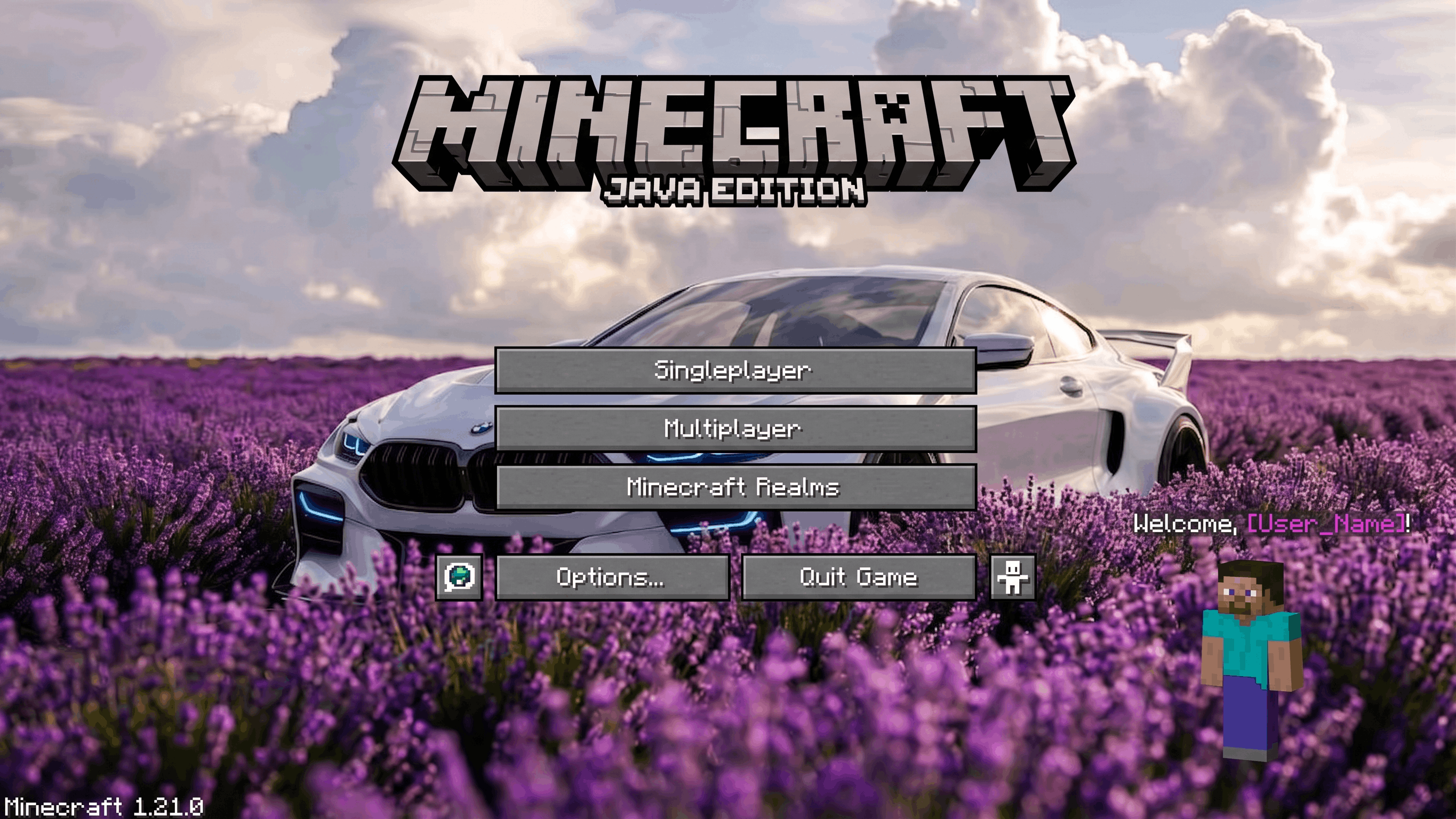
Replaces Minecraft’s main menu background with a white BMW surrounded by blooming flowers, giving your menu a stylish and peaceful look.
by Faentum
Download Claim this project
1,462 downloads
0 likes
0 followers
Updated Oct 14, 2026
0 hypes
Follow0
64x Miscellaneous Modern Photo Realistic
Advertisement Remove ads with Premium →

Upgrade your Minecraft main menu with the elegance of automotive style using BMW Blossom GUI. This resource pack replaces the default background with a stunning scene of a sleek white BMW parked in a beautiful field full of colorful flowers.

The perfect mix of luxury and nature creates a calm yet premium atmosphere every time you open the game. Ideal for car lovers and players who enjoy clean, stylish visuals.

Bring speed, class, and beauty to your Minecraft menu with this unique GUI pack.

BMW Blossom GUI.zip
MC 1.21, 1.21.1-Snapshot, 1.20.2, 1.20.5, 1.20.1, 1.20, 1.20.6, 1.20-Snapshot, 1.21.1, 1.20.4, 1.21-Snapshot, 1.20.3, 1.21.11, 26.1, 26.1.1, 26.1.2
Release 2026-04-27 Get

Requirements & install

How to use this resource pack in Minecraft
Resolution
64x
Minecraft
1.21-Snapshot – 26.1.2
Install folder
.minecraft/resourcepacks

How to install resource packs

  1. Download the resource pack .zip file (do not extract it).
  2. In Minecraft open Options → Resource Packs → Open Pack Folder.
  3. Drop the .zip into the resourcepacks folder (.minecraft/resourcepacks).
  4. Move the pack to the Selected column and click Done.
Browse more: 16x resource packs 32x resource packs 64x resource packs 128x resource packs 256x resource packs 512x+ resource packs Resource Packs for 26.1.2 All resource packs

More from Faentum

Advertisement Remove ads with Premium →

You Might Also Like