Mineuniverse
Resource Packs
Better Vault Menu Pack! - VaultHunters

Better Vault Menu Pack! - VaultHunters

RESOURCE PACK
adds better gui for Vault Hunter's Menus
by DGA
Download Claim this project
1,047 downloads
0 likes
0 followers
Updated Oct 14, 2026
0 hypes
Follow0
16x Miscellaneous Mod Support Modern
Advertisement Remove ads with Premium →

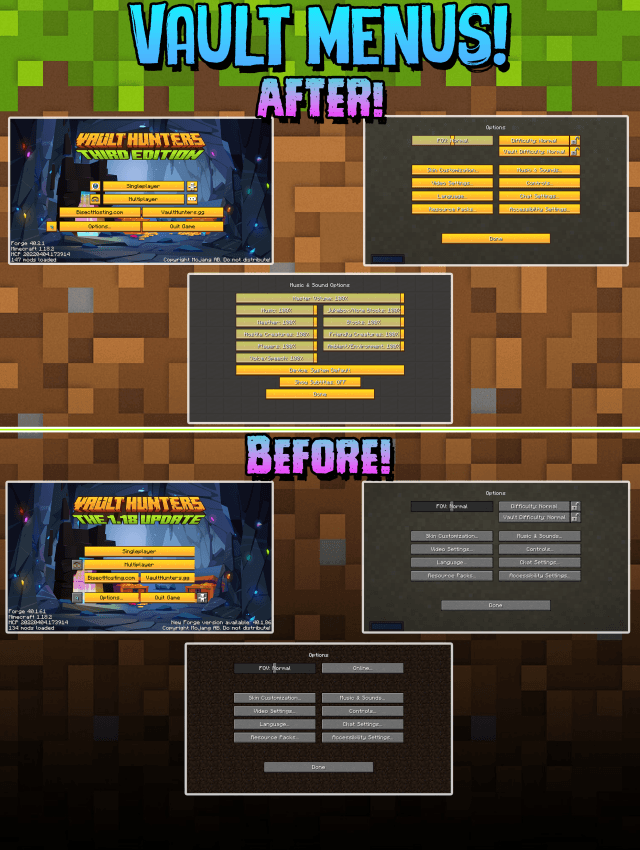
This Pack Upgrades the Menu of Vault Hunters!

REMEMBER this only Works with VaultHunter's ModPack
NOW UPDATED TO 1.18 - Update 15 

No more Boring old Vanilla MENUS~
 

How to install:

  • Go to the escape menu and press "Options"
  • Then press "Resource Packs"
  • In here, press "Open Pack Folder" This should open a folder.
  • Drag and drop the resource pack in that folder
  • The resource pack should now be available in the menu


IMPORTANT : To get the Create button to be in the exact place as image,

extract the pack you will find the Config file place it your profile config & Restart the Client


Use this as you wish & if you use this a stream/video Please Provide Credits!
ThankYou -DGA

 

DGA's Better Vault Menu V2
MC 1.18.2
Release 2023-05-18 Get
DGA's Better Vault Menu.zip
MC 1.18.2
Release 2022-12-08 Get

Requirements & install

How to use this resource pack in Minecraft
Resolution
16x
Minecraft
1.18.2
Install folder
.minecraft/resourcepacks

How to install resource packs

  1. Download the resource pack .zip file (do not extract it).
  2. In Minecraft open Options → Resource Packs → Open Pack Folder.
  3. Drop the .zip into the resourcepacks folder (.minecraft/resourcepacks).
  4. Move the pack to the Selected column and click Done.
Browse more: 16x resource packs 32x resource packs 64x resource packs 128x resource packs 256x resource packs 512x+ resource packs Resource Packs for 1.18.2 All resource packs

More from DGA

Advertisement Remove ads with Premium →

You Might Also Like