Mineuniverse
Resource Packs
Better Greg

Better Greg

RESOURCE PACK
This resource pack aims to make GTCEu Modern more readable
by fullsets_
Download Claim this project
761 downloads
0 likes
0 followers
Updated Oct 14, 2026
0 hypes
Follow0
16x Animated Miscellaneous Mod Support Modern
Advertisement Remove ads with Premium →

Better Greg (Modern) is a small resource pack for GTCEu Modern.

Is it really better? Well, better is subjective, this is MY idea of better textures :)

Also check out GTCEuM Indicators!


Current changes include:

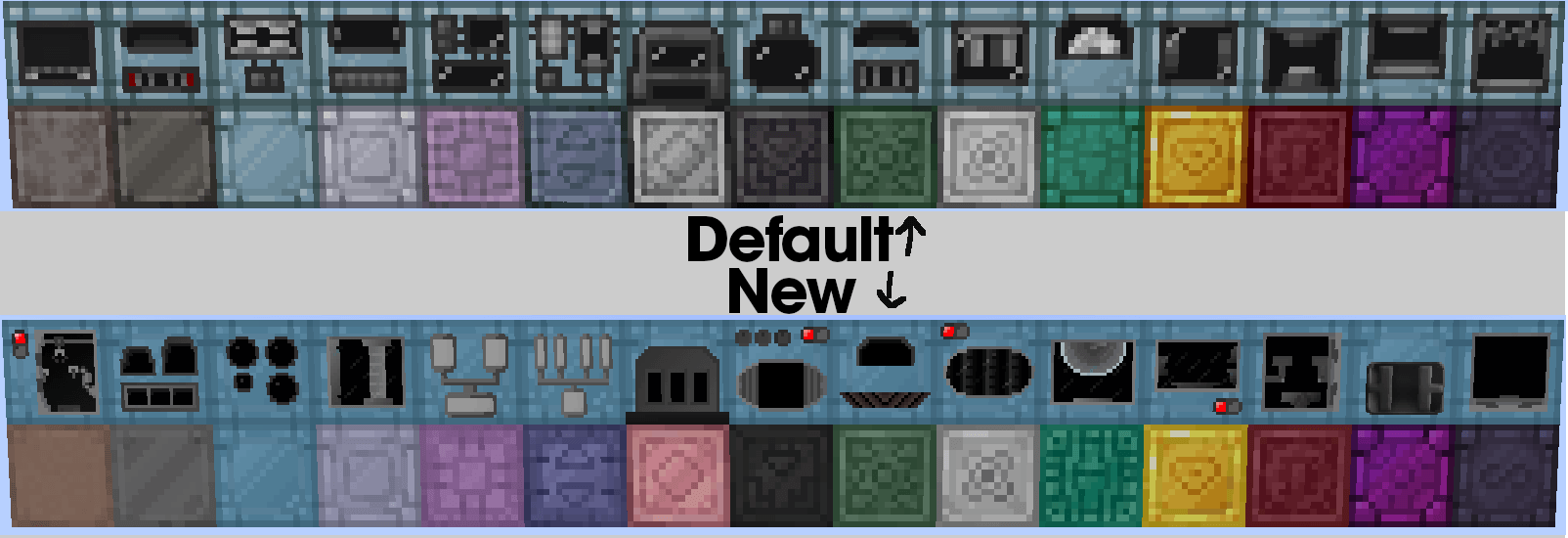
- More distinguishable machine casings

- Modified textures for base tier diode, inductor, capacitor and transistor

- Minor change to electric wirecutters texture
- Changed the saw so it leans to the right like every other normal tool
- Changed the chainsaw so it leans to the left like every other electric tool

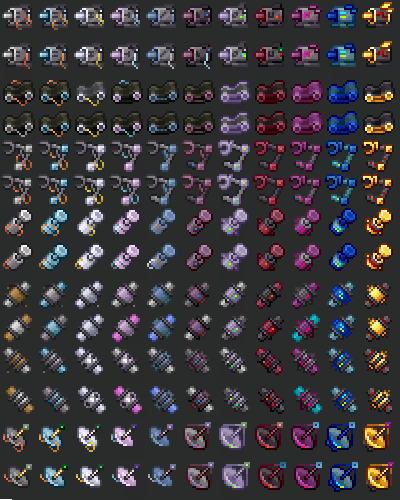
- Changes to Motors, Conveyors, Robot Arms, Pistons, Pumps, Regulators and Sensors

- Changed the "Magnetic" overlay

New magnetic overlay

- Machine faces from GTNH Faithful Textures (In x32)

(If you dislike this but still like the rest of the changes, unzip the resource pack file and delete the 'machines' folder in assets\gtceu\textures\block)

CREDITS

This resource pack uses assets from GTNH-Faithful-Textures by Ethryan and other contributors https://github.com/Ethryan/GTNH-Faithful-Textures

This resource pack uses assets from the mod GTCEu Modern https://github.com/GregTechCEu/GregTech-Modern 

and by extension Gregtech: Refreshed by ULSTICK https://modrinth.com/resourcepack/gregtech-refreshed



BetterGreg-1.0
MC 1.20.1
Release 2025-05-07 Get
ClearerGreg-0.2.zip
MC 1.20.1
Beta 2024-10-04 Get
ClearerGreg-0.1.zip
MC 1.20.1
Beta 2024-10-02 Get

Requirements & install

How to use this resource pack in Minecraft
Resolution
16x
Minecraft
1.20.1
Install folder
.minecraft/resourcepacks

How to install resource packs

  1. Download the resource pack .zip file (do not extract it).
  2. In Minecraft open Options → Resource Packs → Open Pack Folder.
  3. Drop the .zip into the resourcepacks folder (.minecraft/resourcepacks).
  4. Move the pack to the Selected column and click Done.
Browse more: 16x resource packs 32x resource packs 64x resource packs 128x resource packs 256x resource packs 512x+ resource packs Resource Packs for 1.20.1 All resource packs

More from fullsets_

Advertisement Remove ads with Premium →

You Might Also Like