Mineuniverse
Resource Packs
Baby Chicken Totems

Baby Chicken Totems

RESOURCE PACK
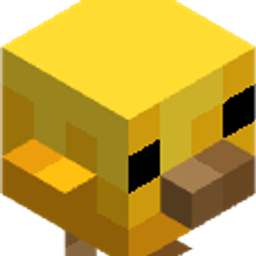
Changes the model and the texture of Totem Of Undying to New baby chickens mob
by PATRICKOOL
Download Claim this project
Add a badge to your pageLink to Baby Chicken Totems from a README, website or forum post.
Preview: Badge

Badges update automatically and link to the resource pack page on MineUniverse.

1,053 downloads
0 likes
0 followers
Updated Oct 14, 2026
0 hypes
Follow0
16x
Advertisement Remove ads with Premium →

Baby Chicken Totem replaces the Totem of Undying with an adorable custom baby chicken, complete with a fully redesigned model and texture.

True Doors Title

When held, it sits on your shoulder, adding a fun and charming companion to your adventures while keeping all the original totem functionality.

Horizontal Line

Sample

ALl Samples

Horizontal Line

Supported Mods

This resource pack specifically supports First Person Mod.

Many other mods are also affected automatically.

When used with Hold My Items, the first-person held position may appear slightly above your hand due to the way that mod adjusts item rendering.

First Person Mod

Horizontal Line

Particles

Polytone Required

The custom popping particle texture requires Polytone, as vanilla Minecraft does not support replacing the Totem of Undying's activation particles through a resource pack alone.

Without Polytone installed, the custom baby chicken totem will still work normally, but the popping particles will use Minecraft's default texture instead.

Totem Particles

ALL OTHER TEXTURES AND STANDARD RESOURCE PACK FEATURES WORK WITHOUT POLYTONE AND LOAD NORMALLY.

Polytone Downloads Button

Horizontal Line

Modrinth Download Button   CurseForge Download Button

Baby Chicken Totems
MC 26.1, 26.1.1, 26.1.2
Release 2026-04-23 Get

Requirements & install

How to use this resource pack in Minecraft
Resolution
16x
Minecraft
26.1 – 26.1.2
Install folder
.minecraft/resourcepacks

How to install resource packs

  1. Download the resource pack .zip file (do not extract it).
  2. In Minecraft open Options → Resource Packs → Open Pack Folder.
  3. Drop the .zip into the resourcepacks folder (.minecraft/resourcepacks).
  4. Move the pack to the Selected column and click Done.
Browse more: 16x resource packs 32x resource packs 64x resource packs 128x resource packs 256x resource packs 512x+ resource packs Resource Packs for 26.1.2 All resource packs

More from PATRICKOOL

Advertisement Remove ads with Premium →

You Might Also Like