Mineuniverse
Resource Packs
Ashen Ore Outlines

Ashen Ore Outlines

RESOURCE PACK
Ashen Ore Outlines is a simple resource pack that highlights all ores with clean outlines to make mining faster, easier, and more efficient.
by iMyth
Download Claim this project
2,932 downloads
0 likes
Updated Oct 14, 2026
0 hypes
16x Miscellaneous Traditional
Advertisement Remove ads with Premium →

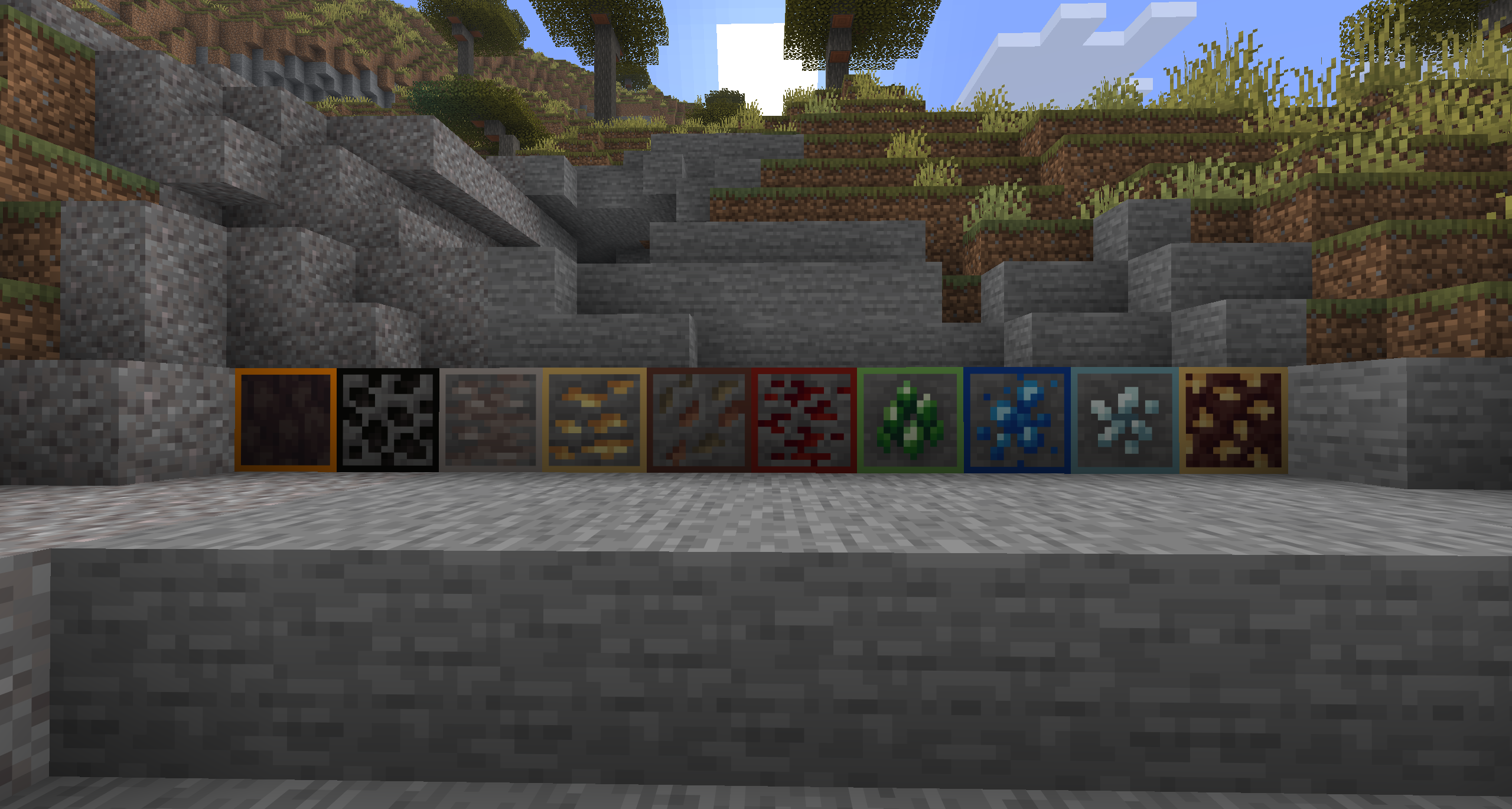
Ashen Ore Outlines is a resource pack that reworks the standard ashen-style textures to make ore spotting faster and easier while mining. Instead of blending ores into the stone and deepslate environment, this pack adds clear, clean outlines around all major ores, helping them stand out instantly in caves, tunnels, and strip mines.

The redesigned ore textures keep a muted, ashen aesthetic for the world, but enhance visibility so important resources like diamonds, iron, gold, redstone, and coal are easier to identify at a glance. Blocks remain consistent with the vanilla feel, but ores are visually separated from surrounding stone so players don’t miss valuable resources hidden in dark or crowded areas.

This pack improves the mining experience by reducing visual strain and making ore detection more efficient, especially in low-light cave systems. It’s designed for players who want a balanced mix of style and practicality—keeping Minecraft’s atmosphere intact while making resource gathering faster, simpler, and more reliable.

Ashen Ore Outlines.zip
MC 1.16.3, 1.17.1, 1.21.2-Snapshot, 1.21, 1.21.6-snapshot, 1.16.1, 1.18.1, 1.20.2-Snapshot, 1.20.5-Snapshot, 1.16, 1.19-Snapshot, 1.21.1-Snapshot, 1.16.5, 1.19.3, 1.20.2, 1.19.4
Release 2026-04-15 Get

Requirements & install

How to use this resource pack in Minecraft
Resolution
16x
Minecraft
1.19.4 – 1.21.6-snapshot
Install folder
.minecraft/resourcepacks

How to install resource packs

  1. Download the resource pack .zip file (do not extract it).
  2. In Minecraft open Options → Resource Packs → Open Pack Folder.
  3. Drop the .zip into the resourcepacks folder (.minecraft/resourcepacks).
  4. Move the pack to the Selected column and click Done.
Browse more: 16x resource packs 32x resource packs 64x resource packs 128x resource packs 256x resource packs 512x+ resource packs Resource Packs for 1.21.6-snapshot All resource packs

More from iMyth

Advertisement Remove ads with Premium →

You Might Also Like